


Getting Started Scripts#
This guide outlines a series of example scripts designed to facilitate typical Isaac Sim Replicator workflows. The examples include both “asynchronous” usage through the Script Editor and “synchronous” usage through the Standalone Application. These scripts cover simulation-based scenarios and configurations for synthetic data generation (SDG).
Prerequisites#
Before starting with these examples, ensure you have:
Basic understanding of Python programming
Familiarity with USD (Universal Scene Description) concepts
Access to NVIDIA Omniverse™ Isaac Sim
Sufficient disk space for data capture (varies based on resolution and number of frames)
GPU with sufficient memory for rendering (recommended: 8GB+)
Setup and Configuration#
This section introduces configurations typically used in such workflows.
Orchestrator Step Function#
In Replicator, the orchestrator.step() function is used to trigger the entire synthetic data generation (SDG) process, including executing randomizations and capturing data. For Isaac Sim workflows, this function is used solely to trigger data capture only, with randomization triggers assigned to custom events and manually activated.
The step() function has the following signature:
rep.orchestrator.step(rt_subframes: int = -1, pause_timeline: bool = True, delta_time: float = None, wait_for_render: bool = True)
Where:
rt_subframes: Specifies the number of subframes to render. A value greater than 0 enables subframe generation, reducing rendering artifacts or allowing materials to load fully.pause_timeline: Pauses the timeline (if currently playing) after the step if set toTrue.delta_time: Specifies the time to advance the timeline during a step. Defaults to the timeline’s rate ifNone.wait_for_render: IfTrue, the function blocks until the renderer completes the current frame before returning. Defaults toTrue.
More details on graph-based replicator randomizers can be found in the Randomizer Details, and for custom Isaac Sim or USD API-based randomizations, refer to the Isaac Sim Randomizers Guide.
Capture on Play Flag#
By default, Replicator captures data every frame during playback. For Isaac Sim workflows, data capture is configured to occur at user-defined frames using the step() function. To achieve this, the capture-on-play flag is disabled:
import omni.replicator.core as rep

rep.orchestrator.set_capture_on_play(False)
# OR
import carb.settings

carb.settings.get_settings().set("/omni/replicator/captureOnPlay", False)
RT Subframes Parameter#
In scenarios where reducing temporal rendering artifacts is needed, such as ghosting caused by quickly moving or teleporting assets, or under weak lighting conditions, RTSubframes can be used to render the same frame multiple times. This pauses the simulation and renders additional subframes, improving rendering quality.
The rt_subframes parameter is typically set during the capture request in the step() function but can also be configured globally:
# Set the rt_subframes parameter for a specific capture step
rep.orchestrator.step(rt_subframes=4)

# Set the rt_subframes parameter globally
import carb.settings

carb.settings.get_settings().set("/omni/replicator/RTSubframes", 4)
Refer to the documentation examples for additional details.
DLSS Quality Mode for SDG#
When using Replicator for synthetic data generation (SDG) workflows, it is recommended to set the DLSS model to Quality mode to avoid rendering artifacts. At lower resolutions (especially below 600x600), the default Performance mode may cause issues such as transparent or incorrectly rendered edges in the generated images.
import carb.settings

# Set DLSS to Quality mode (2) for best SDG results (Options: 0 (Performance), 1 (Balanced), 2 (Quality), 3 (Auto))
carb.settings.get_settings().set("/rtx/post/dlss/execMode", 2)
Wait for Render Parameter#
By default, the step() function blocks until the renderer finishes producing the current frame before returning. Setting wait_for_render=False decouples the capture request from the rendering pipeline, allowing the next randomization to begin immediately while the previous frame is still being rendered. This can significantly improve throughput in workflows where the captured data does not need to exactly match the current simulation state at the time the step() call returns.
# Default behavior: blocks until the frame is rendered
rep.orchestrator.step(wait_for_render=True)

# Non-blocking: returns immediately, allowing the next randomization to start
rep.orchestrator.step(wait_for_render=False)
Note
When using wait_for_render=False, the annotation and writer data may correspond to a previous frame rather than the frame triggered by the most recent step() call. Use this mode only when strict frame-to-data correspondence is not required.
Write to Fabric Mode#
Fabric is the runtime data layer that the renderer reads from directly. By default, Replicator writes attribute changes (such as positions, rotations, and colors) to the USD stage, which are then synchronized to Fabric before rendering. Enabling write-to-fabric mode bypasses the USD stage and writes changes directly to Fabric, reducing the overhead of USD-to-Fabric synchronization and improving randomization performance.
import carb.settings

# Enable write-to-fabric mode
carb.settings.get_settings().set("/exts/omni.replicator.core/enableWriteToFabric", True)
Note
Because changes are written directly to Fabric and bypass the USD stage, they will not be reflected in the USD stage or persisted when saving the scene. This mode is intended for transient randomizations during data generation, not for permanent scene modifications.
Custom Event Randomizations#
To provide flexibility, replicator randomizers can be triggered independently using custom events. This is achieved by registering the randomizer trigger through trigger.on_custom_event and activating it with utils.send_og_event. For instance, the following example creates a randomization graph for a dome light and randomizes its color. The randomization graph is then triggered manually through its custom event name. The step() function does not trigger this randomization graph.
# Create a randomization graph for creating a dome light and randomizing its color
with rep.trigger.on_custom_event(event_name="randomize_dome_light_color"):
    rep.create.light(light_type="Dome", color=rep.distribution.uniform((0, 0, 0), (1, 1, 1)))

# Trigger the randomization graph using its custom event name
rep.utils.send_og_event(event_name="randomize_dome_light_color")
An example snippet for custom events is also available here.
Wait Until Complete#
Ensuring that all data is fully written to disk before closing the application is essential to prevent data loss. High data throughput, such as from multiple cameras or large resolutions, may introduce I/O bottlenecks; refer to the I/O Optimization Guide for strategies to mitigate such issues.
The wait_until_complete function ensures that all writing tasks are finalized by waiting for the writer backend to complete its operations. This process allows the application to continue updating until all writing tasks are complete, safeguarding against potential data loss.
from omni.replicator.core import BackendDispatch
import omni.kit.app

async def wait_until_complete():
    while not BackendDispatch.is_done_writing():
        await omni.kit.app.get_app().next_update_async()
Alternatively, use the documented helper functions: rep.orchestrator.wait_until_complete() for synchronous contexts or await rep.orchestrator.wait_until_complete_async() for asynchronous contexts.
Examples#
Data Capture: BasicWriter#
This example demonstrates how to use the BasicWriter for data capture with RGB and bounding box annotators. It sets up a scene with a cube and a dome light, attaches semantic labels to the cube, and saves captured data to disk. The standalone example can also be run directly (on Windows use python.bat instead of python.sh):
./python.sh standalone_examples/api/isaacsim.replicator.examples/sdg_getting_started_01.py
import asyncio
import os

import carb.settings
import omni.replicator.core as rep
import omni.usd


async def run_example_async():
    # Create a new stage and disable capture on play
    omni.usd.get_context().new_stage()
    rep.orchestrator.set_capture_on_play(False)

    # Set DLSS to Quality mode (2) for best SDG results (Options: 0 (Performance), 1 (Balanced), 2 (Quality), 3 (Auto)
    carb.settings.get_settings().set("rtx/post/dlss/execMode", 2)

    # Setup the stage with a dome light and a cube
    rep.functional.create.xform(name="World")
    rep.functional.create.dome_light(intensity=500, parent="/World", name="DomeLight")
    cube = rep.functional.create.cube(parent="/World", name="Cube")
    rep.functional.modify.semantics(cube, {"class": "my_cube"}, mode="add")

    # Create a render product using the viewport perspective camera
    cam = rep.functional.create.camera(position=(5, 5, 5), look_at=(0, 0, 0), parent="/World", name="Camera")
    rp = rep.create.render_product(cam, (512, 512), name="MyRenderProduct")

    # Write data using the basic writer with the rgb and bounding box annotators
    backend = rep.backends.get("DiskBackend")
    out_dir = os.path.join(os.getcwd(), "_out_basic_writer")
    backend.initialize(output_dir=out_dir)
    print(f"Output directory: {out_dir}")
    writer = rep.writers.get("BasicWriter")
    writer.initialize(backend=backend, rgb=True, bounding_box_2d_tight=True)
    writer.attach(rp)

    # Trigger a data capture request (data will be written to disk by the writer)
    for i in range(3):
        print(f"Step {i}")
        await rep.orchestrator.step_async()

    # Wait for the data to be written to disk and clean up resources
    await rep.orchestrator.wait_until_complete_async()
    writer.detach()
    rp.destroy()


# Run the example
asyncio.ensure_future(run_example_async())
"""Demonstrate basic synthetic data generation with a writer and render product."""

import os

from isaacsim import SimulationApp

simulation_app = SimulationApp(launch_config={"headless": False})

import carb.settings
import omni.replicator.core as rep
import omni.usd


def run_example() -> None:
    """Run a basic SDG pipeline capturing RGB and bounding box data."""
    # Create a new stage and disable capture on play
    omni.usd.get_context().new_stage()
    rep.orchestrator.set_capture_on_play(False)

    # Set DLSS to Quality mode (2) for best SDG results , options: 0 (Performance), 1 (Balanced), 2 (Quality), 3 (Auto)
    carb.settings.get_settings().set("rtx/post/dlss/execMode", 2)

    # Setup the stage with a dome light and a cube
    rep.functional.create.xform(name="World")
    rep.functional.create.dome_light(intensity=500, parent="/World", name="DomeLight")
    cube = rep.functional.create.cube(parent="/World", name="Cube")
    rep.functional.modify.semantics(cube, {"class": "my_cube"}, mode="add")

    # Create a render product using the viewport perspective camera
    cam = rep.functional.create.camera(position=(5, 5, 5), look_at=(0, 0, 0), parent="/World", name="Camera")
    rp = rep.create.render_product(cam, (512, 512), name="MyRenderProduct")

    # Write data using the basic writer with the rgb and bounding box annotators
    backend = rep.backends.get("DiskBackend")
    out_dir = os.path.join(os.getcwd(), "_out_basic_writer")
    backend.initialize(output_dir=out_dir)
    print(f"Output directory: {out_dir}")
    writer = rep.writers.get("BasicWriter")
    writer.initialize(backend=backend, rgb=True, bounding_box_2d_tight=True)
    writer.attach(rp)

    # Trigger a data capture request (data will be written to disk by the writer)
    for i in range(3):
        print(f"Step {i}")
        rep.orchestrator.step()

    # Wait for the data to be written to disk and clean up resources
    rep.orchestrator.wait_until_complete()
    writer.detach()
    rp.destroy()


run_example()
The output directory will contain the captured data, including RGB images and bounding box annotations in .npy and .json formats:

Custom Writer and Annotators with Multiple Cameras#
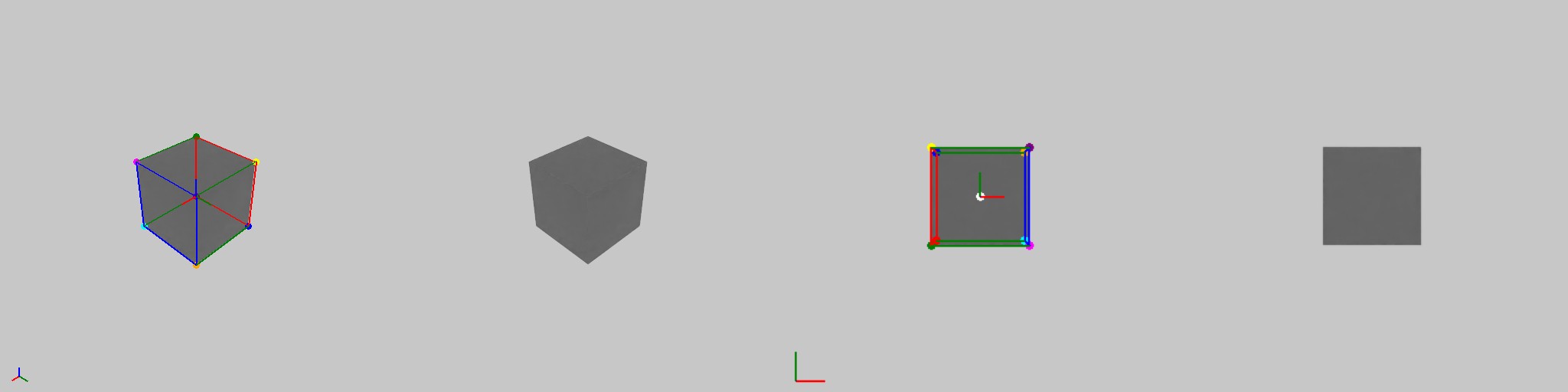
This example demonstrates data capture by creating a custom writer to access annotator data such as camera parameters and 3D bounding boxes. It configures two cameras (custom and viewport perspective), uses annotators to access data directly, writes data to disk using PoseWriter. The standalone example can also be run directly (on Windows use python.bat instead of python.sh):
./python.sh standalone_examples/api/isaacsim.replicator.examples/sdg_getting_started_02.py
import asyncio
import os

import carb.settings
import omni.replicator.core as rep
import omni.usd
from omni.replicator.core import Writer


# Create a custom writer to access annotator data
class MyWriter(Writer):
    def __init__(self, camera_params: bool = True, bounding_box_3d: bool = True):
        # Organize data from render product perspective (legacy, annotator, renderProduct)
        self.data_structure = "renderProduct"
        self.annotators = []
        if camera_params:
            self.annotators.append(rep.annotators.get("camera_params"))
        if bounding_box_3d:
            self.annotators.append(rep.annotators.get("bounding_box_3d"))
        self._frame_id = 0

    def write(self, data: dict):
        print(f"[MyWriter][{self._frame_id}] data:")
        for key, value in data.items():
            print(f"  {key}: {value}")
        self._frame_id += 1


# Register the writer
rep.writers.register_writer(MyWriter)


async def run_example_async():
    # Create a new stage and disable capture on play
    omni.usd.get_context().new_stage()
    rep.orchestrator.set_capture_on_play(False)

    # Set DLSS to Quality mode (2) for best SDG results , options: 0 (Performance), 1 (Balanced), 2 (Quality), 3 (Auto)
    carb.settings.get_settings().set("rtx/post/dlss/execMode", 2)

    # Setup stage
    rep.functional.create.xform(name="World")
    rep.functional.create.dome_light(intensity=500, parent="/World", name="DomeLight")
    cube = rep.functional.create.cube(parent="/World", name="Cube")
    rep.functional.modify.semantics(cube, {"class": "my_cube"}, mode="add")

    # Capture from two perspectives, a custom camera and a perspective camera
    top_cam = rep.functional.create.camera(position=(0, 0, 5), look_at=(0, 0, 0), parent="/World", name="TopCamera")
    persp_cam = rep.functional.create.camera(position=(5, 5, 5), look_at=(0, 0, 0), parent="/World", name="PerspCamera")

    # Create the render products
    rp_top = rep.create.render_product(top_cam.GetPath(), (400, 400), name="top_view")
    rp_persp = rep.create.render_product(persp_cam.GetPath(), (512, 512), name="persp_view")

    # Use the annotators to access the data directly, each annotator is attached to a render product
    rgb_annotator_top = rep.annotators.get("rgb")
    rgb_annotator_top.attach(rp_top)
    rgb_annotator_persp = rep.annotators.get("rgb")
    rgb_annotator_persp.attach(rp_persp)

    # Use the custom writer to access the annotator data
    custom_writer = rep.writers.get("MyWriter")
    custom_writer.initialize(camera_params=True, bounding_box_3d=True)
    custom_writer.attach([rp_top, rp_persp])

    # Use the pose writer to write the data to disk
    pose_writer = rep.WriterRegistry.get("PoseWriter")
    out_dir = os.path.join(os.getcwd(), "_out_pose_writer")
    print(f"Output directory: {out_dir}")
    pose_writer.initialize(output_dir=out_dir, write_debug_images=True)
    pose_writer.attach([rp_top, rp_persp])

    # Trigger a data capture request (data will be written to disk by the writer)
    for i in range(3):
        print(f"Step {i}")
        await rep.orchestrator.step_async()

        # Get the data from the annotators
        rgb_data_cam = rgb_annotator_top.get_data()
        rgb_data_persp = rgb_annotator_persp.get_data()
        print(f"[Annotator][Cam][{i}] rgb_data_cam shape: {rgb_data_cam.shape}")
        print(f"[Annotator][Persp][{i}] rgb_data_persp shape: {rgb_data_persp.shape}")

    # Wait for the data to be written to disk and clean up resources
    await rep.orchestrator.wait_until_complete_async()
    pose_writer.detach()
    custom_writer.detach()
    rgb_annotator_top.detach()
    rgb_annotator_persp.detach()
    rp_top.destroy()
    rp_persp.destroy()


# Run the example
asyncio.ensure_future(run_example_async())
"""Demonstrate SDG with custom writers and multiple render products."""

import os

from isaacsim import SimulationApp

simulation_app = SimulationApp(launch_config={"headless": False})

import carb.settings
import omni.replicator.core as rep
import omni.usd
from omni.replicator.core import Writer


class MyWriter(Writer):
    """Access and print annotator data from attached render products."""

    def __init__(self, camera_params: bool = True, bounding_box_3d: bool = True) -> None:
        # Organize data from render product perspective (legacy, annotator, renderProduct)
        self.data_structure = "renderProduct"
        self.annotators = []
        if camera_params:
            self.annotators.append(rep.annotators.get("camera_params"))
        if bounding_box_3d:
            self.annotators.append(rep.annotators.get("bounding_box_3d"))
        self._frame_id = 0

    def write(self, data: dict) -> None:
        """Print captured annotator data for each frame."""
        print(f"[MyWriter][{self._frame_id}] data:")
        for key, value in data.items():
            print(f"  {key}: {value}")
        self._frame_id += 1


# Register the writer
rep.writers.register_writer(MyWriter)


def run_example() -> None:
    """Run SDG with custom writer, pose writer, and annotator data access."""
    # Create a new stage and disable capture on play
    omni.usd.get_context().new_stage()
    rep.orchestrator.set_capture_on_play(False)

    # Set DLSS to Quality mode (2) for best SDG results , options: 0 (Performance), 1 (Balanced), 2 (Quality), 3 (Auto)
    carb.settings.get_settings().set("rtx/post/dlss/execMode", 2)

    # Setup stage
    rep.functional.create.xform(name="World")
    rep.functional.create.dome_light(intensity=500, parent="/World", name="DomeLight")
    cube = rep.functional.create.cube(parent="/World", name="Cube")
    rep.functional.modify.semantics(cube, {"class": "my_cube"}, mode="add")

    # Capture from two perspectives, a custom camera and a perspective camera
    top_cam = rep.functional.create.camera(position=(0, 0, 5), look_at=(0, 0, 0), parent="/World", name="TopCamera")
    persp_cam = rep.functional.create.camera(position=(5, 5, 5), look_at=(0, 0, 0), parent="/World", name="PerspCamera")

    # Create the render products
    rp_top = rep.create.render_product(top_cam.GetPath(), (400, 400), name="top_view")
    rp_persp = rep.create.render_product(persp_cam.GetPath(), (512, 512), name="persp_view")

    # Use the annotators to access the data directly, each annotator is attached to a render product
    rgb_annotator_top = rep.annotators.get("rgb")
    rgb_annotator_top.attach(rp_top)
    rgb_annotator_persp = rep.annotators.get("rgb")
    rgb_annotator_persp.attach(rp_persp)

    # Use the custom writer to access the annotator data
    custom_writer = rep.writers.get("MyWriter")
    custom_writer.initialize(camera_params=True, bounding_box_3d=True)
    custom_writer.attach([rp_top, rp_persp])

    # Use the pose writer to write the data to disk
    pose_writer = rep.WriterRegistry.get("PoseWriter")
    out_dir = os.path.join(os.getcwd(), "_out_pose_writer")
    print(f"Output directory: {out_dir}")
    pose_writer.initialize(output_dir=out_dir, write_debug_images=True)
    pose_writer.attach([rp_top, rp_persp])

    # Trigger a data capture request (data will be written to disk by the writer)
    for i in range(3):
        print(f"Step {i}")
        rep.orchestrator.step()

        # Get the data from the annotators
        rgb_data_top = rgb_annotator_top.get_data()
        rgb_data_persp = rgb_annotator_persp.get_data()
        print(f"[Annotator][Top][{i}] rgb_data_top shape: {rgb_data_top.shape}")
        print(f"[Annotator][Persp][{i}] rgb_data_persp shape: {rgb_data_persp.shape}")

    # Wait for the data to be written to disk and clean up resources
    rep.orchestrator.wait_until_complete()
    pose_writer.detach()
    custom_writer.detach()
    rgb_annotator_top.detach()
    rgb_annotator_persp.detach()
    rp_top.destroy()
    rp_persp.destroy()


run_example()
The output directory will contain the captured data, including RGB with the 3D bounding box annotations as overlays together with .json files with the frame data. The annotator and custom writer data is printed to the terminal.
Custom Randomizations: Replicator Graph and USD API#
This example demonstrates creating a custom randomization using Replicator’s graph-based randomizers triggered by custom events and a custom USD API-based randomization. A dome light’s color is randomized through custom events, while a cube’s location is randomized through USD API. Data is captured using the BasicWriter with semantic segmentation. The standalone example can also be run directly (on Windows use python.bat instead of python.sh):
./python.sh standalone_examples/api/isaacsim.replicator.examples/sdg_getting_started_03.py
import asyncio
import os
import random

import carb.settings
import omni.replicator.core as rep
import omni.usd


# Randomize the location of a prim without the graph-based randomizer
def randomize_location(prim):
    random_pos = (random.uniform(-1, 1), random.uniform(-1, 1), random.uniform(-1, 1))
    rep.functional.modify.position(prim, random_pos)


async def run_example_async():
    # Create a new stage and disable capture on play
    omni.usd.get_context().new_stage()
    rep.orchestrator.set_capture_on_play(False)
    random.seed(42)
    rep.set_global_seed(42)

    # Set DLSS to Quality mode (2) for best SDG results , options: 0 (Performance), 1 (Balanced), 2 (Quality), 3 (Auto)
    carb.settings.get_settings().set("rtx/post/dlss/execMode", 2)

    # Setup stage
    rep.functional.create.xform(name="World")
    cube = rep.functional.create.cube(parent="/World", name="Cube")
    rep.functional.modify.semantics(cube, {"class": "my_cube"}, mode="add")

    # Create a replicator randomizer with custom event trigger
    with rep.trigger.on_custom_event(event_name="randomize_dome_light_color"):
        rep.create.light(light_type="Dome", color=rep.distribution.uniform((0, 0, 0), (1, 1, 1)))

    # Create a render product using the viewport perspective camera
    cam = rep.functional.create.camera(position=(5, 5, 5), look_at=(0, 0, 0), parent="/World", name="Camera")
    rp = rep.create.render_product(cam, (512, 512))

    # Write data using the basic writer with the rgb and bounding box annotators
    backend = rep.backends.get("DiskBackend")
    out_dir = os.path.join(os.getcwd(), "_out_basic_writer_rand")
    backend.initialize(output_dir=out_dir)
    print(f"Output directory: {out_dir}")
    writer = rep.writers.get("BasicWriter")
    writer.initialize(backend=backend, rgb=True, semantic_segmentation=True, colorize_semantic_segmentation=True)
    writer.attach(rp)

    # Trigger a data capture request (data will be written to disk by the writer)
    for i in range(3):
        print(f"Step {i}")
        # Trigger the custom graph-based event randomizer every second step
        if i % 2 == 1:
            rep.utils.send_og_event(event_name="randomize_dome_light_color")

        # Run the custom USD API location randomizer on the prims
        randomize_location(cube)

        # Since the replicator randomizer is set to trigger on custom events, step will only trigger the writer
        await rep.orchestrator.step_async(rt_subframes=32)

    # Wait for the data to be written to disk and clean up resources
    await rep.orchestrator.wait_until_complete_async()
    writer.detach()
    rp.destroy()


# Run the example
asyncio.ensure_future(run_example_async())
"""Demonstrate SDG with custom and graph-based randomizers."""

import os
import random
from typing import Any

from isaacsim import SimulationApp

simulation_app = SimulationApp(launch_config={"headless": False})

import carb.settings
import omni.replicator.core as rep
import omni.usd


def randomize_location(prim: Any) -> None:
    """Randomize the position of a prim using the USD functional API."""
    random_pos = (random.uniform(-1, 1), random.uniform(-1, 1), random.uniform(-1, 1))
    rep.functional.modify.position(prim, random_pos)


def run_example() -> None:
    """Run SDG with combined USD API and graph-based randomization."""
    # Create a new stage and disable capture on play
    omni.usd.get_context().new_stage()
    rep.orchestrator.set_capture_on_play(False)
    random.seed(42)
    rep.set_global_seed(42)

    # Set DLSS to Quality mode (2) for best SDG results , options: 0 (Performance), 1 (Balanced), 2 (Quality), 3 (Auto)
    carb.settings.get_settings().set("rtx/post/dlss/execMode", 2)

    # Setup stage
    rep.functional.create.xform(name="World")
    cube = rep.functional.create.cube(parent="/World", name="Cube")
    rep.functional.modify.semantics(cube, {"class": "my_cube"}, mode="add")

    # Create a replicator randomizer with custom event trigger
    with rep.trigger.on_custom_event(event_name="randomize_dome_light_color"):
        rep.create.light(light_type="Dome", color=rep.distribution.uniform((0, 0, 0), (1, 1, 1)))

    # Create a render product using the viewport perspective camera
    cam = rep.functional.create.camera(position=(5, 5, 5), look_at=(0, 0, 0), parent="/World", name="Camera")
    rp = rep.create.render_product(cam, (512, 512))

    # Write data using the basic writer with the rgb and bounding box annotators
    backend = rep.backends.get("DiskBackend")
    out_dir = os.path.join(os.getcwd(), "_out_basic_writer_rand")
    backend.initialize(output_dir=out_dir)
    print(f"Output directory: {out_dir}")
    writer = rep.writers.get("BasicWriter")
    writer.initialize(backend=backend, rgb=True, semantic_segmentation=True, colorize_semantic_segmentation=True)
    writer.attach(rp)

    # Trigger a data capture request (data will be written to disk by the writer)
    for i in range(3):
        print(f"Step {i}")
        # Trigger the custom graph-based event randomizer every second step
        if i % 2 == 1:
            rep.utils.send_og_event(event_name="randomize_dome_light_color")

        # Run the custom USD API location randomizer on the prims
        randomize_location(cube)

        # Since the replicator randomizer is set to trigger on custom events, step will only trigger the writer
        rep.orchestrator.step(rt_subframes=32)

    # Wait for the data to be written to disk and clean up resources
    rep.orchestrator.wait_until_complete()
    writer.detach()
    rp.destroy()


# Run the example
run_example()
The output directory will contain the RGB and semantic segmentation images with the captured data. The cube is randomized each capture, while the dome light color is randomized every second capture.

Event-Triggered Data Capture: Timeline and Simulation#
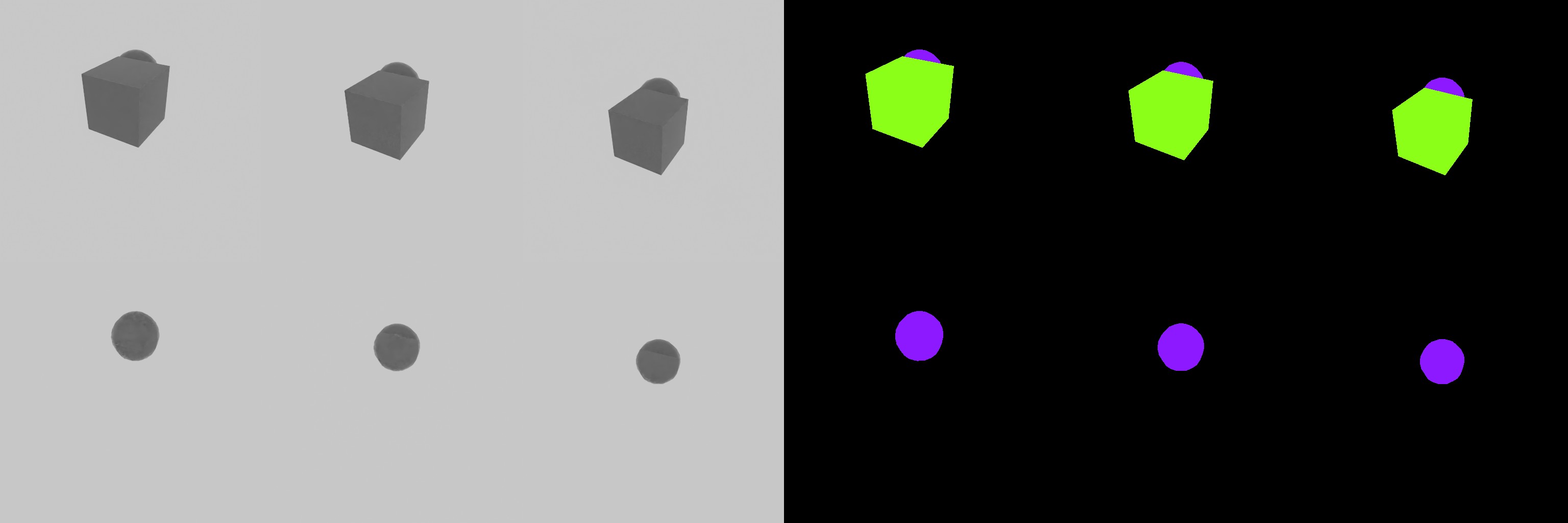
This example shows how to capture simulation data when specific conditions are met. A cube and sphere are dropped in a physics simulation, and data is captured at specific intervals based on the cube’s height. The timeline is paused during capture to ensure data consistency. The standalone example can also be run directly (on Windows use python.bat instead of python.sh):
./python.sh standalone_examples/api/isaacsim.replicator.examples/sdg_getting_started_04.py
import asyncio
import os

import carb.settings
import omni.kit.app
import omni.replicator.core as rep
import omni.timeline
import omni.usd
from isaacsim.core.experimental.prims import RigidPrim
from pxr import UsdGeom


async def run_example_async():
    # Create a new stage and disable capture on play
    omni.usd.get_context().new_stage()
    rep.orchestrator.set_capture_on_play(False)

    # Set DLSS to Quality mode (2) for best SDG results , options: 0 (Performance), 1 (Balanced), 2 (Quality), 3 (Auto)
    carb.settings.get_settings().set("rtx/post/dlss/execMode", 2)

    # Add a light
    rep.functional.create.xform(name="World")
    rep.functional.create.dome_light(intensity=500, parent="/World", name="DomeLight")

    # Create a cube with colliders and rigid body dynamics at a specific location
    cube = rep.functional.create.cube(name="Cube", parent="/World")
    rep.functional.modify.position(cube, (0, 0, 2))
    rep.functional.modify.semantics(cube, {"class": "my_cube"}, mode="add")
    rep.functional.physics.apply_rigid_body(cube, with_collider=True)

    # Createa a sphere with colliders and rigid body dynamics next to the cube
    sphere = rep.functional.create.sphere(name="Sphere", parent="/World")
    rep.functional.modify.position(sphere, (-1, -1, 2))
    rep.functional.modify.semantics(sphere, {"class": "my_sphere"}, mode="add")
    rep.functional.physics.apply_rigid_body(sphere, with_collider=True)

    # Create a render product using the viewport perspective camera
    cam = rep.functional.create.camera(position=(5, 5, 5), look_at=(0, 0, 0), parent="/World", name="Camera")
    rp = rep.create.render_product(cam, (512, 512))

    # Write data using the basic writer with the rgb and bounding box annotators
    backend = rep.backends.get("DiskBackend")
    out_dir = os.path.join(os.getcwd(), "_out_basic_writer_sim")
    backend.initialize(output_dir=out_dir)
    print(f"Output directory: {out_dir}")
    writer = rep.writers.get("BasicWriter")
    writer.initialize(backend=backend, rgb=True, semantic_segmentation=True, colorize_semantic_segmentation=True)
    writer.attach(rp)

    # Start the timeline (will only advance with app update)
    timeline = omni.timeline.get_timeline_interface()
    timeline.play()

    # Wrap the cube with as a RigidPrim for easy access to its world poses and velocities
    cube_rigid = RigidPrim(str(cube.GetPrimPath()))

    # Wrap the cube as an Imageable object to toggle visibility during capture
    cube_imageable = UsdGeom.Imageable(cube)

    # Define the capture interval in meters
    capture_interval_meters = 0.5
    cube_pos = cube_rigid.get_world_poses(indices=[0])[0].numpy()
    previous_capture_height = cube_pos[0, 2]

    # Update the app which will advance the timeline (and implicitly the simulation)
    for i in range(100):
        await omni.kit.app.get_app().next_update_async()
        cube_pos = cube_rigid.get_world_poses(indices=[0])[0].numpy()
        current_height = cube_pos[0, 2]
        distance_dropped = previous_capture_height - current_height
        print(f"Step {i}; cube height: {current_height:.3f}; drop since last capture: {distance_dropped:.3f}")

        # Stop the simulation if the cube falls below the ground
        if current_height < 0:
            print(f"\t Cube fell below the ground at height {current_height:.3f}, stopping simulation..")
            break

        # Capture every time the cube drops by the threshold distance
        if distance_dropped >= capture_interval_meters:
            print(f"\t Capturing at height {current_height:.3f}")
            previous_capture_height = current_height

            # Setting delta_time to 0.0 will make sure the timeline is not advanced during capture
            await rep.orchestrator.step_async(delta_time=0.0)

            # Capture again with the cube hidden
            print("\t Capturing with cube hidden")
            cube_imageable.MakeInvisible()
            await rep.orchestrator.step_async(delta_time=0.0)
            cube_imageable.MakeVisible()

            # Resume the timeline to continue the simulation
            timeline.play()

    # Pause the simulation
    timeline.pause()

    # Wait for the data to be written to disk and clean up resources
    await rep.orchestrator.wait_until_complete_async()
    writer.detach()
    rp.destroy()


# Run the example
asyncio.ensure_future(run_example_async())
"""Demonstrate simulation-driven SDG with physics-based capture triggers."""

import os

from isaacsim import SimulationApp

simulation_app = SimulationApp(launch_config={"headless": False})

import carb.settings
import omni.replicator.core as rep
import omni.timeline
import omni.usd
from isaacsim.core.experimental.prims import RigidPrim
from pxr import UsdGeom


def run_example() -> None:
    """Run physics simulation and capture data at height-based intervals."""
    # Create a new stage and disable capture on play
    omni.usd.get_context().new_stage()
    rep.orchestrator.set_capture_on_play(False)

    # Set DLSS to Quality mode (2) for best SDG results , options: 0 (Performance), 1 (Balanced), 2 (Quality), 3 (Auto)
    carb.settings.get_settings().set("rtx/post/dlss/execMode", 2)

    # Add a light
    rep.functional.create.xform(name="World")
    rep.functional.create.dome_light(intensity=500, parent="/World", name="DomeLight")

    # Create a cube with colliders and rigid body dynamics at a specific location
    cube = rep.functional.create.cube(name="Cube", parent="/World")
    rep.functional.modify.position(cube, (0, 0, 2))
    rep.functional.modify.semantics(cube, {"class": "my_cube"}, mode="add")
    rep.functional.physics.apply_rigid_body(cube, with_collider=True)

    # Createa a sphere with colliders and rigid body dynamics next to the cube
    sphere = rep.functional.create.sphere(name="Sphere", parent="/World")
    rep.functional.modify.position(sphere, (-1, -1, 2))
    rep.functional.modify.semantics(sphere, {"class": "my_sphere"}, mode="add")
    rep.functional.physics.apply_rigid_body(sphere, with_collider=True)

    # Create a render product using the viewport perspective camera
    cam = rep.functional.create.camera(position=(5, 5, 5), look_at=(0, 0, 0), parent="/World", name="Camera")
    rp = rep.create.render_product(cam, (512, 512))

    # Write data using the basic writer with the rgb and bounding box annotators
    backend = rep.backends.get("DiskBackend")
    out_dir = os.path.join(os.getcwd(), "_out_basic_writer_sim")
    backend.initialize(output_dir=out_dir)
    print(f"Output directory: {out_dir}")
    writer = rep.writers.get("BasicWriter")
    writer.initialize(backend=backend, rgb=True, semantic_segmentation=True, colorize_semantic_segmentation=True)
    writer.attach(rp)

    # Start the timeline (will only advance with app update)
    timeline = omni.timeline.get_timeline_interface()
    timeline.play()

    # Wrap the cube with as a RigidPrim for easy access to its world poses and velocities
    cube_rigid = RigidPrim(str(cube.GetPrimPath()))

    # Wrap the cube as an Imageable object to toggle visibility during capture
    cube_imageable = UsdGeom.Imageable(cube)

    # Define the capture interval in meters
    capture_interval_meters = 0.5
    cube_pos = cube_rigid.get_world_poses(indices=[0])[0].numpy()
    previous_capture_height = cube_pos[0, 2]

    # Update the app which will advance the timeline (and implicitly the simulation)
    for i in range(100):
        simulation_app.update()
        cube_pos = cube_rigid.get_world_poses(indices=[0])[0].numpy()
        current_height = cube_pos[0, 2]
        distance_dropped = previous_capture_height - current_height
        print(f"Step {i}; cube height: {current_height:.3f}; drop since last capture: {distance_dropped:.3f}")

        # Stop the simulation if the cube falls below the ground
        if current_height < 0:
            print(f"\t Cube fell below the ground at height {current_height:.3f}, stopping simulation..")
            break

        # Capture every time the cube drops by the threshold distance
        if distance_dropped >= capture_interval_meters:
            print(f"\t Capturing at height {current_height:.3f}")
            previous_capture_height = current_height

            # Setting delta_time to 0.0 will make sure the timeline is not advanced during capture
            rep.orchestrator.step(delta_time=0.0)

            # Capture again with the cube hidden
            print("\t Capturing with cube hidden")
            cube_imageable.MakeInvisible()
            rep.orchestrator.step(delta_time=0.0)
            cube_imageable.MakeVisible()

            # Resume the timeline to continue the simulation
            timeline.play()

    # Pause the simulation
    timeline.pause()

    # Wait for the data to be written to disk and clean up resources
    rep.orchestrator.wait_until_complete()
    writer.detach()
    rp.destroy()


# Run the example
run_example()
The output directory will contain the RGB and semantic segmentation images with the captured data at specific simulation times (cube drop height intervals) and the cube hidden during capture. During every second capture with the cube hidden, the timeline will not advance (delta_time=0.0) ensuring the same simulation state can be captured multiple times.
Batch Randomization with Performance Optimization#
This example demonstrates batch creation and randomization of 100 cubes using the functional API and ReplicatorRNG. It runs three configurations to compare performance: default (wait_for_render=True), non-blocking capture (wait_for_render=False), and non-blocking capture with write-to-fabric enabled. Each run prints per-step randomization and capture timings as well as the total duration including wait_until_complete, illustrating the impact of wait_for_render and write-to-fabric on throughput. The standalone example can also be run directly (on Windows use python.bat instead of python.sh):
./python.sh standalone_examples/api/isaacsim.replicator.examples/sdg_getting_started_05.py
import asyncio
import os
import time

import carb.settings
import omni.replicator.core as rep
import omni.usd

NUM_CUBES = 100
NUM_CAPTURES = 10


async def run_example_async(wait_for_render, write_to_fabric):
    print(f"\n[SDG] Running with wait_for_render={wait_for_render}, write_to_fabric={write_to_fabric}")
    omni.usd.get_context().new_stage()
    rep.orchestrator.set_capture_on_play(False)

    settings = carb.settings.get_settings()
    settings.set("rtx/post/dlss/execMode", 2)
    settings.set("/exts/omni.replicator.core/enableWriteToFabric", write_to_fabric)

    rng = rep.rng.ReplicatorRNG(seed=42)

    # Setup stage with a dome light and batch-created cubes
    rep.functional.create.xform(name="World")
    rep.functional.create.dome_light(intensity=500, parent="/World", name="DomeLight")
    cubes = rep.functional.create_batch.cube(
        count=NUM_CUBES,
        parent="/World",
        name="Cube",
        semantics={"class": "my_cube"},
    )
    rep.functional.modify.scale(cubes, (0.2, 0.2, 0.2))

    # Create the camera and render product
    cam = rep.functional.create.camera(position=(5, 5, 5), look_at=(0, 0, 0), parent="/World", name="Camera")
    rp = rep.create.render_product(cam, (512, 512))

    # Write data using BasicWriter with rgb annotator
    backend = rep.backends.get("DiskBackend")
    out_dir = os.path.join(os.getcwd(), f"_out_fabric_{write_to_fabric}_wait_{wait_for_render}")
    backend.initialize(output_dir=out_dir)
    print(f"[SDG] Output directory: {out_dir}")
    writer = rep.writers.get("BasicWriter")
    writer.initialize(backend=backend, rgb=True)
    writer.attach(rp)

    # Randomize and capture, measuring timing for each phase
    randomization_times_ms = []
    capture_times_ms = []
    total_start = time.perf_counter()

    for i in range(NUM_CAPTURES):
        random_positions = rng.generator.uniform((-3.0, -3.0, -3.0), (3.0, 3.0, 3.0), size=(NUM_CUBES, 3))
        random_rotations = rng.generator.uniform((0.0, 0.0, 0.0), (360.0, 360.0, 360.0), size=(NUM_CUBES, 3))
        random_scales = rng.generator.uniform(0.1, 0.4, size=(NUM_CUBES, 3))

        rand_start = time.perf_counter()
        rep.functional.modify.pose(
            cubes,
            position_value=random_positions,
            rotation_value=random_rotations,
            scale_value=random_scales,
        )
        rep.functional.randomizer.display_color(cubes, rng=rng)
        rand_ms = (time.perf_counter() - rand_start) * 1000.0
        randomization_times_ms.append(rand_ms)

        cap_start = time.perf_counter()
        await rep.orchestrator.step_async(wait_for_render=wait_for_render)
        cap_ms = (time.perf_counter() - cap_start) * 1000.0
        capture_times_ms.append(cap_ms)

        print(f"[SDG] Step {i}: randomization {rand_ms:.1f} ms, capture {cap_ms:.1f} ms")

    # Wait for all data to be written to disk
    print("[SDG] Waiting for all data to be written to disk..")
    await rep.orchestrator.wait_until_complete_async()
    total_ms = (time.perf_counter() - total_start) * 1000.0

    avg_rand = sum(randomization_times_ms) / len(randomization_times_ms)
    avg_cap = sum(capture_times_ms) / len(capture_times_ms)
    print(f"[SDG] Avg randomization: {avg_rand:.1f} ms, avg capture: {avg_cap:.1f} ms, total: {total_ms:.1f} ms")

    writer.detach()
    rp.destroy()


async def run_examples_async():
    # Run with different configurations to compare performance
    await run_example_async(wait_for_render=True, write_to_fabric=False)
    await run_example_async(wait_for_render=False, write_to_fabric=False)
    await run_example_async(wait_for_render=False, write_to_fabric=True)


asyncio.ensure_future(run_examples_async())
"""Demonstrate SDG performance with fabric writes and render wait options."""

import os
import time

from isaacsim import SimulationApp

simulation_app = SimulationApp(launch_config={"headless": False})

import carb.settings
import omni.replicator.core as rep
import omni.usd

NUM_CUBES = 100
NUM_CAPTURES = 10


def run_example(wait_for_render: bool, write_to_fabric: bool) -> None:
    """Run SDG with the given render wait and fabric write settings."""
    print(f"\n[SDG] Running with wait_for_render={wait_for_render}, write_to_fabric={write_to_fabric}")
    omni.usd.get_context().new_stage()
    rep.orchestrator.set_capture_on_play(False)

    settings = carb.settings.get_settings()
    settings.set("rtx/post/dlss/execMode", 2)
    settings.set("/exts/omni.replicator.core/enableWriteToFabric", write_to_fabric)

    rng = rep.rng.ReplicatorRNG(seed=42)

    # Setup stage with a dome light and batch-created cubes
    rep.functional.create.xform(name="World")
    rep.functional.create.dome_light(intensity=500, parent="/World", name="DomeLight")
    cubes = rep.functional.create_batch.cube(
        count=NUM_CUBES,
        parent="/World",
        name="Cube",
        semantics={"class": "my_cube"},
    )
    rep.functional.modify.scale(cubes, (0.2, 0.2, 0.2))

    # Create the camera and render product
    cam = rep.functional.create.camera(position=(5, 5, 5), look_at=(0, 0, 0), parent="/World", name="Camera")
    rp = rep.create.render_product(cam, (512, 512))

    # Write data using BasicWriter with rgb annotator
    backend = rep.backends.get("DiskBackend")
    out_dir = os.path.join(os.getcwd(), f"_out_fabric_{write_to_fabric}_wait_{wait_for_render}")
    backend.initialize(output_dir=out_dir)
    print(f"[SDG] Output directory: {out_dir}")
    writer = rep.writers.get("BasicWriter")
    writer.initialize(backend=backend, rgb=True)
    writer.attach(rp)

    # Randomize and capture, measuring timing for each phase
    randomization_times_ms = []
    capture_times_ms = []
    total_start = time.perf_counter()

    for i in range(NUM_CAPTURES):
        random_positions = rng.generator.uniform((-3.0, -3.0, -3.0), (3.0, 3.0, 3.0), size=(NUM_CUBES, 3))
        random_rotations = rng.generator.uniform((0.0, 0.0, 0.0), (360.0, 360.0, 360.0), size=(NUM_CUBES, 3))
        random_scales = rng.generator.uniform(0.1, 0.4, size=(NUM_CUBES, 3))

        rand_start = time.perf_counter()
        rep.functional.modify.pose(
            cubes,
            position_value=random_positions,
            rotation_value=random_rotations,
            scale_value=random_scales,
        )
        rep.functional.randomizer.display_color(cubes, rng=rng)
        rand_ms = (time.perf_counter() - rand_start) * 1000.0
        randomization_times_ms.append(rand_ms)

        cap_start = time.perf_counter()
        rep.orchestrator.step(wait_for_render=wait_for_render)
        cap_ms = (time.perf_counter() - cap_start) * 1000.0
        capture_times_ms.append(cap_ms)

        print(f"[SDG] Step {i}: randomization {rand_ms:.1f} ms, capture {cap_ms:.1f} ms")

    # Wait for all data to be written to disk
    print("[SDG] Waiting for all data to be written to disk..")
    rep.orchestrator.wait_until_complete()
    total_ms = (time.perf_counter() - total_start) * 1000.0

    avg_rand = sum(randomization_times_ms) / len(randomization_times_ms)
    avg_cap = sum(capture_times_ms) / len(capture_times_ms)
    print(f"[SDG] Avg randomization: {avg_rand:.1f} ms, avg capture: {avg_cap:.1f} ms, total: {total_ms:.1f} ms")

    writer.detach()
    rp.destroy()


# Run with different configurations to compare performance
run_example(wait_for_render=True, write_to_fabric=False)
run_example(wait_for_render=False, write_to_fabric=False)
run_example(wait_for_render=False, write_to_fabric=True)
Each configuration writes its output to a separate directory. The terminal output shows per-step randomization and capture durations (in milliseconds) and total time, allowing direct comparison of the three modes.
Troubleshooting#
For troubleshooting information related to the Getting Started Scripts, refer to the Getting Started Scripts Issues section in the Replicator Troubleshooting page.
Next Steps#
After completing these examples, consider exploring:
Advanced randomizations using the Randomizer Details
Custom annotators for specialized data capture
Distributed data generation using multiple GPUs
Integration with machine learning pipelines
Advanced physics-based simulations
For more information, refer to: - Replicator Documentation - Isaac Sim Randomizers Guide - I/O Optimization Guide