


Robot Inspector Window#
The isaacsim.robot.schema.ui extension provides an interactive Robot Inspector window for inspecting the kinematic structure of robots on the stage and selectively masking components for simulation.
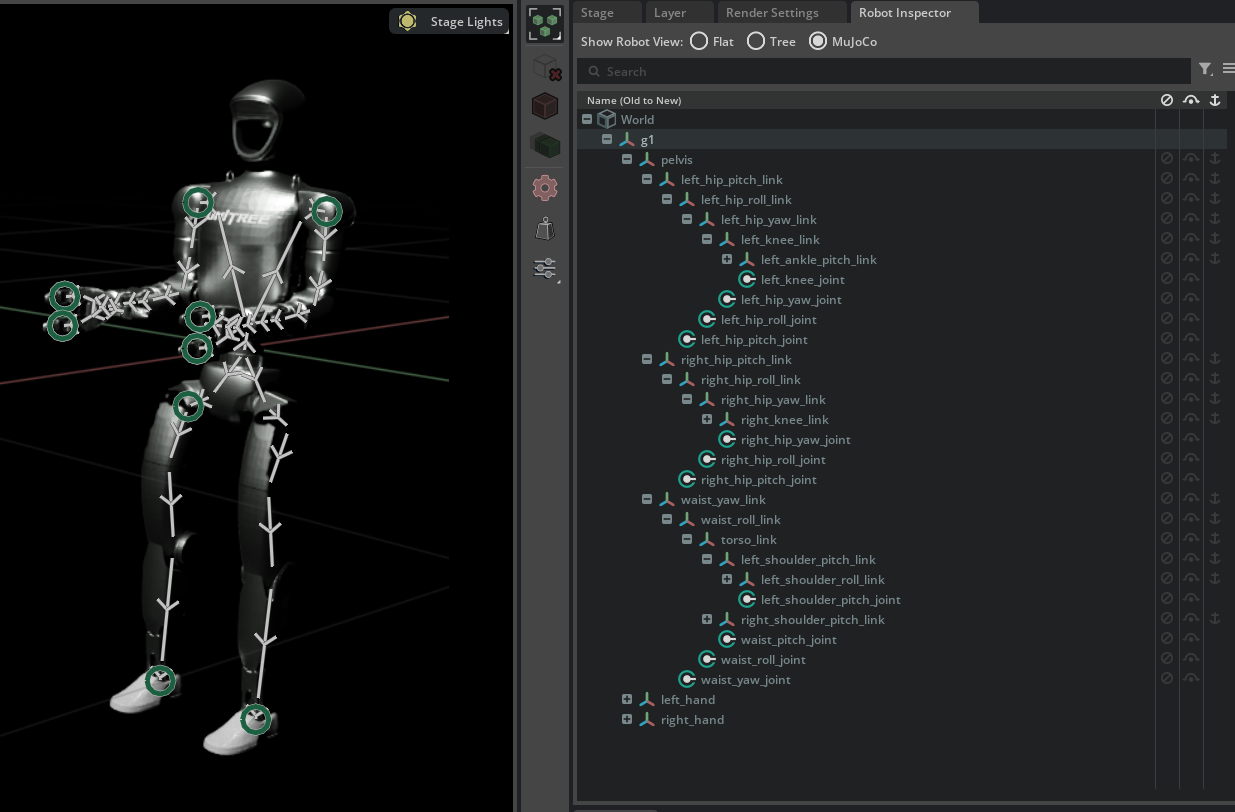
Opening the Window#
The Robot Inspector window is accessible via Window > Robot Inspector. It docks next to the Stage panel by default.
Hierarchy Display Modes#
A mode selector at the top of the window controls how the robot hierarchy is displayed. Three modes are available:
Mode |
Description |
|---|---|
Flat |
Links and joints are listed as two flat scopes ( |
Tree (default) |
Parent link → joint → child link chain. Matches the kinematic traversal order and is the most natural representation for articulated robots. |
MuJoCo |
Tree rooted at the base link. Each link’s children appear first, and the joint connecting the link to its own parent appears as the last child entry. Mirrors the body-centric layout used by MuJoCo MJCF files. |

|

|
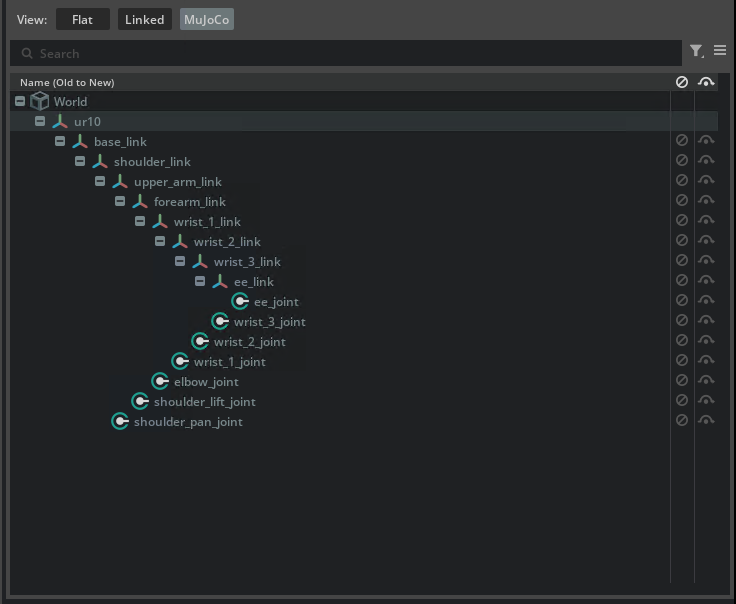
|
Flat |
Tree |
MuJoCo |
Component Masking#
The Robot Inspector provides per-component masking controls that allow disabling individual joints and links for simulation without modifying the authored USD layers. All masking opinions are a debugging tool and are written to a dedicated anonymous sublayer inserted into the session layer stack, so they are transient and never saved to disk.
Three masking columns appear in the tree view:
Column |
Description |
|---|---|
Deactivate ( |
Disables the joint or link for simulation. Joint deactivation sets |
Bypass ( |
Disables the element AND reconnects the kinematic chain around it. For joints, fixed joints are created bridging the nearest backward non-masked link to each forward non-masked link. For links, the backward joint is deactivated and forward joints are reparented to the nearest non-masked ancestor link with recalculated local-frame offsets. |
Anchor ( |
Pins a link to the world at its current pose by creating a temporary fixed joint with no |


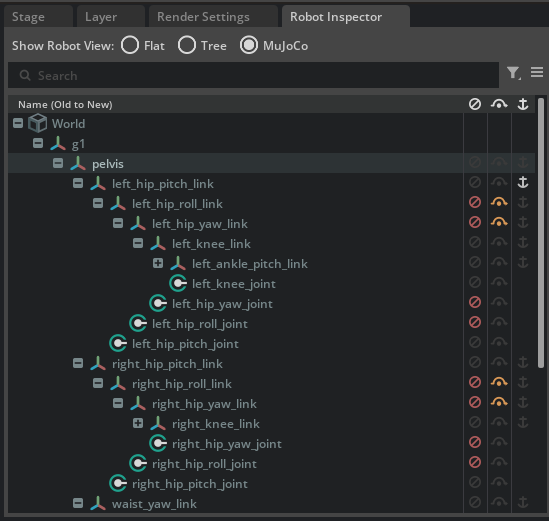
Masking operations support multi-selection: clicking a column icon while multiple prims are selected applies the action to all selected prims in a single batch.
Note
The masking sublayer is automatically cleared when a new stage is opened or the current stage is closed. Masking state does not persist across sessions.
Viewport Joint Visualization#
When the Robot Inspector window is active, joint connections are drawn as overlay lines in the 3D viewport, connecting parent and child links at joint locations. This visualization provides a quick visual check of the kinematic chain.
Connection lines include directional arrows indicating the parent-to-child relationship.
When multiple joints overlap at the same screen position (common at dense joint clusters), an overlay circle is drawn. Clicking the circle opens a context menu listing all joints at that location, allowing selection of any individual joint.
Joint visualization is hidden during simulation playback and restored when playback stops.
Visibility is controlled by the Visibility Menu (Eye Icon on viewport) > Show by Type > Physics > Joints setting.
UI Utility Functions#
The isaacsim.robot.schema.ui extension exposes additional utilities for hierarchy generation and component inspection. These are accessible via:
from isaacsim.robot.schema.ui.utils import HierarchyMode, generate_robot_hierarchy_stage
Hierarchy Mode#
HierarchyMode is an enum controlling how the robot hierarchy is structured in the Robot Inspector and in the in-memory hierarchy stage:
Value |
Description |
|---|---|
|
Links under a |
|
Parent link → joint → child link chain (default). |
|
Tree rooted at the base link. Child links appear first under each link; the joint connecting the link to its parent appears as the last child entry. |
Hierarchy Stage Generation#
Function |
Description |
|---|---|
|
Scans the current stage for prims with |
The returned PathMap object provides bidirectional mapping between original stage paths and hierarchy stage paths:
hierarchy_stage, path_map, connections = generate_robot_hierarchy_stage(HierarchyMode.FLAT)
# Map from original stage path to hierarchy path
hier_path = path_map.get_hierarchy_path(original_prim_path)
# Map back from hierarchy path to original stage path
orig_path = path_map.get_original_path(hier_prim_path)
Note
During hierarchy generation, any active masking sublayer is temporarily muted so the tree always reflects the unmodified robot structure.
Masking Operations API#
The isaacsim.robot.schema.ui extension provides a programmatic API for masking, bypassing, and anchoring robot components. The state is managed by the MaskingState singleton and the USD operations are performed by MaskingOperations.
from isaacsim.robot.schema.ui.masking_state import MaskingState
from isaacsim.robot.schema.ui.masking_ops import MaskingOperations
MaskingState#
MaskingState is a singleton that tracks which prims are deactivated (masked), bypassed, or anchored. It maintains three independent sets and notifies subscribers when any state changes.
Method |
Description |
|---|---|
|
Returns the singleton |
|
Returns |
|
Returns |
|
Returns |
|
Toggles plain mask. Unmasking a bypassed prim unbypasses it first. |
|
Toggles bypass state (mask + reconnect chain). |
|
Toggles world-anchor on a link. |
|
Sets deactivation state for multiple prims with a single change notification. |
|
Sets bypass state for multiple prims with a single change notification. |
|
Sets anchor state for multiple links with a single change notification. |
|
Clears all masking, bypass, and anchor state. |
|
Registers a no-argument callback invoked when any state changes. |
|
Unregisters a previously registered change callback. |
MaskingOperations#
MaskingOperations performs the actual USD edits on a dedicated anonymous sublayer. All opinions are transient and never written to the authored layers.
Method |
Description |
|---|---|
|
Disables a joint ( |
|
Removes mask opinions, restoring base-layer values. |
|
Masks the element and reconnects the kinematic chain around it. For joints, creates fixed joints bridging the gap. For links, deactivates the backward joint and reparents forward joints. |
|
Removes the bypass, restoring the chain to its original state. |
|
Pins a link to the world by creating a fixed joint at its current pose. |
|
Removes the anchor fixed joint. |
|
Drops the masking sublayer entirely, reverting everything at once. |