Articulation Controller#
Deprecated
This page documents the legacy ArticulationController / SingleArticulation / ArticulationAction Python API, which has been deprecated. For new development, use the Articulation class from isaacsim.core.experimental.prims. See Robot Simulation Snippets for end-to-end examples covering DOF position, velocity, and effort control, and the Articulation API reference for the full method list.
The OmniGraph node at the end of this page is still fully supported, and wraps the updated Articulation class.
Overview#
Articulation controller is the low level controller that controls joint position, joint velocity, and joint effort in Isaac Sim. The articulation controller can be interfaced using Python and OmniGraph.
Note
Angular units are expressed in radians while angles in USD are expressed in degrees and will be adjusted accordingly by the articulation controller.
Python Interface#
Create the articulation controller#
There are several ways to create the articulation controller. The articulation controller is usually created implicitly by applying articulation on a robot prim through the SingleArticulation class.
However, the articulation controller can be created directly by importing the controller class before the simulation starts, but this approach will require you to create or pass in the Articulation during initialization.
The snippet below will load and apply articulation on a franka robot.
import isaacsim.core.utils.stage as stage_utils
from isaacsim.core.prims import SingleArticulation

usd_path = "/Path/To/Robots/FrankaRobotics/FrankaPanda/franka.usd"
prim_path = "/World/envs/env_0/panda"

# load the Franka Panda robot USD file
stage_utils.add_reference_to_stage(usd_path, prim_path)
# wrap the prim as an articulation
prim = SingleArticulation(prim_path=prim_path, name="franka_panda")
import isaacsim.core.utils.stage as stage_utils
from isaacsim.core.api.controllers.articulation_controller import ArticulationController

usd_path = "/Path/To/Robots/FrankaRobotics/FrankaPanda/franka.usd"
prim_path = "/World/envs/env_0/panda"

# load the Franka Panda robot USD file
stage_utils.add_reference_to_stage(usd_path, prim_path)
# Create the articulation controller
articulation_controller = ArticulationController()
Initialize the controller#
After the simulation is started, the robot articulation must be initialized before any commands can be passed to the robot.
The more common approach is by initializing the single articulation object that you have created earlier, this will initialize the articulation controller and articulation view stored in the SingleArticulation object
prim.initialize()
After the simulation starts, the articulation controller must be initialzied with an articulation view. Articulation view is the backend for selecting the joints and applying joint actions.
For example, the code snippet below creates an articulation view with the Franka robot and initializes the articulation controller.
from isaacsim.core.prims import Articulation

# Create the articulation view
articulation_view = Articulation(prim_paths_expr="/World/envs/env_0/panda", name="franka_panda_view")
# Initialize the articulation controller
articulation_controller.initialize(articulation_view)
Articulation Action#
Joint controls commands are packaged in ArticulationAction objects first, before sending them to the articulation controller. The articulation controller allows you to specify the command joint postion, velocity and effort, as well as joint indicies of the joints actuated.
If the joint indice is empty, the articulation action will assume the command will apply to all joints of the robot, and if any of the command is 0, articulation action will assume it is unactuated.
For example, the snippet below creates the command that closes the franka robot fingers: panda_finger_joint1 (7) and panda_finger_joint2 (8) to 0.0
import numpy as np
from isaacsim.core.utils.types import ArticulationAction

action = ArticulationAction(joint_positions=np.array([0.0, 0.0]), joint_indices=np.array([7, 8]))
This snippet creates the command that moves all the robot joints to the indicated position
import numpy as np
from isaacsim.core.utils.types import ArticulationAction

action = ArticulationAction(joint_positions=np.array([0.0, -1.0, 0.0, -2.2, 0.0, 2.4, 0.8, 0.04, 0.04]))
Important
Make sure the joint commands matches the order and the number of joint indices passed in to the articulation action. If joint indice is not passed in, make sure the command matches the number of joints in the robot.
Note
A joint can only be controlled by one control method. For example a joint cannot be controlled by both desired position and desired torque
Apply Action#
The apply_action function in both SingleArticulation and ArticulationController classes will apply the ArticulationAction you created earlier to the robot.
prim.apply_action(action)
articulation_controller.apply_action(action)
Script Editor Example#
You can try out basic articulation controller examples by running the following code snippets in the Script Editor. For more advanced usage, it is recommended to follow the Core API Tutorial Series.
import asyncio

import numpy as np
from isaacsim.core.api.world import World
from isaacsim.core.prims import SingleArticulation
from isaacsim.core.utils.stage import add_reference_to_stage
from isaacsim.core.utils.types import ArticulationAction
from isaacsim.storage.native import get_assets_root_path


async def robot_control_example():
    if World.instance():
        World.instance().clear_instance()
    world = World()
    await world.initialize_simulation_context_async()
    world.scene.add_default_ground_plane()

    # Load the robot USD file
    usd_path = get_assets_root_path() + "/Isaac/Robots/FrankaRobotics/FrankaPanda/franka.usd"
    prim_path = "/World/envs/env_0/panda"
    add_reference_to_stage(usd_path, prim_path)

    # Create SingleArticulation wrapper (automatically creates articulation controller)
    robot = SingleArticulation(prim_path=prim_path, name="franka_panda")
    await world.reset_async()

    # Initialize the robot (initializes articulation controller internally)
    robot.initialize()

    # Run simulation
    await world.play_async()

    # Get current joint positions
    current_positions = robot.get_joint_positions()
    print(f"Current joint positions: {current_positions}")

    # Create target positions
    target_positions = np.array([0.0, -1.5, 0.0, -2.8, 0.0, 2.8, 1.2, 0.04, 0.04])

    # Create and apply articulation action
    action = ArticulationAction(joint_positions=target_positions)
    robot.apply_action(action)

    await asyncio.sleep(5.0)  # Run for 5 seconds to reach target positions

    # Get current joint positions
    current_positions = robot.get_joint_positions()
    print(f"Current joint positions: {current_positions}")

    world.pause()


# Run the example
asyncio.ensure_future(robot_control_example())
import asyncio

import numpy as np
from isaacsim.core.api.controllers.articulation_controller import ArticulationController
from isaacsim.core.api.world import World
from isaacsim.core.prims import Articulation
from isaacsim.core.utils.stage import add_reference_to_stage
from isaacsim.core.utils.types import ArticulationAction
from isaacsim.storage.native import get_assets_root_path


async def robot_control_example():
    if World.instance():
        World.instance().clear_instance()
    world = World()
    await world.initialize_simulation_context_async()
    world.scene.add_default_ground_plane()

    # Load the robot USD file
    usd_path = get_assets_root_path() + "/Isaac/Robots/FrankaRobotics/FrankaPanda/franka.usd"
    prim_path = "/World/envs/env_0/panda"
    add_reference_to_stage(usd_path, prim_path)

    # Create Articulation view for the robot
    robot_view = Articulation(prim_paths_expr=prim_path, name="franka_panda_view")

    # Create and initialize the articulation controller with the articulation view
    articulation_controller = ArticulationController()
    articulation_controller.initialize(robot_view)

    # Run simulation
    await world.play_async()

    # Get current joint positions
    current_positions = robot_view.get_joint_positions()
    print(f"Current joint positions: {current_positions}")

    # Create target positions
    target_positions = np.array([0.0, -1.5, 0.0, -2.8, 0.0, 2.8, 1.2, 0.04, 0.04])

    # Create and apply articulation action
    action = ArticulationAction(joint_positions=target_positions)
    articulation_controller.apply_action(action)

    await asyncio.sleep(5.0)  # Run for 5 seconds to reach target positions

    # Get current joint positions
    current_positions = robot_view.get_joint_positions()
    print(f"Current joint positions: {current_positions}")

    world.pause()


# Run the example
asyncio.ensure_future(robot_control_example())
OmniGraph Interface#
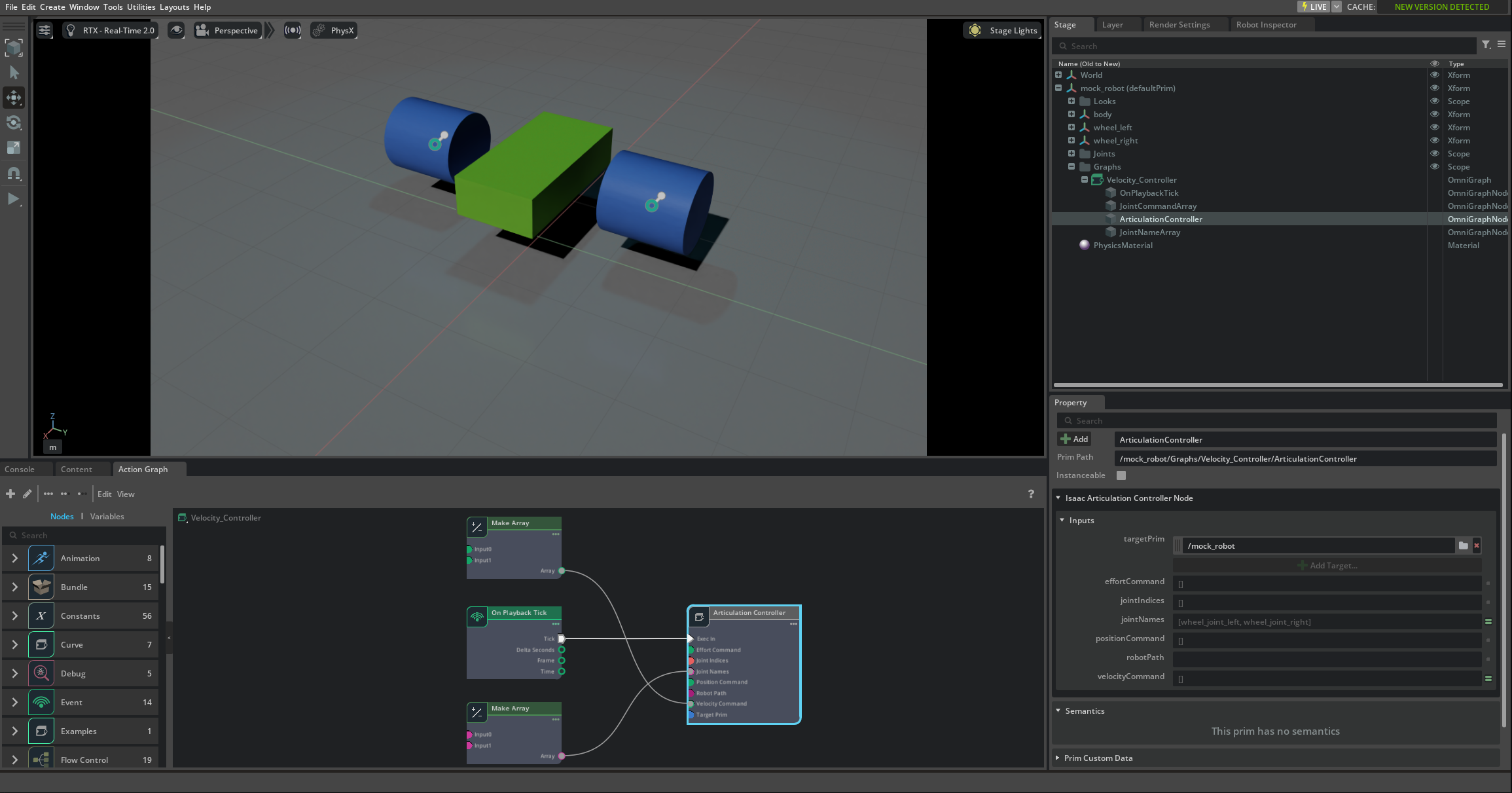
The articulation controller can also be accessed through OmniGraph nodes, providing a visual, node-based approach to robot control.
Input Parameters#
The articulation controller OmniGraph node accepts the following input parameters:
Input Parameter |
Description |
|---|---|
execIn |
Input execution trigger - connects to other nodes to control when the articulation controller runs |
targetPrim |
The prim containing the robot articulation root. Leave empty if using robotPath |
robotPath |
String path to the robot articulation root. Leave empty if using targetPrim |
jointIndices |
Array of joint indices to control. Leave empty to control all joints or use jointNames |
jointNames |
Array of joint names to control. Leave empty to control all joints or use jointIndices |
positionCommand |
Desired joint positions. Leave empty if not using position control |
velocityCommand |
Desired joint velocities. Leave empty if not using velocity control |
effortCommand |
Desired joint efforts/torques. Leave empty if not using effort control |
Usage Guidelines#
Important
Parameter Validation: Ensure joint commands match the order and number of joint indices or joint names. If neither joint indices nor joint names are specified, the command must match the total number of joints in the robot.
Note
Control Method Limitation: A joint can only be controlled by one method at a time. For example, a joint cannot be controlled by both position and effort commands simultaneously.
Example Usage#
For a complete example of the articulation controller OmniGraph node in action, see the mock_robot_rigged asset in the Content Browser at Isaac Sim > Samples > Rigging > MockRobot > mock_robot_rigged.usd.