


RTX Sensor Non-Visual Materials#
The omni.sensors.nv.materials extension, documented here, provides support for rendering materials, which are visible in non-visual spectra for RTX sensors. These materials
are referred to as “non-visual materials”.
As described in the extension documentation, non-visual materials are rendered using USD attributes, and can be specified in the USD file. Isaac Sim includes the isaacsim.core.experimental.materials.NonVisualMaterial class to simplify setting these attributes on Material prims. The renderer
will compute a material ID for each non-visual material, based on the combination of provided attributes. This material ID is provided by the GenericModelOutput AOV, and is exposed by multiple Annotators. Refer to RTX Sensor Annotators for more details.
Specifying Non-Visual Material Attributes#
Valid non-visual material attribute names and values are specified in Omniverse Kit documentation.
User Interface#
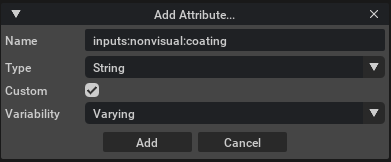
Attributes may be added to materials from the UI by right-clicking the material in the Stage window, then selecting Add > Attribute. This will open a new window like the one below, enabling you to specify custom non-visual attributes.
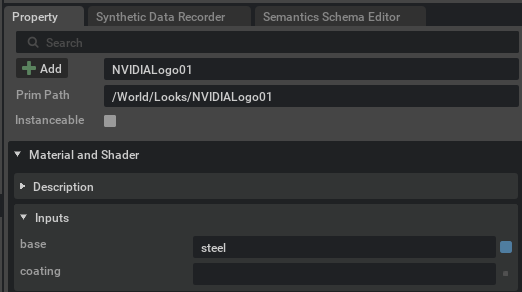
After adding the new attribute, it will appear in the material’s properties, at which point it can be populated:
Python#
The isaacsim.core.experimental.materials.NonVisualMaterial class provides a Python API to simplify setting non-visual material attributes on Material prims. The following standalone example
demonstrates how to use this API. Examine the source code to learn more.
./python.sh standalone_examples/api/isaacsim.sensors.experimental.rtx/apply_nonvisual_materials.py
After running this example, verify that you receive the following:
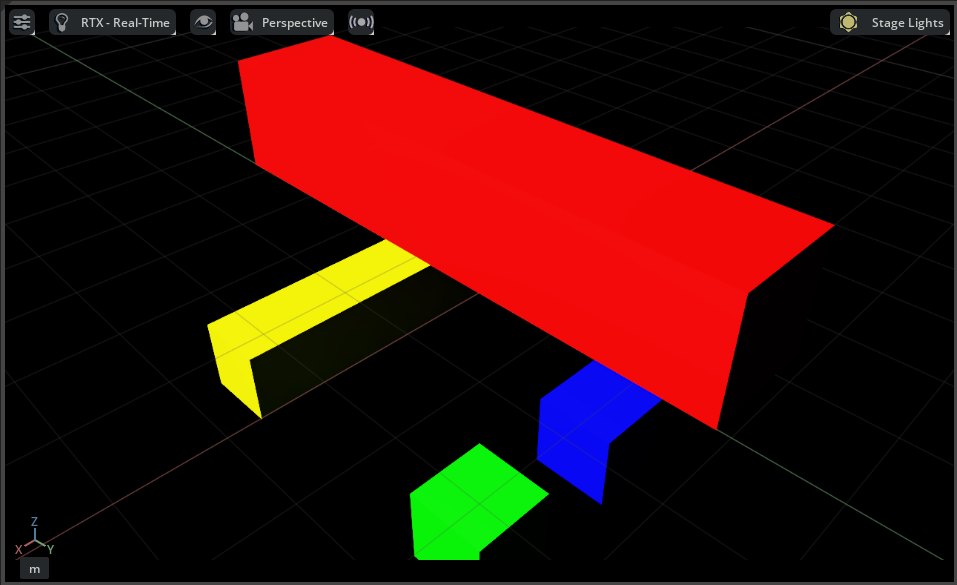
Observe each cube is colored differently in the visual spectrum. Select the Non-Visual Material ID Debug View in the viewport by selecting RTX - Real-Time > Debug View > Non-Visual Material ID. The following image
shows the menu selection:

After selecting the Debug View, verify that you receive the following:

The Non-Visual Material ID Debug View shows the material ID for each non-visual material as a color, which can be used to identify the material in the scene.
Observe each cube’s color changes compared to the default view to reflect the material ID, which is computed from the combination of non-visual material attributes applied to the visual material
applied to the cube.
Note
If you modify non-visual material attributes on a material prim, you must save and reload the stage for the changes to take effect.
Mapping Visual Materials to RTX Sensor Non-Visual Materials (Removed)#
Deprecated since version 5.1: Mapping visual materials to RTX Sensor non-visual materials via a CSV specification (the
RtxSensorMaterialMap.csv workflow paired with the rtx.materialDb.rtSensorNameToIdMap
and rtx.materialDb.rtSensorMaterialLogs carb settings) is no longer supported — those
settings and the CSV file are now ignored. Specify non-visual materials via USD attributes
instead — see Specifying Non-Visual Material Attributes above.