


Tutorial 1: Setup#
This tutorial runs in NVIDIA Isaac Sim with the Inspire Hand USD asset. Complete the following setup before starting the tutorials in this series.
Learning Objectives#
In this tutorial, you will:
Understand the hardware and software requirements for the OpenUSD and Tuning Best Practices series.
Download the course USD files from Content to a local directory
/path/to/Inspire/.Open the starting Inspire Hand scene in Isaac Sim.
Prerequisites#
Basic familiarity with USD and Isaac Sim (stage, prims, layers).
Understanding of rigid-body physics (mass, inertia, joints) is helpful but not required.
Get the Course USD Files#
In the file paths used in this tutorial series, replace /path/to with the directory that contains your copied Inspire folder.
In the Content browser, go to
IsaacSim/Samples/Rigging/Inspire/.In the Content browser, right-click on the
Inspirefolder and select “Download” to save it to your local machine. Place the downloaded folder so that its path is/path/to/Inspire/, replacing/path/towith your chosen directory.
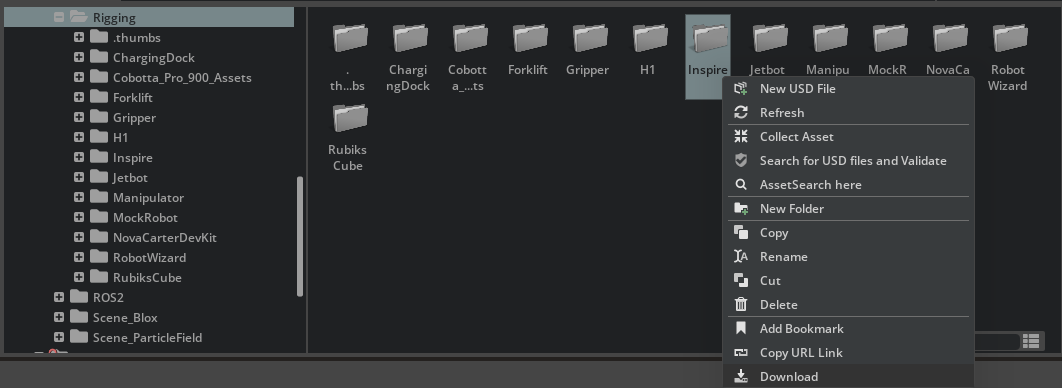
In the Content browser, right-click the Inspire folder and select “Download” to save the course files locally.#
Within /path/to/Inspire/, the course files are organized into multiple checkpoint folders:
/path/to/Inspire/module_1_start— Initial Inspire Hand USDinspire_hand.usda./path/to/Inspire/module_3_end-checkpoint_1— Checkpoint with collision filters configured./path/to/Inspire/module_4_end-checkpoint_2— Checkpoint with mimic joints, joint drive maximums, and tuned gains for the finger joints configured./path/to/Inspire/module_5_end-checkpoint_3— Checkpoint with all finger and thumb joint gains tuned and authored.
Open the Starting Scene#
Open
/path/to/Inspire/module_1_start/inspire_hand.usdain Isaac Sim.Select the
inspire_handprim.
Summary#
This tutorial covered:
Where the samples live in Content and how to copy them so the course root is
/path/to/Inspire/.How the checkpoint folders are laid out under
/path/to/Inspire/.How to open the starting Inspire Hand scene in Isaac Sim.
Next Steps#
Continue to Tutorial 2: Asset Structure to learn the USD Asset Structure 3.0 layout for the Inspire Hand.