

生成多个资产#
典型的生成配置(见 生成基本物体到场景中 教程)会将同一个资产复制到表达式解析出的所有 prim 路径。多资产工作流满足两种相关的组合需求:
刚性物体集合将每个环境中的多个刚性物体批量组织起来,通过统一的数据和命令 API 访问。
多资产生成器为一个场景资产绑定声明多个变体,使不同环境可包含不同几何体或机器人变体。
本指南演示这两种机制,并解释它们在 PhysX 和 Newton 中的执行差异。
打包提供的 multi-asset 示例包含参考脚本 multi_asset.py 。
multi_asset.py 的代码
  1# Copyright (c) 2022-2026, The Isaac Lab Project Developers (https://github.com/isaac-sim/IsaacLab/blob/main/CONTRIBUTORS.md).
  2# All rights reserved.
  3#
  4# SPDX-License-Identifier: BSD-3-Clause
  5
  6"""Spawn several asset types across cloned environments.
  7
  8.. code-block:: bash
  9
 10    uvx isaaclab example multi-asset --num_envs 1024
 11"""
 12
 13from __future__ import annotations
 14
 15import argparse
 16from typing import TYPE_CHECKING
 17
 18from isaaclab.app import add_launcher_args, launch_simulation
 19
 20parser = argparse.ArgumentParser(
 21    description="Example of spawning different objects in multiple environments.",
 22    conflict_handler="resolve",
 23)
 24parser.add_argument("--num_envs", type=int, default=512, help="Number of environments to spawn.")
 25parser.add_argument(
 26    "--physics", default="newton_mjwarp", choices=["isaacsim_physx", "newton_mjwarp"], help="Physics backend."
 27)
 28parser.add_argument("--max_steps", type=int, default=-1, help="Stop after this many steps; negative runs forever.")
 29add_launcher_args(parser)
 30parser.set_defaults(visualizer=["newton_gl"])
 31args_cli = parser.parse_args()
 32if args_cli.max_steps == 0 or args_cli.max_steps < -1:
 33    parser.error("--max_steps must be positive or -1.")
 34
 35from isaaclab_newton.sim.schemas import NewtonArticulationCfg
 36from isaaclab_physx.sim.schemas import PhysxArticulationCfg, PhysxRigidBodyCfg
 37
 38import isaaclab.sim as sim_utils
 39from isaaclab.assets import ArticulationCfg, AssetBaseCfg, RigidObjectCfg, RigidObjectCollectionCfg
 40from isaaclab.scene import InteractiveSceneCfg
 41
 42from isaaclab_assets.robots.anymal import ANYDRIVE_3_LSTM_ACTUATOR_CFG  # isort: skip
 43
 44from isaaclab.utils import Timer, configclass, instantiate
 45from isaaclab.utils.assets import ISAACLAB_NUCLEUS_DIR
 46
 47if TYPE_CHECKING:
 48    from isaaclab.assets import Articulation, RigidObject, RigidObjectCollection
 49    from isaaclab.scene import InteractiveScene
 50
 51
 52# Visual material presets for the multi-asset variants.
 53GREEN_MATERIAL = {"visual_material": sim_utils.PreviewSurfaceCfg(diffuse_color=(0.0, 1.0, 0.0), metallic=0.2)}
 54RED_MATERIAL = {"visual_material": sim_utils.PreviewSurfaceCfg(diffuse_color=(1.0, 0.0, 0.0), metallic=0.2)}
 55BLUE_MATERIAL = {"visual_material": sim_utils.PreviewSurfaceCfg(diffuse_color=(0.0, 0.0, 1.0), metallic=0.2)}
 56GOLD_MATERIAL = {"visual_material": sim_utils.PreviewSurfaceCfg(diffuse_color=(1.0, 0.75, 0.0), metallic=0.2)}
 57PURPLE_MATERIAL = {"visual_material": sim_utils.PreviewSurfaceCfg(diffuse_color=(0.5, 0.0, 1.0), metallic=0.2)}
 58OBJECT_PHYSICS = {
 59    "rigid_props": PhysxRigidBodyCfg(solver_position_iteration_count=4, solver_velocity_iteration_count=0),
 60    "mass_props": sim_utils.MassCfg(mass=1.0),
 61    "collision_props": sim_utils.UsdPhysicsCollisionCfg(),
 62}
 63
 64##
 65# Scene Configuration
 66##
 67
 68
 69@configclass
 70class MultiObjectSceneCfg(InteractiveSceneCfg):
 71    """Configuration for a multi-object scene."""
 72
 73    # ground plane
 74    ground = AssetBaseCfg(prim_path="/World/defaultGroundPlane", spawn=sim_utils.GroundPlaneCfg())
 75
 76    # lights
 77    dome_light = AssetBaseCfg(
 78        prim_path="/World/Light", spawn=sim_utils.DomeLightCfg(intensity=3000.0, color=(0.75, 0.75, 0.75))
 79    )
 80
 81    # rigid object
 82    object: RigidObjectCfg = RigidObjectCfg(
 83        prim_path="/World/envs/env_.*/Object",
 84        spawn=sim_utils.MultiAssetSpawnerCfg(
 85            assets_cfg=[
 86                sim_utils.CylinderCfg(radius=0.3, height=0.6, **GREEN_MATERIAL),
 87                sim_utils.CuboidCfg(size=(0.3, 0.3, 0.3), **RED_MATERIAL),
 88                sim_utils.SphereCfg(radius=0.3, **BLUE_MATERIAL),
 89                sim_utils.CylinderCfg(radius=0.3, height=0.6, **GOLD_MATERIAL),
 90                sim_utils.CuboidCfg(size=(0.3, 0.3, 0.3), **GOLD_MATERIAL),
 91                sim_utils.SphereCfg(radius=0.3, **GOLD_MATERIAL),
 92                sim_utils.CylinderCfg(radius=0.3, height=0.6, **PURPLE_MATERIAL),
 93                sim_utils.CuboidCfg(size=(0.3, 0.3, 0.3), **PURPLE_MATERIAL),
 94                sim_utils.SphereCfg(radius=0.3, **PURPLE_MATERIAL),
 95            ],
 96            random_choice=False,
 97            **OBJECT_PHYSICS,
 98        ),
 99        init_state=RigidObjectCfg.InitialStateCfg(pos=(0.0, 0.0, 2.0)),
100    )
101
102    # object collection
103    object_collection: RigidObjectCollectionCfg = RigidObjectCollectionCfg(
104        rigid_objects={
105            "object_A": RigidObjectCfg(
106                prim_path="/World/envs/env_.*/Object_A",
107                spawn=sim_utils.SphereCfg(radius=0.1, **RED_MATERIAL, **OBJECT_PHYSICS),
108                init_state=RigidObjectCfg.InitialStateCfg(pos=(0.0, -0.5, 2.0)),
109            ),
110            "object_B": RigidObjectCfg(
111                prim_path="/World/envs/env_.*/Object_B",
112                spawn=sim_utils.CuboidCfg(size=(0.1, 0.1, 0.1), **RED_MATERIAL, **OBJECT_PHYSICS),
113                init_state=RigidObjectCfg.InitialStateCfg(pos=(0.0, 0.5, 2.0)),
114            ),
115            "object_C": RigidObjectCfg(
116                prim_path="/World/envs/env_.*/Object_C",
117                spawn=sim_utils.CylinderCfg(radius=0.1, height=0.3, **RED_MATERIAL, **OBJECT_PHYSICS),
118                init_state=RigidObjectCfg.InitialStateCfg(pos=(0.5, 0.0, 2.0)),
119            ),
120        }
121    )
122
123    # articulation
124    robot: ArticulationCfg = ArticulationCfg(
125        prim_path="/World/envs/env_.*/Robot",
126        spawn=sim_utils.MultiUsdFileCfg(
127            usd_path=[
128                f"{ISAACLAB_NUCLEUS_DIR}/Robots/ANYbotics/ANYmal-C/anymal_c.usd",
129                f"{ISAACLAB_NUCLEUS_DIR}/Robots/ANYbotics/ANYmal-D/anymal_d.usd",
130            ],
131            random_choice=False,
132            rigid_props=PhysxRigidBodyCfg(
133                disable_gravity=False,
134                retain_accelerations=False,
135                linear_damping=0.0,
136                angular_damping=0.0,
137                max_linear_velocity=1000.0,
138                max_angular_velocity=1000.0,
139                max_depenetration_velocity=1.0,
140            ),
141            articulation_props=[
142                PhysxArticulationCfg(
143                    enabled_self_collisions=True, solver_position_iteration_count=4, solver_velocity_iteration_count=0
144                ),
145                NewtonArticulationCfg(self_collision_enabled=True),
146            ],
147            activate_contact_sensors=True,
148        ),
149        init_state=ArticulationCfg.InitialStateCfg(
150            pos=(0.0, 0.0, 0.6),
151            joint_pos={
152                ".*HAA": 0.0,  # all HAA
153                ".*F_HFE": 0.4,  # both front HFE
154                ".*H_HFE": -0.4,  # both hind HFE
155                ".*F_KFE": -0.8,  # both front KFE
156                ".*H_KFE": 0.8,  # both hind KFE
157            },
158        ),
159        actuators={"legs": ANYDRIVE_3_LSTM_ACTUATOR_CFG},
160    )
161
162
163##
164# Simulation Loop
165##
166
167
168def run_simulator(sim: sim_utils.SimulationContext, scene: InteractiveScene):
169    """Runs the simulation loop."""
170    # Extract scene entities
171    # note: we only do this here for readability.
172    rigid_object: RigidObject = scene["object"]
173    rigid_object_collection: RigidObjectCollection = scene["object_collection"]
174    robot: Articulation = scene["robot"]
175    # Define simulation stepping
176    sim_dt = sim.get_physics_dt()
177    count = 0
178    step_count = 0
179    # Step while a visualizer window is still open (or none exist, e.g. headless); works for kit and newton.
180    while sim.is_running() and (args_cli.max_steps < 0 or step_count < args_cli.max_steps):
181        # Reset
182        if count % 250 == 0:
183            # reset counter
184            count = 0
185            # reset the scene entities
186            # object
187            root_pose = rigid_object.data.default_root_pose.torch.clone()
188            root_pose[:, :3] += scene.env_origins
189            rigid_object.write_root_pose_to_sim_index(root_pose=root_pose)
190            root_vel = rigid_object.data.default_root_vel.torch.clone()
191            rigid_object.write_root_velocity_to_sim_index(root_velocity=root_vel)
192            # object collection
193            default_pose_w = rigid_object_collection.data.default_body_pose.torch.clone()
194            default_pose_w[..., :3] += scene.env_origins.unsqueeze(1)
195            rigid_object_collection.write_body_pose_to_sim_index(body_poses=default_pose_w)
196            default_vel_w = rigid_object_collection.data.default_body_vel.torch.clone()
197            rigid_object_collection.write_body_com_velocity_to_sim_index(body_velocities=default_vel_w)
198            # robot
199            # -- root state
200            root_pose = robot.data.default_root_pose.torch.clone()
201            root_pose[:, :3] += scene.env_origins
202            robot.write_root_pose_to_sim_index(root_pose=root_pose)
203            root_vel = robot.data.default_root_vel.torch
204            robot.write_root_velocity_to_sim_index(root_velocity=root_vel)
205            # -- joint state
206            joint_pos = robot.data.default_joint_pos.torch
207            joint_vel = robot.data.default_joint_vel.torch
208            robot.write_joint_position_to_sim_index(position=joint_pos)
209            robot.write_joint_velocity_to_sim_index(velocity=joint_vel)
210            # clear internal buffers
211            scene.reset()
212            print("[INFO]: Resetting scene state...")
213
214        # Apply action to robot
215        robot.set_joint_position_target_index(target=robot.data.default_joint_pos.torch)
216        # Write data to sim
217        scene.write_data_to_sim()
218        # Perform step
219        sim.step()
220        step_count += 1
221        # Increment counter
222        count += 1
223        # Update buffers
224        scene.update(sim_dt)
225
226
227def main():
228    """Main function."""
229    sim_cfg = sim_utils.SimulationCfg(dt=0.005, device=args_cli.device)
230    with launch_simulation(sim_cfg, args_cli):
231        sim = sim_utils.SimulationContext(sim_cfg)
232        # Set main camera
233        sim.set_camera_view([2.5, 0.0, 4.0], [0.0, 0.0, 2.0])
234
235        # Design scene
236        scene_cfg = MultiObjectSceneCfg(num_envs=args_cli.num_envs, env_spacing=2.0)
237        if args_cli.physics == "newton_mjwarp":
238            # Newton views currently require a uniform body layout across worlds.
239            scene_cfg.object.spawn.assets_cfg = scene_cfg.object.spawn.assets_cfg[1:2]
240            scene_cfg.robot.spawn.usd_path = scene_cfg.robot.spawn.usd_path[0]
241        with Timer("[INFO] Time to create scene: "):
242            scene = instantiate(scene_cfg)
243
244        sim.reset()
245        print("[INFO]: Setup complete...")
246        run_simulator(sim, scene)
247
248
249if __name__ == "__main__":
250    main()
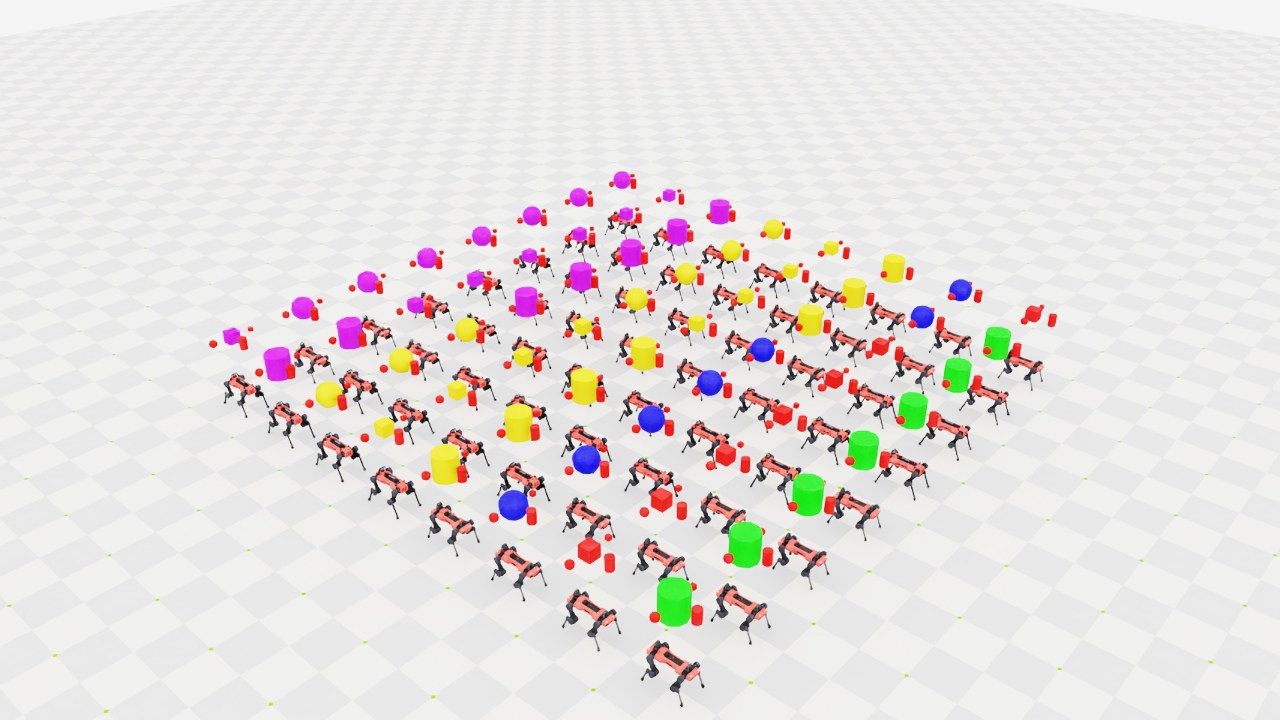
使用默认 Newton 配置时,此脚本会创建多个环境,其中包含:
由球体、立方体和圆柱体组成的刚性物体集合
由克隆计划从九种几何和材料变体中选择的刚性物体
由克隆计划从 ANYmal-C 和 ANYmal-D 变体中选择的关节体
刚性物体集合#
如果每个环境都包含同一组独立运动的刚体,且希望以一个批次访问它们,可使用刚性物体集合。集合以 (env, object, ...) 布局提供数据,并接受 (env_ids, obj_ids) 选择来执行命令。与分别管理各物体相比,集合只使用一个批量物理视图。
object_collection: RigidObjectCollectionCfg = RigidObjectCollectionCfg(
    rigid_objects={
        "object_A": RigidObjectCfg(
            prim_path="/World/envs/env_.*/Object_A",
            spawn=sim_utils.SphereCfg(radius=0.1, **RED_MATERIAL, **OBJECT_PHYSICS),
            init_state=RigidObjectCfg.InitialStateCfg(pos=(0.0, -0.5, 2.0)),
        ),
        "object_B": RigidObjectCfg(
            prim_path="/World/envs/env_.*/Object_B",
            spawn=sim_utils.CuboidCfg(size=(0.1, 0.1, 0.1), **RED_MATERIAL, **OBJECT_PHYSICS),
            init_state=RigidObjectCfg.InitialStateCfg(pos=(0.0, 0.5, 2.0)),
        ),
        "object_C": RigidObjectCfg(
            prim_path="/World/envs/env_.*/Object_C",
            spawn=sim_utils.CylinderCfg(radius=0.1, height=0.3, **RED_MATERIAL, **OBJECT_PHYSICS),
            init_state=RigidObjectCfg.InitialStateCfg(pos=(0.5, 0.0, 2.0)),
        ),
    }
)
RigidObjectCollectionCfg 配置持有一个由 RigidObjectCfg 实例组成的字典。每个字典键都是对应物体在集合中的稳定标识。
本例通过两个物理后端共用的 API 重置集合中的所有成员:
default_pose_w = rigid_object_collection.data.default_body_pose.torch.clone()
default_pose_w[..., :3] += scene.env_origins.unsqueeze(1)
rigid_object_collection.write_body_pose_to_sim_index(body_poses=default_pose_w)
default_vel_w = rigid_object_collection.data.default_body_vel.torch.clone()
rigid_object_collection.write_body_com_velocity_to_sim_index(body_velocities=default_vel_w)
为一个场景资产生成不同变体#
使用 MultiAssetSpawnerCfg 和 MultiUsdFileCfg ,为一个场景资产绑定声明可用变体。 InteractiveScene 将这些变体纳入克隆计划,并为每个环境分配一个有效的原型组合。
对于通过配置构建的资产,将 MultiAssetSpawnerCfg 赋给 RigidObjectCfg 的生成配置:
object: RigidObjectCfg = RigidObjectCfg(
    prim_path="/World/envs/env_.*/Object",
    spawn=sim_utils.MultiAssetSpawnerCfg(
        assets_cfg=[
            sim_utils.CylinderCfg(radius=0.3, height=0.6, **GREEN_MATERIAL),
            sim_utils.CuboidCfg(size=(0.3, 0.3, 0.3), **RED_MATERIAL),
            sim_utils.SphereCfg(radius=0.3, **BLUE_MATERIAL),
            sim_utils.CylinderCfg(radius=0.3, height=0.6, **GOLD_MATERIAL),
            sim_utils.CuboidCfg(size=(0.3, 0.3, 0.3), **GOLD_MATERIAL),
            sim_utils.SphereCfg(radius=0.3, **GOLD_MATERIAL),
            sim_utils.CylinderCfg(radius=0.3, height=0.6, **PURPLE_MATERIAL),
            sim_utils.CuboidCfg(size=(0.3, 0.3, 0.3), **PURPLE_MATERIAL),
            sim_utils.SphereCfg(radius=0.3, **PURPLE_MATERIAL),
        ],
        random_choice=False,
        **OBJECT_PHYSICS,
    ),
    init_state=RigidObjectCfg.InitialStateCfg(pos=(0.0, 0.0, 2.0)),
)
assets_cfg 列表定义克隆计划可用的原型。变体分配由 clone_strategy 控制;默认的 sequential() 策略按轮转顺序分配组合。如果希望随机采样组合,应在构建场景前设置策略:
from isaaclab import cloner

scene_cfg.clone_cfg.clone_strategy = cloner.random
对于 USD 资产,将 MultiUsdFileCfg 赋给 ArticulationCfg 的生成配置:
robot: ArticulationCfg = ArticulationCfg(
    prim_path="/World/envs/env_.*/Robot",
    spawn=sim_utils.MultiUsdFileCfg(
        usd_path=[
            f"{ISAACLAB_NUCLEUS_DIR}/Robots/ANYbotics/ANYmal-C/anymal_c.usd",
            f"{ISAACLAB_NUCLEUS_DIR}/Robots/ANYbotics/ANYmal-D/anymal_d.usd",
        ],
        random_choice=False,
        rigid_props=PhysxRigidBodyCfg(
            disable_gravity=False,
            retain_accelerations=False,
            linear_damping=0.0,
            angular_damping=0.0,
            max_linear_velocity=1000.0,
            max_angular_velocity=1000.0,
            max_depenetration_velocity=1.0,
        ),
        articulation_props=[
            PhysxArticulationCfg(
                enabled_self_collisions=True, solver_position_iteration_count=4, solver_velocity_iteration_count=0
            ),
            NewtonArticulationCfg(self_collision_enabled=True),
        ],
        activate_contact_sensors=True,
    ),
    init_state=ArticulationCfg.InitialStateCfg(
        pos=(0.0, 0.0, 0.6),
        joint_pos={
            ".*HAA": 0.0,  # all HAA
            ".*F_HFE": 0.4,  # both front HFE
            ".*H_HFE": -0.4,  # both hind HFE
            ".*F_KFE": -0.8,  # both front KFE
            ".*H_KFE": 0.8,  # both hind KFE
        },
    ),
    actuators={"legs": ANYDRIVE_3_LSTM_ACTUATOR_CFG},
)
变体兼容性#
同一批量资产接口下的所有变体必须结构兼容。关节体变体必须具有相同的连杆、关节、碰撞刚体数量及名称。刚性物体变体可以有不同的几何和材料,但必须保留兼容的刚体布局。结构不同的资产应建模为独立的场景绑定。
克隆规划与物理复制#
InteractiveScene 将多资产变体表示为克隆计划中的原型,并仅向各原型所分配的环境分发。物理资产使用其声明的克隆上下文,默认采用原生物理复制。不同环境的舞台差异应声明为 clone_combinations 原型。
本例依赖物理复制。对于 Newton,独立物体与关节系统还各限制为单个变体,因为其批量 Newton 视图目前要求各世界具有统一的刚体布局:
scene_cfg = MultiObjectSceneCfg(num_envs=args_cli.num_envs, env_spacing=2.0)
if args_cli.physics == "newton_mjwarp":
    # Newton views currently require a uniform body layout across worlds.
    scene_cfg.object.spawn.assets_cfg = scene_cfg.object.spawn.assets_cfg[1:2]
    scene_cfg.robot.spawn.usd_path = scene_cfg.robot.spawn.usd_path[0]
原型分配与复制的更多细节见 克隆环境 。
运行示例#
物理后端与可视化器分别选择。从仓库根目录运行以下任一命令:
uv run --extra isaacsim isaaclab example multi-asset \
    --physics isaacsim_physx --visualizer kit --num_envs 2048
uv run --extra isaacsim isaaclab example multi-asset \
    --physics newton_mjwarp --visualizer kit --num_envs 2048
uv run isaaclab example multi-asset \
    --physics newton_mjwarp --visualizer newton_gl --num_envs 2048
Newton 命令与 PhysX 命令使用相同的 RigidObjectCollectionCfg 和 (env_ids, obj_ids) API。由于上述统一布局限制,它们不展示逐环境的物体或关节系统变体;这部分请使用 PhysX 命令查看。运行不依赖 Kit 的命令前,请阅读 安装指南。
关闭窗口或在终端按 Ctrl+C ,即可停止仿真。