

与表面夹爪互动#
本教程展示如何在仿真中与末端执行器上安装表面夹持器的关节式机器人交互。它延续 与关节交互 教程中介绍的关节式机器人交互方法。在配合 Isaac Sim 6.x 的 Isaac Lab 3.0 中,表面夹持器只支持 CPU 仿真。请使用 --device cpu 运行本教程。
代码#
该教程对应于 scripts/tutorials/01_assets 目录中的 run_surface_gripper.py 脚本。
run_surface_gripper.py 的代码
  1# Copyright (c) 2022-2026, The Isaac Lab Project Developers (https://github.com/isaac-sim/IsaacLab/blob/main/CONTRIBUTORS.md).
  2# All rights reserved.
  3#
  4# SPDX-License-Identifier: BSD-3-Clause
  5
  6"""This script demonstrates how to spawn a pick-and-place robot equipped with a surface gripper and interact with it.
  7
  8.. code-block:: bash
  9
 10    # Usage
 11    uv run python scripts/tutorials/01_assets/run_surface_gripper.py --device=cpu
 12
 13When running this script make sure the --device flag is set to cpu. This is because the surface gripper is
 14currently only supported on the CPU.
 15"""
 16
 17"""Parse the command-line arguments first."""
 18
 19import argparse
 20
 21from isaaclab.app import add_launcher_args, launch_simulation
 22from isaaclab.utils import clone
 23
 24# add argparse arguments
 25parser = argparse.ArgumentParser(description="Tutorial on spawning and interacting with a Surface Gripper.")
 26# append simulation launcher cli args
 27add_launcher_args(parser)
 28# tutorials should open Kit visualizer by default
 29parser.set_defaults(visualizer=["kit"])
 30# parse the arguments
 31args_cli = parser.parse_args()
 32
 33"""Rest everything follows."""
 34
 35import torch
 36import warp as wp
 37from isaaclab_physx.assets import SurfaceGripper, SurfaceGripperCfg
 38
 39import isaaclab.sim as sim_utils
 40from isaaclab.assets import Articulation
 41from isaaclab.sim import SimulationContext
 42
 43##
 44# Pre-defined configs
 45##
 46from isaaclab_assets import PICK_AND_PLACE_CFG  # isort:skip
 47
 48
 49def design_scene():
 50    """Designs the scene."""
 51    # Ground-plane
 52    cfg = sim_utils.GroundPlaneCfg()
 53    cfg.func("/World/defaultGroundPlane", cfg)
 54    # Lights
 55    cfg = sim_utils.DomeLightCfg(intensity=3000.0, color=(0.75, 0.75, 0.75))
 56    cfg.func("/World/Light", cfg)
 57
 58    # Create separate groups called "Origin1", "Origin2"
 59    # Each group will have a robot in it
 60    origins = [[2.75, 0.0, 0.0], [-2.75, 0.0, 0.0]]
 61    # Origin 1
 62    sim_utils.create_prim("/World/Origin1", "Xform", translation=origins[0])
 63    # Origin 2
 64    sim_utils.create_prim("/World/Origin2", "Xform", translation=origins[1])
 65
 66    # Articulation: First we define the robot config
 67    pick_and_place_robot_cfg = clone(PICK_AND_PLACE_CFG)
 68    pick_and_place_robot_cfg.prim_path = "/World/Origin.*/Robot"
 69    pick_and_place_robot = Articulation(cfg=pick_and_place_robot_cfg)
 70
 71    # Surface Gripper: Next we define the surface gripper config
 72    surface_gripper_cfg = SurfaceGripperCfg()
 73    # We need to tell the View which prim to use for the surface gripper
 74    surface_gripper_cfg.prim_path = "/World/Origin.*/Robot/picker_head/SurfaceGripper"
 75    # We can then set different parameters for the surface gripper, note that if these parameters are not set,
 76    # the View will try to read them from the prim.
 77    surface_gripper_cfg.max_grip_distance = 0.1  # [m] (Maximum distance at which the gripper can grasp an object)
 78    surface_gripper_cfg.shear_force_limit = 500.0  # [N] (Force limit in the direction perpendicular direction)
 79    surface_gripper_cfg.coaxial_force_limit = 500.0  # [N] (Force limit in the direction of the gripper's axis)
 80    surface_gripper_cfg.retry_interval = 0.1  # seconds (Time the gripper will stay in a grasping state)
 81    # We can now spawn the surface gripper
 82    surface_gripper = SurfaceGripper(cfg=surface_gripper_cfg)
 83
 84    # return the scene information
 85    scene_entities = {"pick_and_place_robot": pick_and_place_robot, "surface_gripper": surface_gripper}
 86    return scene_entities, origins
 87
 88
 89def run_simulator(
 90    sim: sim_utils.SimulationContext, entities: dict[str, Articulation | SurfaceGripper], origins: torch.Tensor
 91):
 92    """Runs the simulation loop."""
 93    # Extract scene entities
 94    robot: Articulation = entities["pick_and_place_robot"]
 95    surface_gripper: SurfaceGripper = entities["surface_gripper"]
 96
 97    # Define simulation stepping
 98    sim_dt = sim.get_physics_dt()
 99    count = 0
100    # Simulation loop
101    while sim.is_running():
102        # Reset
103        if count % 500 == 0:
104            # reset counter
105            count = 0
106            # reset the scene entities
107            # root state
108            # we offset the root state by the origin since the states are written in simulation world frame
109            # if this is not done, then the robots will be spawned at the (0, 0, 0) of the simulation world
110            root_pose = robot.data.default_root_pose.torch.clone()
111            root_pose[:, :3] += origins
112            robot.write_root_pose_to_sim_index(root_pose=root_pose)
113            root_vel = robot.data.default_root_vel.torch.clone()
114            robot.write_root_velocity_to_sim_index(root_velocity=root_vel)
115            # set joint positions with some noise
116            joint_pos, joint_vel = (
117                robot.data.default_joint_pos.torch.clone(),
118                robot.data.default_joint_vel.torch.clone(),
119            )
120            joint_pos += torch.rand_like(joint_pos) * 0.1
121            robot.write_joint_position_to_sim_index(position=joint_pos)
122            robot.write_joint_velocity_to_sim_index(velocity=joint_vel)
123            # clear internal buffers
124            robot.reset()
125            print("[INFO]: Resetting robot state...")
126            # Opens the gripper and makes sure the gripper is in the open state
127            surface_gripper.reset()
128            print("[INFO]: Resetting gripper state...")
129
130        # Sample a random command between -1 and 1.
131        gripper_commands = torch.rand(surface_gripper.num_instances) * 2.0 - 1.0
132        # The gripper behavior is as follows:
133        # -1 < command < -0.3 --> Gripper is Opening
134        # -0.3 < command < 0.3 --> Gripper is Idle
135        # 0.3 < command < 1 --> Gripper is Closing
136        print(f"[INFO]: Gripper commands: {gripper_commands}")
137        mapped_commands = [
138            "Opening" if command < -0.3 else "Closing" if command > 0.3 else "Idle" for command in gripper_commands
139        ]
140        print(f"[INFO]: Mapped commands: {mapped_commands}")
141        # Set the gripper command
142        surface_gripper.set_grippers_command(gripper_commands)
143        # Write data to sim
144        surface_gripper.write_data_to_sim()
145        # Perform step
146        sim.step()
147        # Increment counter
148        count += 1
149        # Read the gripper state from the simulation
150        surface_gripper.update(sim_dt)
151        # Read the gripper state from the buffer
152        surface_gripper_state = surface_gripper.state
153        # The gripper state is a list of integers that can be mapped to the following:
154        # -1 --> Open
155        # 0 --> Closing
156        # 1 --> Closed
157        # Print the gripper state
158        print(f"[INFO]: Gripper state: {surface_gripper_state}")
159        mapped_commands = [
160            "Open" if state == -1 else "Closing" if state == 0 else "Closed"
161            for state in wp.to_torch(surface_gripper_state).tolist()
162        ]
163        print(f"[INFO]: Mapped commands: {mapped_commands}")
164
165
166def main():
167    """Main function."""
168    # Configure the simulation
169    sim_cfg = sim_utils.SimulationCfg(device=args_cli.device)
170    # Launch the simulator runtime that the configuration needs
171    with launch_simulation(sim_cfg, args_cli):
172        # Initialize the simulation context
173        sim = SimulationContext(sim_cfg)
174        # Set main camera
175        sim.set_camera_view([2.75, 7.5, 10.0], [2.75, 0.0, 0.0])
176        # Design scene
177        scene_entities, scene_origins = design_scene()
178        scene_origins = torch.tensor(scene_origins, device=sim.device)
179        # Play the simulator
180        sim.reset()
181        # Now we are ready!
182        print("[INFO]: Setup complete...")
183        # Run the simulator
184        run_simulator(sim, scene_entities, scene_origins)
185
186
187if __name__ == "__main__":
188    # run the main function
189    main()
代码解释#
设计场景#
类似于上一个教程,我们在场景中添加了地面平面和一个远处的光源。然后,我们从其 USD 文件中生成一个关节。这次生成了一个拾取-放置机器人。拾取-放置机器人是一个简单的机器人,有 3 个受驱动的轴,其龙门使其可以沿 x 和 y 轴移动,以及沿 z 轴上下移动。此外,机器人末端执行器配备了一个表面夹爪。拾取放置机器人的 USD 文件包含了机器人的几何形状、关节和其他物理属性以及表面夹爪。在自己的机器人上实现类似的夹爪之前,我们建议查看 Isaaclab 的 Nucleus 上找到的夹爪的 USD 文件。
对于抓取和放置机器人,我们使用它的预定义配置对象,在 机器人与关节体配置 教程中可以找到更多信息。对于表面夹爪,我们还需要创建一个配置对象。这可以通过实例化一个 assets.SurfaceGripperCfg 对象并传递相关参数来实现。
可用的参数包括:
max_grip_distance: 夹爪能够抓取物体的最大距离。shear_force_limit: 夹爪能在与夹爪轴线垂直的方向上施加的最大力。coaxial_force_limit: 夹爪沿夹爪轴的方向可以施加的最大力。retry_interval: 夹爪将保持在抓取状态的时间。
如前面的教程中所见,我们可以通过创建一个 assets.Articulation 类的实例,并将配置对象传递给其构造函数,以类似的方式将关节添加到场景中。同样的原则也适用于表面夹爪。通过将配置对象传递给 assets.SurfaceGripper 构造函数,就可以创建表面夹爪并将其添加到场景中。实际上,当按下播放按钮时,对象将只被初始化。
    # Create separate groups called "Origin1", "Origin2"
    # Each group will have a robot in it
    origins = [[2.75, 0.0, 0.0], [-2.75, 0.0, 0.0]]
    # Origin 1
    sim_utils.create_prim("/World/Origin1", "Xform", translation=origins[0])
    # Origin 2
    sim_utils.create_prim("/World/Origin2", "Xform", translation=origins[1])

    # Articulation: First we define the robot config
    pick_and_place_robot_cfg = clone(PICK_AND_PLACE_CFG)
    pick_and_place_robot_cfg.prim_path = "/World/Origin.*/Robot"
    pick_and_place_robot = Articulation(cfg=pick_and_place_robot_cfg)

    # Surface Gripper: Next we define the surface gripper config
    surface_gripper_cfg = SurfaceGripperCfg()
    # We need to tell the View which prim to use for the surface gripper
    surface_gripper_cfg.prim_path = "/World/Origin.*/Robot/picker_head/SurfaceGripper"
    # We can then set different parameters for the surface gripper, note that if these parameters are not set,
    # the View will try to read them from the prim.
    surface_gripper_cfg.max_grip_distance = 0.1  # [m] (Maximum distance at which the gripper can grasp an object)
    surface_gripper_cfg.shear_force_limit = 500.0  # [N] (Force limit in the direction perpendicular direction)
    surface_gripper_cfg.coaxial_force_limit = 500.0  # [N] (Force limit in the direction of the gripper's axis)
    surface_gripper_cfg.retry_interval = 0.1  # seconds (Time the gripper will stay in a grasping state)
    # We can now spawn the surface gripper
    surface_gripper = SurfaceGripper(cfg=surface_gripper_cfg)
运行仿真循环#
继续从前一教程开始,我们定期重置仿真,为关节设置指令,执行仿真步骤,并更新关节的内部缓冲区。
重置仿真#
重置表面夹爪时,只需调用 SurfaceGripper.reset() ,即可重置内部缓冲区和缓存。
            # Opens the gripper and makes sure the gripper is in the open state
            surface_gripper.reset()
推进仿真#
将命令应用到表面夹爪涉及两个步骤:
设置所需命令: 这将设置所需的夹爪命令(打开、关闭或空闲)。
将数据写入仿真: 基于表面夹爪的配置,此步骤将转换后的值写入 PhysX 缓冲区。
在本教程中,我们使用一个随机命令来设置夹爪的指令。夹爪的行为如下:
-1 < command < -0.3 --> 夹爪打开中
-0.3 < command < 0.3` --> 夹爪空闲中
0.3 < command < 1 --> 夹爪关闭中
在每一步中,我们通过调用 SurfaceGripper.set_grippers_command() 方法随机采样命令并将其设置到夹爪中。设置完命令后,我们调用 SurfaceGripper.write_data_to_sim() 方法将数据写入到 PhysX 缓冲区中。最后,我们进行仿真步进。
        # Sample a random command between -1 and 1.
        gripper_commands = torch.rand(surface_gripper.num_instances) * 2.0 - 1.0
        # The gripper behavior is as follows:
        # -1 < command < -0.3 --> Gripper is Opening
        # -0.3 < command < 0.3 --> Gripper is Idle
        # 0.3 < command < 1 --> Gripper is Closing
        print(f"[INFO]: Gripper commands: {gripper_commands}")
        mapped_commands = [
            "Opening" if command < -0.3 else "Closing" if command > 0.3 else "Idle" for command in gripper_commands
        ]
        print(f"[INFO]: Mapped commands: {mapped_commands}")
        # Set the gripper command
        surface_gripper.set_grippers_command(gripper_commands)
        # Write data to sim
        surface_gripper.write_data_to_sim()
更新状态#
要了解表面夹爪的当前状态,我们可以查询 assets.SurfaceGripper.state() 属性。这个属性返回一个大小为 [num_envs] 的张量,其中每个元素都是 -1 、 0 或 1 ,分别对应夹爪的状态。这个属性在每次调用 assets.SurfaceGripper.update() 方法时都会更新。
-1--> 机械手爪是打开的0--> 夹爪正在闭合1--> 夹爪已关闭
        # Read the gripper state from the simulation
        surface_gripper.update(sim_dt)
        # Read the gripper state from the buffer
        surface_gripper_state = surface_gripper.state
代码执行#
要运行代码并查看结果,请从终端运行脚本:
uv run python scripts/tutorials/01_assets/run_surface_gripper.py --device cpu --viz kit
这个命令应该打开一个带有地面平面、灯光和两个夹取放置机器人的场景。在终端中,您应该看到夹爪的状态以及打印出的命令。要停止仿真,您可以关闭窗口,或在终端中按 Ctrl+C 。
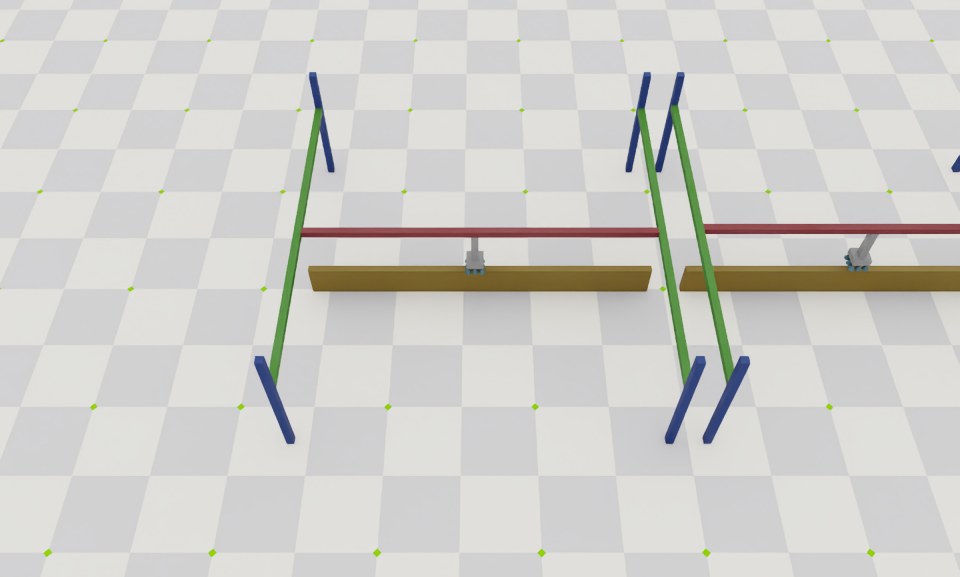
在本教程中,我们学习了如何创建和与表面夹爪进行交互。我们看到如何设置命令并查询夹爪的状态。我们还看到如何更新其缓冲区以从仿真中读取最新状态。
除本教程外,我们还提供了生成其他机器人的脚本,通过打包的演示命令运行:
# Spawn many pick-and-place robots and perform a pick-and-place task
uv run --extra isaacsim isaaclab demo pick-and-place --viz kit
请注意,实践中,用户应将其 assets.SurfaceGripper 实例注册到 isaaclab.InteractiveScene 对象中,由该对象自动处理对 assets.SurfaceGripper.write_data_to_sim() 和 assets.SurfaceGripper.update() 方法的调用。
# Create a scene
scene = InteractiveScene()

# Register the surface gripper
scene.surface_grippers["gripper"] = surface_gripper