

可视化#
可视化器用于检查、调试和录制正在运行的仿真。Isaac Lab 提供五种选择,从轻量查看器到 Isaac Sim 视口均有覆盖。您还可在流式相机面板中查看相机传感器输出。
可试用直接在浏览器中运行的 Franka 方块堆叠 仿真:旋转相机观察、观看脚本控制的抓取,或在手动模式下控制末端执行器。
五种可视化器运行 Isaac-Velocity-Flat-AnymalD,并使用环形速度指令
绿色箭头表示指令速度;蓝色箭头表示当前速度。
注意:Newton RTX 暂不支持可视化标记,因此没有速度箭头。
快速开始#
在任意训练命令中加入 --viz 即可启动可视化器。 --visualizer 是等效的别名。
# Newton GL: lightweight OpenGL viewport
uv run isaaclab train --rl_library rsl_rl --task Isaac-Cartpole --viz newton_gl

# Viser: browser-based viewer
uv run isaaclab train --rl_library rsl_rl --task Isaac-Cartpole --viz viser

# Kit viewport
uv run isaaclab train --rl_library rsl_rl --task Isaac-Cartpole --viz kit

# Multiple visualizers simultaneously (comma-separated, no spaces)
uv run isaaclab train --rl_library rsl_rl --task Isaac-Cartpole --viz rerun,newton_rtx
备注
大多数任务默认使用 PhysX 后端,需要安装 Isaac Sim。如果尚未安装,请在上述 uv run 命令中加入 --extra isaacsim ;详情见 可选依赖组 。
备注
train 和 play 仅在传入 --viz 时启动可视化器;内置演示和示例则会打开各自的默认可视化器。--viz none 可以关闭可视化器。
关于组合使用可视化器、无界面运行等常见场景,请参阅下文的 使用方法 。
可视化器预设#
任务命令接受 visualizer=newton_gl、visualizer=kit 或 visualizer=rerun,newton_gl。--viz 和 --visualizer 是同一选择的别名,visualizer=none 则禁用查看器。选择在配置组合阶段完成,早于进程运行时选择和场景创建。
任务脚本可通过 isaaclab_tasks.utils.presets.MultiBackendVisualizerCfg 声明备选项,并用配置实例定制,无需创建预设子类。应在脚本调用 launch_simulation 前解析这些选项:
from isaaclab.sim import SimulationCfg
from isaaclab_visualizers.newton import NewtonGLVisualizerCfg
from isaaclab_tasks.utils import resolve_presets
from isaaclab_tasks.utils.presets import MultiBackendVisualizerCfg

sim_cfg = SimulationCfg(
    visualizer_cfgs=MultiBackendVisualizerCfg(
        newton_gl=NewtonGLVisualizerCfg(max_visible_envs=16)
    )
)

sim_cfg = resolve_presets(sim_cfg, overrides={"visualizer_cfgs": "newton_gl"})
当传入 visualizer=newton_gl 或 --viz newton_gl 时,任务入口通过 resolve_task_config 完成选择。启动器和仿真接收的都是具体配置。
任务配置组合完成后,visualizer_cfgs 包含所选的具体配置或配置列表。独立脚本可直接提供具体可视化器配置,无需任务预设。查看器实现仅在构造时导入。
使用 --video 时,若未选择支持捕获的查看器,启动过程会选择无窗口 Newton GL 作为图像来源。visualizer=none 关闭窗口,但录制仍会按需运行其图像生成器。使用 --video sensor:<name> 可直接录制场景相机,无需可视化器提供图像。
可视化器概览#
可视化器 |
描述 |
|---|---|
Newton GL |
轻量,功能支持完善;推荐使用 |
Viser |
基于网页,支持录制和回放;推荐使用 |
Newton RTX |
高质量 RTX 渲染;实验性功能,部分功能尚未实现 |
Rerun |
基于网页,支持录制和回放;界面中的开关选项较少 |
Kit |
高质量 RTX 渲染,配备丰富的 Isaac Sim 工具;启动时间较长 |
Newton GL 可视化器提供轻量的 OpenGL 窗口,启动开销很小。
Newton GL 可视化器中的 Isaac-Reorient-Cube-Allegro
每只 Allegro 手调整立方体朝向,使其与上方标记显示的目标一致
该可视化器的特有功能:
ImGui 中的 Pause Rendering (暂停渲染)、 Pause Simulation (暂停仿真)和 Reset Episode (重置回合)控件
右键拖动刚体,见右侧演示(仅限 Newton 求解器)
可调整渲染更新频率
newton-dominoes 示例
右键拖动第一张骨牌,在 NVIDIA 标志形状的骨牌布局中触发连锁倒下
可试用在本地浏览器中运行的 多米诺骨牌连锁:24 块骨牌,可调整摩擦,并用可重复的推力脉冲启动倾倒。
核心配置:
from isaaclab.visualizers import WindowCfg
from isaaclab_visualizers.newton import NewtonGLVisualizerCfg

visualizer_cfg = NewtonGLVisualizerCfg(
    eye=(8.0, 8.0, 3.0),
    lookat=(0.0, 0.0, 0.0),
    window=WindowCfg(size=(1920, 1080), fps=30.0),
    show_joints=False,
    show_contacts=False,
    enable_live_plots=True,
)
完整的配置参考见下列配置类。
NewtonGLVisualizerCfg 源代码
@configclass
class NewtonGLVisualizerCfg(NewtonVisualizerCfg):
    """Configuration for the Newton OpenGL rasterizer visualizer.

    Selects Newton's OpenGL backend — fast local window with the full Isaac Lab
    feature set: scene-camera display, particle color override, and live scalar/array plots.

    A scene-camera view replaces perspective rendering. With no explicit camera selection,
    the viewer starts in perspective mode and the sidebar can switch to a scene camera.
    """

    class_type: type[NewtonGLVisualizer] | str = "{DIR}.newton_visualizer:NewtonGLVisualizer"
    """Visualizer implementation class."""

    visualizer_type: str = "newton_gl"
    """Visualizer selector identifier. Do not change."""

    streaming_view: bool = True
    """Make scene cameras available in the view selector.

    A SceneCameraCfg selection enables this automatically. Otherwise the viewer starts in perspective.
    """
Newton GL 模型选项
@configclass
class NewtonVisualizerCfg(VisualizerCfg):
    """Deprecated configuration base for the Newton GL visualizer.

    .. deprecated::
        :class:`NewtonVisualizerCfg` is deprecated. Use :class:`NewtonGLVisualizerCfg` for the
        OpenGL rasterizer or :class:`NewtonRTXVisualizerCfg` for the OVRTX path tracer.
    """

    class_type: type[NewtonGLVisualizer] | str = "{DIR}.newton_visualizer:NewtonGLVisualizer"
    """Deprecated alias for the Newton GL visualizer implementation."""

    # Deprecated alias: "newton" routes to the GL backend via visualizer_cfg.VISUALIZER_ALIASES.
    visualizer_type: str = "newton_gl"

    cloning_contexts: tuple[type | str, ...] = ("isaaclab_newton.cloner:NewtonReplicateContext",)

    def __post_init__(self) -> None:
        super().__post_init__()
        if type(self) is NewtonVisualizerCfg:
            warnings.warn(
                "NewtonVisualizerCfg is deprecated and will be removed in a future release. "
                "Use NewtonGLVisualizerCfg (OpenGL rasterizer) or NewtonRTXVisualizerCfg (OVRTX path tracer) instead.",
                DeprecationWarning,
                stacklevel=3,
            )

    world_spacing: tuple[float, float, float] = (0.0, 0.0, 0.0)
    """Visual spacing between simulation worlds along each axis [m].

    Non-zero axes arrange visible worlds in a compact grid without changing their simulated poses.
    """

    show_joints: bool = False
    """Show joint visualization."""

    show_contacts: bool = False
    """Show contact visualization."""

    show_collision: bool = False
    """Show collision visualization."""

    show_springs: bool = False
    """Show spring visualization."""

    show_inertia_boxes: bool = False
    """Show inertia box visualization."""

    show_com: bool = False
    """Show center of mass visualization."""

    show_particles: bool = False
    """Show particle visualization."""

    particle_color: tuple[float, float, float] | None = None
    """Optional particle color RGB [0, 1]. Uses Newton viewer defaults when ``None``."""

    enable_picking: bool = True
    """Enable right-click dragging with Newton rigid-body solvers.

    Supported coupled solvers may expose dragging through a rigid-body entry.
    Disabled automatically for headless viewers, standalone MPM, and non-Newton
    physics. MPM particles are not pickable.
    """

    enable_shadows: bool = True
    """Enable shadow rendering."""

    enable_sky: bool = True
    """Enable procedural sky rendering when ``background_color`` is ``None``."""

    enable_wireframe: bool = False
    """Enable wireframe rendering."""

    sky_upper_color: tuple[float, float, float] = (0.2, 0.4, 0.6)
    """Sky upper color RGB [0, 1]."""

    sky_lower_color: tuple[float, float, float] = (0.5, 0.6, 0.7)
    """Sky lower color RGB [0, 1]."""

    light_color: tuple[float, float, float] = (1.0, 1.0, 1.0)
    """Light color RGB [0, 1]."""
VisualizerCfg 源代码(共用基类)
@configclass
class VisualizerCfg:
    """Base configuration for all visualizer backends.

    Note:
        This configuration can be used directly as
        :attr:`~isaaclab.sim.SimulationCfg.default_visualizer_cfg` to provide shared defaults.
        To create a visualizer, use a concrete config from ``isaaclab_visualizers``, such as
        ``KitVisualizerCfg`` or ``NewtonGLVisualizerCfg``.
    """

    class_type: type[BaseVisualizer] | str | None = None
    """Visualizer implementation class. Concrete configs must set this field."""

    cloning_contexts: tuple[type[ReplicateContext] | str, ...] = ()
    """Clone contexts that build this visualizer's scene representation from the asset plan."""

    view: ImageViewCfg | None = None
    """Shared image view, or None to use the visualizer's camera selection."""

    window: WindowCfg = WindowCfg()
    """Native window settings used by Newton and Kit; network visualizers manage their own presentation."""

    headless: bool = False
    """Render on demand without opening a native viewer window."""

    # Primary interactive camera settings
    cameras: list[PerspectiveCameraCfg | SceneCameraCfg] | None = None
    """Camera sources available to the visualizer.

    PerspectiveCameraCfg configures the interactive view; SceneCameraCfg refers to an existing scene
    sensor. Newton GL and RTX display the first source and offer a dropdown for switching sources.
    Kit, Rerun, and Viser display the first scene source in their camera panel.
    None uses eye/lookat/focal_length and the streaming settings below.
    Every explicit scene source must provide all requested streaming_gt_types channels.
    """

    eye: tuple[float, float, float] = (4.0, -4.0, 3.0)
    """Interactive visualizer camera eye position in world coordinates."""

    lookat: tuple[float, float, float] = (0.0, 0.0, 0.0)
    """Interactive visualizer camera look-at target in world coordinates."""

    focal_length: float = 12.0
    """Camera focal length in millimeters for visualizer camera views."""

    background_color: tuple[float, float, float] | None = None
    """Viewer perspective-camera background as normalized RGB values in ``[0, 1]``.

    None preserves the scene HDR background in Kit and Newton RTX, or Newton GL's procedural sky.
    An explicit color changes only the visible background, not scene lighting or reflections.
    Scene-camera images retain their sensor's :attr:`~isaaclab.sensors.CameraCfg.background_color`.
    """

    # ── Streaming view ────────────────────────────────────────────────────────
    # Reads pixels from a scene-declared camera sensor, tiles them
    # across envs and GT types, and shows the result as an image panel in interactive
    # visualizers (Newton GL, Kit) or pushes it per-step to sink-based ones (Rerun, Viser).

    streaming_view: bool = False
    """Enable the streaming camera image view (opt-in, disabled by default)."""

    streaming_sensor_prim_path: str | None = None
    """Prim path of a scene-declared :class:`~isaaclab.sensors.Camera` to display.

    Use the camera's configured prim path, including ``{ENV_REGEX_NS}`` when applicable.
    None selects the first compatible camera in the scene. Without one the panel stays empty.
    The scene owns camera construction, updates, and lifetime; visualizers only read its output.
    """

    # Shared settings
    streaming_envs: int | list[int] = 32
    """Environments to display, limited to 100 tiles.

    * ``int`` — sample this many envs once at initialization (from all visible envs).
    * ``list[int]`` — display exactly these env indices.
    """

    streaming_gt_types: tuple[str, ...] = ("rgb",)
    """GT data types displayed left-to-right per environment row.

    Valid values: ``"rgb"``, ``"depth"``, ``"segmentation"``, ``"normals"``.
    Validated at initialization when :attr:`streaming_view` is ``True``.
    """

    streaming_depth_min: float = 0.1
    """Near-clip for the turbo depth colormap [m].  Used when ``"depth"`` is in
    :attr:`streaming_gt_types`."""

    streaming_depth_max: float = 10.0
    """Far-clip for the turbo depth colormap [m].  Used when ``"depth"`` is in
    :attr:`streaming_gt_types`."""

    # Partial visualization settings
    max_visible_envs: int | None = None
    """Upper bound on how many envs are shown.

    * If visible_env_indices is not None, then this field will apply also
      to the explicit env indices set to the visible_env_indices.
    """

    visible_env_indices: list[int] | None = None
    """env indices to visualize in order (out-of-range indices are dropped)."""

    randomly_sample_visible_envs: bool = True
    """If ``max_visible_envs`` is provided, when enabled, selected visible envs are randomly sampled.
       If disabled, the first ``max_visible_envs`` envs are selected.

    * Note: ``visible_env_indices`` overrides this field.
    """

    # Visualization Markers
    enable_markers: bool = True
    """Enable visualization markers (debug drawing)."""

    # Live Plots
    enable_live_plots: bool = True
    """Stream per-step scalar data (manager terms, episode reward, episode length) into the visualizer.

    Plot windows start hidden or collapsed by default and can be toggled open at runtime.
    Set to ``False`` to disable live plots entirely and avoid any collection overhead.
    """

    live_plots_update_interval: int = 5
    """Collect and push live plot data every ``N`` simulation steps (default: every 5 steps)."""

    # Internal
    launcher_type: ClassVar[str | None] = None
    """Process runtime required by this visualizer, if any."""

    visualizer_type: str | None = None
    """Type identifier (e.g., 'newton', 'rerun', 'viser', 'kit'). Must be overridden by subclasses."""

    def validate_config(self) -> None:
        """Reject ambiguous sources and unsupported native-window configurations."""
        if self.view is not None:
            if self.visualizer_type not in ("newton_gl", "newton_rtx"):
                raise ValueError("VisualizerCfg.view requires a Newton GL or RTX visualizer.")
            if self.cameras is not None or self.streaming_sensor_prim_path is not None:
                raise ValueError("Choose view or legacy cameras/streaming_sensor_prim_path, not both.")

    def __post_init__(self) -> None:
        if self.background_color is not None:
            if len(self.background_color) != 3 or any(not 0.0 <= value <= 1.0 for value in self.background_color):
                raise ValueError("background_color must contain three normalized RGB values in [0, 1].")
            self.background_color = tuple(float(value) for value in self.background_color)

        if self.cameras is not None:
            if not self.cameras:
                raise ValueError("cameras must contain at least one display source.")
            self.streaming_view = any(isinstance(camera, SceneCameraCfg) for camera in self.cameras)
            if isinstance(camera := self.cameras[0], PerspectiveCameraCfg):
                self.eye, self.lookat, self.focal_length = camera.eye, camera.lookat, camera.focal_length
Viser 将 Newton Warp 渲染器的画面传输到本地 Web 服务器,默认地址为 http://localhost:8080 。还可以通过 share=True 获取公开分享链接,或录制为 .viser 文件以供回放。
Viser 可视化器中的 Isaac-Lift-KukaAllegro
各 Kuka 机械臂和 Allegro 手将立方体从桌面举起
桌面颜色表示成功状态:立方体到达目标位姿前为红色,到达后变为绿色。
该可视化器的特有功能:
设置
share=True可生成用于远程访问的公开分享链接侧栏中的 Pause Rendering (暂停渲染)、 Pause Simulation (暂停仿真)和 Reset Episode (重置回合)控件
重要
训练开始前会输出访问地址。设置 open_browser=True 可自动打开该地址。如需远程访问,请将 display_address 设为机器的主机名或 IP 地址,并确保浏览器能够访问配置的 port 。
╭────── viser (listening *:8080) ───────╮
│   URL  │  http://localhost:8080        │
╰───────────────────────────────────────╯
核心配置:
from isaaclab_visualizers.viser import ViserVisualizerCfg

visualizer_cfg = ViserVisualizerCfg(
    port=8080,
    bind_address="0.0.0.0",       # use 0.0.0.0 for remote access
    display_address="localhost",   # hostname shown in the printed URL
    open_browser=False,
    share=False,                   # request a public share URL
    record_to_viser=None,          # set a path to save a .viser recording
)
完整的配置参考见下列配置类。
ViserVisualizerCfg 源代码
@configclass
class ViserVisualizerCfg(VisualizerCfg):
    """Configuration for Viser visualizer (web-based visualization)."""

    class_type: type[ViserVisualizer] | str = "{DIR}.viser_visualizer:ViserVisualizer"
    """Visualizer implementation class."""

    visualizer_type: str = "viser"
    """Type identifier for Viser visualizer."""

    cloning_contexts: tuple[type | str, ...] = ("isaaclab_newton.cloner:NewtonReplicateContext",)

    port: int = 8080
    """Port of the local viser web server."""

    bind_address: str = "0.0.0.0"
    """Host/interface for the Viser server to bind.

    Use ``"0.0.0.0"`` to listen on all interfaces for remote access.
    """

    display_address: str = "localhost"
    """Host name or IP address shown in the printed browser URL.

    For remote access, set this to the hostname/IP reachable from your browser.
    """

    open_browser: bool = False
    """Whether to attempt opening the viser web viewer URL in a browser.

    The viewer URL is always logged during initialization. Set this to ``True`` to auto-launch it.
    """

    verbose: bool = True
    """Whether to print viewer server startup information."""

    share: bool = False
    """Whether to request a public share URL from viser."""

    record_to_viser: str | None = None
    """Path to save a .viser recording file. None = no recording."""

    show_particles: bool = True
    """Whether to render particle systems (MPM, VBD) in the Viser viewer.

    Defaults to ``True`` so particle simulations (granular, cloth, soft-body) are
    visible on startup.  Can also be toggled at runtime via the Visualization Markers
    panel in the Viser sidebar.
    """
VisualizerCfg 源代码(共用基类)
@configclass
class VisualizerCfg:
    """Base configuration for all visualizer backends.

    Note:
        This configuration can be used directly as
        :attr:`~isaaclab.sim.SimulationCfg.default_visualizer_cfg` to provide shared defaults.
        To create a visualizer, use a concrete config from ``isaaclab_visualizers``, such as
        ``KitVisualizerCfg`` or ``NewtonGLVisualizerCfg``.
    """

    class_type: type[BaseVisualizer] | str | None = None
    """Visualizer implementation class. Concrete configs must set this field."""

    cloning_contexts: tuple[type[ReplicateContext] | str, ...] = ()
    """Clone contexts that build this visualizer's scene representation from the asset plan."""

    view: ImageViewCfg | None = None
    """Shared image view, or None to use the visualizer's camera selection."""

    window: WindowCfg = WindowCfg()
    """Native window settings used by Newton and Kit; network visualizers manage their own presentation."""

    headless: bool = False
    """Render on demand without opening a native viewer window."""

    # Primary interactive camera settings
    cameras: list[PerspectiveCameraCfg | SceneCameraCfg] | None = None
    """Camera sources available to the visualizer.

    PerspectiveCameraCfg configures the interactive view; SceneCameraCfg refers to an existing scene
    sensor. Newton GL and RTX display the first source and offer a dropdown for switching sources.
    Kit, Rerun, and Viser display the first scene source in their camera panel.
    None uses eye/lookat/focal_length and the streaming settings below.
    Every explicit scene source must provide all requested streaming_gt_types channels.
    """

    eye: tuple[float, float, float] = (4.0, -4.0, 3.0)
    """Interactive visualizer camera eye position in world coordinates."""

    lookat: tuple[float, float, float] = (0.0, 0.0, 0.0)
    """Interactive visualizer camera look-at target in world coordinates."""

    focal_length: float = 12.0
    """Camera focal length in millimeters for visualizer camera views."""

    background_color: tuple[float, float, float] | None = None
    """Viewer perspective-camera background as normalized RGB values in ``[0, 1]``.

    None preserves the scene HDR background in Kit and Newton RTX, or Newton GL's procedural sky.
    An explicit color changes only the visible background, not scene lighting or reflections.
    Scene-camera images retain their sensor's :attr:`~isaaclab.sensors.CameraCfg.background_color`.
    """

    # ── Streaming view ────────────────────────────────────────────────────────
    # Reads pixels from a scene-declared camera sensor, tiles them
    # across envs and GT types, and shows the result as an image panel in interactive
    # visualizers (Newton GL, Kit) or pushes it per-step to sink-based ones (Rerun, Viser).

    streaming_view: bool = False
    """Enable the streaming camera image view (opt-in, disabled by default)."""

    streaming_sensor_prim_path: str | None = None
    """Prim path of a scene-declared :class:`~isaaclab.sensors.Camera` to display.

    Use the camera's configured prim path, including ``{ENV_REGEX_NS}`` when applicable.
    None selects the first compatible camera in the scene. Without one the panel stays empty.
    The scene owns camera construction, updates, and lifetime; visualizers only read its output.
    """

    # Shared settings
    streaming_envs: int | list[int] = 32
    """Environments to display, limited to 100 tiles.

    * ``int`` — sample this many envs once at initialization (from all visible envs).
    * ``list[int]`` — display exactly these env indices.
    """

    streaming_gt_types: tuple[str, ...] = ("rgb",)
    """GT data types displayed left-to-right per environment row.

    Valid values: ``"rgb"``, ``"depth"``, ``"segmentation"``, ``"normals"``.
    Validated at initialization when :attr:`streaming_view` is ``True``.
    """

    streaming_depth_min: float = 0.1
    """Near-clip for the turbo depth colormap [m].  Used when ``"depth"`` is in
    :attr:`streaming_gt_types`."""

    streaming_depth_max: float = 10.0
    """Far-clip for the turbo depth colormap [m].  Used when ``"depth"`` is in
    :attr:`streaming_gt_types`."""

    # Partial visualization settings
    max_visible_envs: int | None = None
    """Upper bound on how many envs are shown.

    * If visible_env_indices is not None, then this field will apply also
      to the explicit env indices set to the visible_env_indices.
    """

    visible_env_indices: list[int] | None = None
    """env indices to visualize in order (out-of-range indices are dropped)."""

    randomly_sample_visible_envs: bool = True
    """If ``max_visible_envs`` is provided, when enabled, selected visible envs are randomly sampled.
       If disabled, the first ``max_visible_envs`` envs are selected.

    * Note: ``visible_env_indices`` overrides this field.
    """

    # Visualization Markers
    enable_markers: bool = True
    """Enable visualization markers (debug drawing)."""

    # Live Plots
    enable_live_plots: bool = True
    """Stream per-step scalar data (manager terms, episode reward, episode length) into the visualizer.

    Plot windows start hidden or collapsed by default and can be toggled open at runtime.
    Set to ``False`` to disable live plots entirely and avoid any collection overhead.
    """

    live_plots_update_interval: int = 5
    """Collect and push live plot data every ``N`` simulation steps (default: every 5 steps)."""

    # Internal
    launcher_type: ClassVar[str | None] = None
    """Process runtime required by this visualizer, if any."""

    visualizer_type: str | None = None
    """Type identifier (e.g., 'newton', 'rerun', 'viser', 'kit'). Must be overridden by subclasses."""

    def validate_config(self) -> None:
        """Reject ambiguous sources and unsupported native-window configurations."""
        if self.view is not None:
            if self.visualizer_type not in ("newton_gl", "newton_rtx"):
                raise ValueError("VisualizerCfg.view requires a Newton GL or RTX visualizer.")
            if self.cameras is not None or self.streaming_sensor_prim_path is not None:
                raise ValueError("Choose view or legacy cameras/streaming_sensor_prim_path, not both.")

    def __post_init__(self) -> None:
        if self.background_color is not None:
            if len(self.background_color) != 3 or any(not 0.0 <= value <= 1.0 for value in self.background_color):
                raise ValueError("background_color must contain three normalized RGB values in [0, 1].")
            self.background_color = tuple(float(value) for value in self.background_color)

        if self.cameras is not None:
            if not self.cameras:
                raise ValueError("cameras must contain at least one display source.")
            self.streaming_view = any(isinstance(camera, SceneCameraCfg) for camera in self.cameras)
            if isinstance(camera := self.cameras[0], PerspectiveCameraCfg):
                self.eye, self.lookat, self.focal_length = camera.eye, camera.lookat, camera.focal_length
Newton RTX 可视化器目前处于 实验阶段 ,使用 --viz newton_rtx 启动。它通过 OVRTX 路径追踪器实现照片级真实感渲染,无需启动 Kit 进程。由于高质量 RTX 渲染的开销较大,其速度略低于 Newton GL 可视化器。
Newton RTX 可视化器中的 Isaac-Velocity-Rough-H1
各 H1 人形机器人攀登楼梯子地形
该可视化器的特有功能:
使用 OVRTX 路径追踪,实现照片级真实感、基于物理的光照
备注
以下功能尚未支持,将在后续版本中加入:实时曲线和刚体拖拽。目前已支持可视化标记、相机选择、场景相机显示、暂停控制和无窗口录制。
核心配置:
from isaaclab_visualizers.newton import NewtonRTXVisualizerCfg

visualizer_cfg = NewtonRTXVisualizerCfg(
    eye=(8.0, 8.0, 3.0),
    lookat=(0.0, 0.0, 0.0),
)
完整的配置参考见下列配置类。
NewtonRTXVisualizerCfg 源代码
@configclass
class NewtonRTXVisualizerCfg(VisualizerCfg):
    """Simulation-owned OVRTX rendering displayed in a Newton GL window.

    Launch preparation expands perspective sources into ordinary scene CameraCfg entries.
    All views borrow camera output. Scripts without a SceneCfg declare cameras through ReplicateSession,
    construct them with instantiate(camera_cfg), and select them with SceneCameraCfg.
    Window resizing scales the displayed image without changing either source's resolution.
    Scene USD owns lighting, materials, and environment placement. Newton-model overlays,
    rigid-body dragging, and viewer-only lighting or world offsets are not supported.
    Environment selection controls tiled sensor views; the perspective camera sees the full scene.
    """

    class_type: type[NewtonRTXVisualizer] | str = "{DIR}.newton_visualizer:NewtonRTXVisualizer"
    """Visualizer implementation class."""

    launcher_type: ClassVar[str] = "isaaclab_ov.app:OvrtxLauncher"

    visualizer_type: str = "newton_rtx"
    """Visualizer selector identifier. Do not change."""

    render_settings: dict[str, Any] = dict()
    """RTX attributes to author on the OVRTX render product, as ``{name: (usd_type_name, value)}``.

    ``usd_type_name`` names an ``Sdf.ValueTypeNames`` member, as a string so the config stays
    copyable. For example, ``{"omni:rtx:quality": ("Int", 100)}`` re-enables the path tracer's
    quality convergence loop, disabled by default to keep interactive latency down."""

    renderer_cfg: OVRTXRendererCfg = OVRTXRendererCfg()
    """Shared scene renderer. Use the same configuration as scene cameras to share their instance.

    Used when declaring perspective CameraCfg entries. SceneCameraCfg retains its sensor's renderer.
    """

    streaming_view: bool = True
    """Display the cameras declared by :attr:`view` or :attr:`cameras`; default to a perspective camera."""
通用窗口选项
@configclass
class WindowCfg:
    """Native window presentation, independent of the camera's image resolution."""

    size: tuple[int, int] = (1920, 1080)
    """Initial window width and height [px]."""

    fps: float = 30.0
    """Maximum Newton window update rate [Hz], measured in wall-clock time.

    Headless on-demand recording is independent of this limit. Kit owns its application update cadence.
    """

    def validate_config(self) -> None:
        """Require positive dimensions and a finite, positive presentation rate."""
        if len(self.size) != 2 or any(not isinstance(value, int) or value < 1 for value in self.size):
            raise ValueError("WindowCfg.size must contain positive integer width and height.")
        if not math.isfinite(self.fps) or self.fps <= 0:
            raise ValueError("WindowCfg.fps must be finite and positive.")
VisualizerCfg 源代码(共用基类)
@configclass
class VisualizerCfg:
    """Base configuration for all visualizer backends.

    Note:
        This configuration can be used directly as
        :attr:`~isaaclab.sim.SimulationCfg.default_visualizer_cfg` to provide shared defaults.
        To create a visualizer, use a concrete config from ``isaaclab_visualizers``, such as
        ``KitVisualizerCfg`` or ``NewtonGLVisualizerCfg``.
    """

    class_type: type[BaseVisualizer] | str | None = None
    """Visualizer implementation class. Concrete configs must set this field."""

    cloning_contexts: tuple[type[ReplicateContext] | str, ...] = ()
    """Clone contexts that build this visualizer's scene representation from the asset plan."""

    view: ImageViewCfg | None = None
    """Shared image view, or None to use the visualizer's camera selection."""

    window: WindowCfg = WindowCfg()
    """Native window settings used by Newton and Kit; network visualizers manage their own presentation."""

    headless: bool = False
    """Render on demand without opening a native viewer window."""

    # Primary interactive camera settings
    cameras: list[PerspectiveCameraCfg | SceneCameraCfg] | None = None
    """Camera sources available to the visualizer.

    PerspectiveCameraCfg configures the interactive view; SceneCameraCfg refers to an existing scene
    sensor. Newton GL and RTX display the first source and offer a dropdown for switching sources.
    Kit, Rerun, and Viser display the first scene source in their camera panel.
    None uses eye/lookat/focal_length and the streaming settings below.
    Every explicit scene source must provide all requested streaming_gt_types channels.
    """

    eye: tuple[float, float, float] = (4.0, -4.0, 3.0)
    """Interactive visualizer camera eye position in world coordinates."""

    lookat: tuple[float, float, float] = (0.0, 0.0, 0.0)
    """Interactive visualizer camera look-at target in world coordinates."""

    focal_length: float = 12.0
    """Camera focal length in millimeters for visualizer camera views."""

    background_color: tuple[float, float, float] | None = None
    """Viewer perspective-camera background as normalized RGB values in ``[0, 1]``.

    None preserves the scene HDR background in Kit and Newton RTX, or Newton GL's procedural sky.
    An explicit color changes only the visible background, not scene lighting or reflections.
    Scene-camera images retain their sensor's :attr:`~isaaclab.sensors.CameraCfg.background_color`.
    """

    # ── Streaming view ────────────────────────────────────────────────────────
    # Reads pixels from a scene-declared camera sensor, tiles them
    # across envs and GT types, and shows the result as an image panel in interactive
    # visualizers (Newton GL, Kit) or pushes it per-step to sink-based ones (Rerun, Viser).

    streaming_view: bool = False
    """Enable the streaming camera image view (opt-in, disabled by default)."""

    streaming_sensor_prim_path: str | None = None
    """Prim path of a scene-declared :class:`~isaaclab.sensors.Camera` to display.

    Use the camera's configured prim path, including ``{ENV_REGEX_NS}`` when applicable.
    None selects the first compatible camera in the scene. Without one the panel stays empty.
    The scene owns camera construction, updates, and lifetime; visualizers only read its output.
    """

    # Shared settings
    streaming_envs: int | list[int] = 32
    """Environments to display, limited to 100 tiles.

    * ``int`` — sample this many envs once at initialization (from all visible envs).
    * ``list[int]`` — display exactly these env indices.
    """

    streaming_gt_types: tuple[str, ...] = ("rgb",)
    """GT data types displayed left-to-right per environment row.

    Valid values: ``"rgb"``, ``"depth"``, ``"segmentation"``, ``"normals"``.
    Validated at initialization when :attr:`streaming_view` is ``True``.
    """

    streaming_depth_min: float = 0.1
    """Near-clip for the turbo depth colormap [m].  Used when ``"depth"`` is in
    :attr:`streaming_gt_types`."""

    streaming_depth_max: float = 10.0
    """Far-clip for the turbo depth colormap [m].  Used when ``"depth"`` is in
    :attr:`streaming_gt_types`."""

    # Partial visualization settings
    max_visible_envs: int | None = None
    """Upper bound on how many envs are shown.

    * If visible_env_indices is not None, then this field will apply also
      to the explicit env indices set to the visible_env_indices.
    """

    visible_env_indices: list[int] | None = None
    """env indices to visualize in order (out-of-range indices are dropped)."""

    randomly_sample_visible_envs: bool = True
    """If ``max_visible_envs`` is provided, when enabled, selected visible envs are randomly sampled.
       If disabled, the first ``max_visible_envs`` envs are selected.

    * Note: ``visible_env_indices`` overrides this field.
    """

    # Visualization Markers
    enable_markers: bool = True
    """Enable visualization markers (debug drawing)."""

    # Live Plots
    enable_live_plots: bool = True
    """Stream per-step scalar data (manager terms, episode reward, episode length) into the visualizer.

    Plot windows start hidden or collapsed by default and can be toggled open at runtime.
    Set to ``False`` to disable live plots entirely and avoid any collection overhead.
    """

    live_plots_update_interval: int = 5
    """Collect and push live plot data every ``N`` simulation steps (default: every 5 steps)."""

    # Internal
    launcher_type: ClassVar[str | None] = None
    """Process runtime required by this visualizer, if any."""

    visualizer_type: str | None = None
    """Type identifier (e.g., 'newton', 'rerun', 'viser', 'kit'). Must be overridden by subclasses."""

    def validate_config(self) -> None:
        """Reject ambiguous sources and unsupported native-window configurations."""
        if self.view is not None:
            if self.visualizer_type not in ("newton_gl", "newton_rtx"):
                raise ValueError("VisualizerCfg.view requires a Newton GL or RTX visualizer.")
            if self.cameras is not None or self.streaming_sensor_prim_path is not None:
                raise ValueError("Choose view or legacy cameras/streaming_sensor_prim_path, not both.")

    def __post_init__(self) -> None:
        if self.background_color is not None:
            if len(self.background_color) != 3 or any(not 0.0 <= value <= 1.0 for value in self.background_color):
                raise ValueError("background_color must contain three normalized RGB values in [0, 1].")
            self.background_color = tuple(float(value) for value in self.background_color)

        if self.cameras is not None:
            if not self.cameras:
                raise ValueError("cameras must contain at least one display source.")
            self.streaming_view = any(isinstance(camera, SceneCameraCfg) for camera in self.cameras)
            if isinstance(camera := self.cameras[0], PerspectiveCameraCfg):
                self.eye, self.lookat, self.focal_length = camera.eye, camera.lookat, camera.focal_length
警告
Newton RTX(OVRTX)是不依赖 Kit 的渲染器,不能与 Kit( presets=isaacsim_physx )在同一进程中使用。 presets=ovphysx 本身也不依赖 Kit,可以与 Newton RTX 配合使用。请将 --viz newton_rtx 与 presets=newton_mjwarp,ovrtx 或 presets=ovphysx,ovrtx 搭配,或者改用 --viz newton_gl 、 --viz viser 、 --viz rerun ;也可以在兼容 Kit 的物理后端下使用 --viz kit 。
与 Viser 类似, Rerun 将仿真状态传输到本地 Web 服务器,支持远程观察、时间线回放和录制为 .rrd 文件。
Rerun 可视化器中的 Isaac-Reorient-Cube-Shadow-Direct
各 Shadow Hand 调整立方体朝向,使其与目标位姿一致
该可视化器的特有功能:
在时间线上拖动定位,并回放
.rrd录制文件ImGui 侧栏中的 Pause Rendering (暂停渲染)和 Reset Episode (重置回合)控件
备注
在实时查看仿真或训练过程时,Rerun 界面原生的时间线播放/暂停控件不起作用。这些控件默认隐藏,但仍可通过 Rerun 的停靠面板界面显示;即使显示出来,点击也不会生效。请使用 Isaac Lab 自身的 Pause Rendering (暂停渲染)和 Reset Episode (重置回合)控件。时间线控件仅在回放已保存的 .rrd 文件时有效。
重要
训练开始前,终端会突出显示访问地址。按住 Ctrl 点击即可打开查看器,也可以设置 open_browser=True 自动打开。
╭─────────────────────────── rerun (listening *:9090) ───────────────────────────╮
│   URL  │  http://127.0.0.1:9090/?url=rerun%2Bhttp://127.0.0.1:9876/proxy       │
╰────────────────────────────────────────────────────────────────────────────────╯
核心配置:
from isaaclab_visualizers.rerun import RerunVisualizerCfg

visualizer_cfg = RerunVisualizerCfg(
    eye=(8.0, 8.0, 3.0),
    lookat=(0.0, 0.0, 0.0),
    keep_historical_data=False,   # enable for time scrubbing
    keep_scalar_history=False,    # enable for scalar time-series
    record_to_rrd=None,           # set a path to save a .rrd recording
    open_browser=False,
)
完整的配置参考见下列配置类。
RerunVisualizerCfg 源代码
@configclass
class RerunVisualizerCfg(VisualizerCfg):
    """Configuration for Rerun visualizer (web-based visualization)."""

    class_type: type[RerunVisualizer] | str = "{DIR}.rerun_visualizer:RerunVisualizer"
    """Visualizer implementation class."""

    visualizer_type: str = "rerun"
    """Type identifier for Rerun visualizer."""

    cloning_contexts: tuple[type | str, ...] = ("isaaclab_newton.cloner:NewtonReplicateContext",)

    app_id: str = "isaaclab-simulation"
    """Application identifier shown in viewer title."""

    web_port: int = 9090
    """Port of the local rerun web viewer whose URL is logged during initialization."""

    grpc_port: int = 9876
    """Port of the rerun gRPC server (used when serving web viewer externally)."""

    bind_address: str | None = "0.0.0.0"
    """Host used for endpoint formatting and reuse checks.

    Notes:
    - If an existing rerun server is reachable on ``grpc_port``, it is reused.
    - New server startup is managed by ``newton.viewer.ViewerRerun`` via the rerun Python SDK.
    - Local browser links normalize common loopback/wildcard hosts to ``127.0.0.1``.
    """

    open_browser: bool = False
    """Whether to attempt opening the rerun web viewer URL in a browser.

    The viewer URL is always logged during initialization. Set this to ``True`` to auto-launch it.
    """

    keep_historical_data: bool = False
    """Keep transform history for time scrubbing (False = constant memory for training)."""

    keep_scalar_history: bool = False
    """Accumulate scalars as a time-series in the Rerun timeline (True = live plot history, False = constant memory).

    When :attr:`~isaaclab.visualizers.VisualizerCfg.enable_live_plots` is ``True`` (the default),
    this is automatically forced to ``True`` so that scalar values accumulate as a time series in
    the Rerun viewer.  Set to ``False`` explicitly to reduce memory usage when scalar history is
    not needed, but note this will disable live plot curves.
    """

    show_particles: bool = True
    """Whether to show model particles.

    Disable this option to reduce streaming overhead for large particle clouds.
    """

    record_to_rrd: str | None = None
    """Path to save .rrd recording file. None = no recording."""
VisualizerCfg 源代码(共用基类)
@configclass
class VisualizerCfg:
    """Base configuration for all visualizer backends.

    Note:
        This configuration can be used directly as
        :attr:`~isaaclab.sim.SimulationCfg.default_visualizer_cfg` to provide shared defaults.
        To create a visualizer, use a concrete config from ``isaaclab_visualizers``, such as
        ``KitVisualizerCfg`` or ``NewtonGLVisualizerCfg``.
    """

    class_type: type[BaseVisualizer] | str | None = None
    """Visualizer implementation class. Concrete configs must set this field."""

    cloning_contexts: tuple[type[ReplicateContext] | str, ...] = ()
    """Clone contexts that build this visualizer's scene representation from the asset plan."""

    view: ImageViewCfg | None = None
    """Shared image view, or None to use the visualizer's camera selection."""

    window: WindowCfg = WindowCfg()
    """Native window settings used by Newton and Kit; network visualizers manage their own presentation."""

    headless: bool = False
    """Render on demand without opening a native viewer window."""

    # Primary interactive camera settings
    cameras: list[PerspectiveCameraCfg | SceneCameraCfg] | None = None
    """Camera sources available to the visualizer.

    PerspectiveCameraCfg configures the interactive view; SceneCameraCfg refers to an existing scene
    sensor. Newton GL and RTX display the first source and offer a dropdown for switching sources.
    Kit, Rerun, and Viser display the first scene source in their camera panel.
    None uses eye/lookat/focal_length and the streaming settings below.
    Every explicit scene source must provide all requested streaming_gt_types channels.
    """

    eye: tuple[float, float, float] = (4.0, -4.0, 3.0)
    """Interactive visualizer camera eye position in world coordinates."""

    lookat: tuple[float, float, float] = (0.0, 0.0, 0.0)
    """Interactive visualizer camera look-at target in world coordinates."""

    focal_length: float = 12.0
    """Camera focal length in millimeters for visualizer camera views."""

    background_color: tuple[float, float, float] | None = None
    """Viewer perspective-camera background as normalized RGB values in ``[0, 1]``.

    None preserves the scene HDR background in Kit and Newton RTX, or Newton GL's procedural sky.
    An explicit color changes only the visible background, not scene lighting or reflections.
    Scene-camera images retain their sensor's :attr:`~isaaclab.sensors.CameraCfg.background_color`.
    """

    # ── Streaming view ────────────────────────────────────────────────────────
    # Reads pixels from a scene-declared camera sensor, tiles them
    # across envs and GT types, and shows the result as an image panel in interactive
    # visualizers (Newton GL, Kit) or pushes it per-step to sink-based ones (Rerun, Viser).

    streaming_view: bool = False
    """Enable the streaming camera image view (opt-in, disabled by default)."""

    streaming_sensor_prim_path: str | None = None
    """Prim path of a scene-declared :class:`~isaaclab.sensors.Camera` to display.

    Use the camera's configured prim path, including ``{ENV_REGEX_NS}`` when applicable.
    None selects the first compatible camera in the scene. Without one the panel stays empty.
    The scene owns camera construction, updates, and lifetime; visualizers only read its output.
    """

    # Shared settings
    streaming_envs: int | list[int] = 32
    """Environments to display, limited to 100 tiles.

    * ``int`` — sample this many envs once at initialization (from all visible envs).
    * ``list[int]`` — display exactly these env indices.
    """

    streaming_gt_types: tuple[str, ...] = ("rgb",)
    """GT data types displayed left-to-right per environment row.

    Valid values: ``"rgb"``, ``"depth"``, ``"segmentation"``, ``"normals"``.
    Validated at initialization when :attr:`streaming_view` is ``True``.
    """

    streaming_depth_min: float = 0.1
    """Near-clip for the turbo depth colormap [m].  Used when ``"depth"`` is in
    :attr:`streaming_gt_types`."""

    streaming_depth_max: float = 10.0
    """Far-clip for the turbo depth colormap [m].  Used when ``"depth"`` is in
    :attr:`streaming_gt_types`."""

    # Partial visualization settings
    max_visible_envs: int | None = None
    """Upper bound on how many envs are shown.

    * If visible_env_indices is not None, then this field will apply also
      to the explicit env indices set to the visible_env_indices.
    """

    visible_env_indices: list[int] | None = None
    """env indices to visualize in order (out-of-range indices are dropped)."""

    randomly_sample_visible_envs: bool = True
    """If ``max_visible_envs`` is provided, when enabled, selected visible envs are randomly sampled.
       If disabled, the first ``max_visible_envs`` envs are selected.

    * Note: ``visible_env_indices`` overrides this field.
    """

    # Visualization Markers
    enable_markers: bool = True
    """Enable visualization markers (debug drawing)."""

    # Live Plots
    enable_live_plots: bool = True
    """Stream per-step scalar data (manager terms, episode reward, episode length) into the visualizer.

    Plot windows start hidden or collapsed by default and can be toggled open at runtime.
    Set to ``False`` to disable live plots entirely and avoid any collection overhead.
    """

    live_plots_update_interval: int = 5
    """Collect and push live plot data every ``N`` simulation steps (default: every 5 steps)."""

    # Internal
    launcher_type: ClassVar[str | None] = None
    """Process runtime required by this visualizer, if any."""

    visualizer_type: str | None = None
    """Type identifier (e.g., 'newton', 'rerun', 'viser', 'kit'). Must be overridden by subclasses."""

    def validate_config(self) -> None:
        """Reject ambiguous sources and unsupported native-window configurations."""
        if self.view is not None:
            if self.visualizer_type not in ("newton_gl", "newton_rtx"):
                raise ValueError("VisualizerCfg.view requires a Newton GL or RTX visualizer.")
            if self.cameras is not None or self.streaming_sensor_prim_path is not None:
                raise ValueError("Choose view or legacy cameras/streaming_sensor_prim_path, not both.")

    def __post_init__(self) -> None:
        if self.background_color is not None:
            if len(self.background_color) != 3 or any(not 0.0 <= value <= 1.0 for value in self.background_color):
                raise ValueError("background_color must contain three normalized RGB values in [0, 1].")
            self.background_color = tuple(float(value) for value in self.background_color)

        if self.cameras is not None:
            if not self.cameras:
                raise ValueError("cameras must contain at least one display source.")
            self.streaming_view = any(isinstance(camera, SceneCameraCfg) for camera in self.cameras)
            if isinstance(camera := self.cameras[0], PerspectiveCameraCfg):
                self.eye, self.lookat, self.focal_length = camera.eye, camera.lookat, camera.focal_length
Kit 可视化器将 Isaac Lab 嵌入 Kit 进程,可以访问完整的 Isaac Sim USD 舞台、RTX 渲染器和图形界面工具。在这 5 种可视化器中,它的启动和运行开销最大。
Kit 可视化器中的 Isaac-Reach-Franka
各 Franka 机械臂将末端执行器移动到随机目标位姿
该可视化器的特有功能:
可直接访问 Isaac Sim USD 舞台,在运行时查看和编辑 prim
完整的 Isaac Sim 图形界面工具(Property、Layers 和 Stage 面板)
备注
Kit 的 ImGui 界面会在进程的工作目录中写入 imgui.ini 文件,记录窗口布局(面板位置、停靠方式和折叠状态)。如果工作目录是仓库根目录,该文件就会作为未跟踪文件出现。 .gitignore 已列出 imgui.ini ;如果希望它完全不出现在仓库中,可以删除该文件,或在仓库外的目录中启动程序。
核心配置:
from isaaclab.visualizers import WindowCfg
from isaaclab_visualizers.kit import KitVisualizerCfg

visualizer_cfg = KitVisualizerCfg(
    eye=(8.0, 8.0, 3.0),
    lookat=(0.0, 0.0, 0.0),
    window=WindowCfg(size=(1280, 720)),
    enable_markers=True,
    enable_live_plots=True,
)
完整的配置参考见下列配置类。
KitVisualizerCfg 源代码
@configclass
class KitVisualizerCfg(VisualizerCfg):
    """Configuration for Kit visualizer using Isaac Sim viewport.

    .. note::
        The streaming panel displays a scene-declared camera. Isaac RTX cameras require
        ``--enable_cameras``. Set ``dock_position="RIGHT"`` to display the panel beside the viewport.
    """

    class_type: type[KitVisualizer] | str = "{DIR}.kit_visualizer:KitVisualizer"
    """Visualizer implementation class."""

    visualizer_type: str = "kit"
    """Type identifier for Kit visualizer."""

    launcher_type: ClassVar[str] = "isaaclab_physx.app:KitLauncher"

    viewport_name: str | None = None
    """Name for a new viewport window when :attr:`create_viewport` is ``True``.

    If ``None``, a default name (``"Visualizer Viewport"``) is used.
    """

    create_viewport: bool = False
    """If ``True``, create a new viewport window; if ``False``, use the active viewport window."""

    dock_position: str = "SAME"
    """Dock position for the streaming image panel and any new viewport window.

    Options: ``'LEFT'``, ``'RIGHT'``, ``'BOTTOM'``, ``'SAME'``.

    .. note::
        ``'SAME'`` (the default) places the streaming panel as a hidden tab in the
        same dock group as the main Viewport — you must click the panel's tab to see it.
        Use ``'RIGHT'`` to keep both the Viewport and the streaming panel visible
        side-by-side.
    """

    window: WindowCfg = WindowCfg(size=(1280, 720))
    """Viewport and capture dimensions. Kit owns the application update cadence."""

    origin_type: str = "world"
    """Frame in which :attr:`~isaaclab.visualizers.VisualizerCfg.eye` and
    :attr:`~isaaclab.visualizers.VisualizerCfg.lookat` are interpreted.

    Options:

    * ``"world"``: global origin.
    * ``"env"``: origin of the environment at :attr:`origin_env_index`.
    * ``"asset"``: a scene asset (or body) specified by :attr:`origin_track_path`.
    """

    origin_env_index: int = 0
    """Index of the environment used as the viewport camera origin.

    Only meaningful when :attr:`origin_type` is ``"env"`` or ``"asset"``.
    """

    origin_track_path: str | None = None
    """Asset tracking path for the viewport camera origin.

    Format: ``"<asset_name>"`` to track the asset root, or ``"<asset_name>/<body_name>"``
    to track a specific body on the asset.  Required when :attr:`origin_type` is ``"asset"``.

    Examples::

        origin_track_path = "robot"             # track robot root
        origin_track_path = "robot/panda_hand"  # track panda_hand body on robot
    """
VisualizerCfg 源代码(共用基类)
@configclass
class VisualizerCfg:
    """Base configuration for all visualizer backends.

    Note:
        This configuration can be used directly as
        :attr:`~isaaclab.sim.SimulationCfg.default_visualizer_cfg` to provide shared defaults.
        To create a visualizer, use a concrete config from ``isaaclab_visualizers``, such as
        ``KitVisualizerCfg`` or ``NewtonGLVisualizerCfg``.
    """

    class_type: type[BaseVisualizer] | str | None = None
    """Visualizer implementation class. Concrete configs must set this field."""

    cloning_contexts: tuple[type[ReplicateContext] | str, ...] = ()
    """Clone contexts that build this visualizer's scene representation from the asset plan."""

    view: ImageViewCfg | None = None
    """Shared image view, or None to use the visualizer's camera selection."""

    window: WindowCfg = WindowCfg()
    """Native window settings used by Newton and Kit; network visualizers manage their own presentation."""

    headless: bool = False
    """Render on demand without opening a native viewer window."""

    # Primary interactive camera settings
    cameras: list[PerspectiveCameraCfg | SceneCameraCfg] | None = None
    """Camera sources available to the visualizer.

    PerspectiveCameraCfg configures the interactive view; SceneCameraCfg refers to an existing scene
    sensor. Newton GL and RTX display the first source and offer a dropdown for switching sources.
    Kit, Rerun, and Viser display the first scene source in their camera panel.
    None uses eye/lookat/focal_length and the streaming settings below.
    Every explicit scene source must provide all requested streaming_gt_types channels.
    """

    eye: tuple[float, float, float] = (4.0, -4.0, 3.0)
    """Interactive visualizer camera eye position in world coordinates."""

    lookat: tuple[float, float, float] = (0.0, 0.0, 0.0)
    """Interactive visualizer camera look-at target in world coordinates."""

    focal_length: float = 12.0
    """Camera focal length in millimeters for visualizer camera views."""

    background_color: tuple[float, float, float] | None = None
    """Viewer perspective-camera background as normalized RGB values in ``[0, 1]``.

    None preserves the scene HDR background in Kit and Newton RTX, or Newton GL's procedural sky.
    An explicit color changes only the visible background, not scene lighting or reflections.
    Scene-camera images retain their sensor's :attr:`~isaaclab.sensors.CameraCfg.background_color`.
    """

    # ── Streaming view ────────────────────────────────────────────────────────
    # Reads pixels from a scene-declared camera sensor, tiles them
    # across envs and GT types, and shows the result as an image panel in interactive
    # visualizers (Newton GL, Kit) or pushes it per-step to sink-based ones (Rerun, Viser).

    streaming_view: bool = False
    """Enable the streaming camera image view (opt-in, disabled by default)."""

    streaming_sensor_prim_path: str | None = None
    """Prim path of a scene-declared :class:`~isaaclab.sensors.Camera` to display.

    Use the camera's configured prim path, including ``{ENV_REGEX_NS}`` when applicable.
    None selects the first compatible camera in the scene. Without one the panel stays empty.
    The scene owns camera construction, updates, and lifetime; visualizers only read its output.
    """

    # Shared settings
    streaming_envs: int | list[int] = 32
    """Environments to display, limited to 100 tiles.

    * ``int`` — sample this many envs once at initialization (from all visible envs).
    * ``list[int]`` — display exactly these env indices.
    """

    streaming_gt_types: tuple[str, ...] = ("rgb",)
    """GT data types displayed left-to-right per environment row.

    Valid values: ``"rgb"``, ``"depth"``, ``"segmentation"``, ``"normals"``.
    Validated at initialization when :attr:`streaming_view` is ``True``.
    """

    streaming_depth_min: float = 0.1
    """Near-clip for the turbo depth colormap [m].  Used when ``"depth"`` is in
    :attr:`streaming_gt_types`."""

    streaming_depth_max: float = 10.0
    """Far-clip for the turbo depth colormap [m].  Used when ``"depth"`` is in
    :attr:`streaming_gt_types`."""

    # Partial visualization settings
    max_visible_envs: int | None = None
    """Upper bound on how many envs are shown.

    * If visible_env_indices is not None, then this field will apply also
      to the explicit env indices set to the visible_env_indices.
    """

    visible_env_indices: list[int] | None = None
    """env indices to visualize in order (out-of-range indices are dropped)."""

    randomly_sample_visible_envs: bool = True
    """If ``max_visible_envs`` is provided, when enabled, selected visible envs are randomly sampled.
       If disabled, the first ``max_visible_envs`` envs are selected.

    * Note: ``visible_env_indices`` overrides this field.
    """

    # Visualization Markers
    enable_markers: bool = True
    """Enable visualization markers (debug drawing)."""

    # Live Plots
    enable_live_plots: bool = True
    """Stream per-step scalar data (manager terms, episode reward, episode length) into the visualizer.

    Plot windows start hidden or collapsed by default and can be toggled open at runtime.
    Set to ``False`` to disable live plots entirely and avoid any collection overhead.
    """

    live_plots_update_interval: int = 5
    """Collect and push live plot data every ``N`` simulation steps (default: every 5 steps)."""

    # Internal
    launcher_type: ClassVar[str | None] = None
    """Process runtime required by this visualizer, if any."""

    visualizer_type: str | None = None
    """Type identifier (e.g., 'newton', 'rerun', 'viser', 'kit'). Must be overridden by subclasses."""

    def validate_config(self) -> None:
        """Reject ambiguous sources and unsupported native-window configurations."""
        if self.view is not None:
            if self.visualizer_type not in ("newton_gl", "newton_rtx"):
                raise ValueError("VisualizerCfg.view requires a Newton GL or RTX visualizer.")
            if self.cameras is not None or self.streaming_sensor_prim_path is not None:
                raise ValueError("Choose view or legacy cameras/streaming_sensor_prim_path, not both.")

    def __post_init__(self) -> None:
        if self.background_color is not None:
            if len(self.background_color) != 3 or any(not 0.0 <= value <= 1.0 for value in self.background_color):
                raise ValueError("background_color must contain three normalized RGB values in [0, 1].")
            self.background_color = tuple(float(value) for value in self.background_color)

        if self.cameras is not None:
            if not self.cameras:
                raise ValueError("cameras must contain at least one display source.")
            self.streaming_view = any(isinstance(camera, SceneCameraCfg) for camera in self.cameras)
            if isinstance(camera := self.cameras[0], PerspectiveCameraCfg):
                self.eye, self.lookat, self.focal_length = camera.eye, camera.lookat, camera.focal_length
共有功能#
相机流视图#
流式相机视图用于实时监测与调试,将多个环境中的真值相机图像(RGB、深度、分割或表面法线)组合到同一个面板中。相机在克隆前声明于场景,可视化器仅读取其输出。多个可视化器可显示同一传感器,并选择不同的平铺视图。
Galbot 立方体堆叠环境的交互视图
显示 Galbot 腕部相机平铺画面的串流视图
将相机附着到机器人刚体上,即可跟随其运动;也可选择已有视图,例如 Galbot 任务的腕部相机和第一视角相机。Kit、Newton GL、Newton RTX、Rerun 和 Viser 均支持此视图。Kit 将其打开为独立的 Streaming View 视口,可与默认视口并排监测;Newton GL 和 Newton RTX 在侧边栏提供 Camera View 选择器,用于切换透视视图与场景相机视图。
VisualizerCfg 选项、显示源、故障排查、从自动生成相机迁移的方法及分步示例,见 在可视化器中显示相机流视图。
可视化标记#
可视化标记通过 VisualizationMarkers 在场景上绘制调试用几何图形。
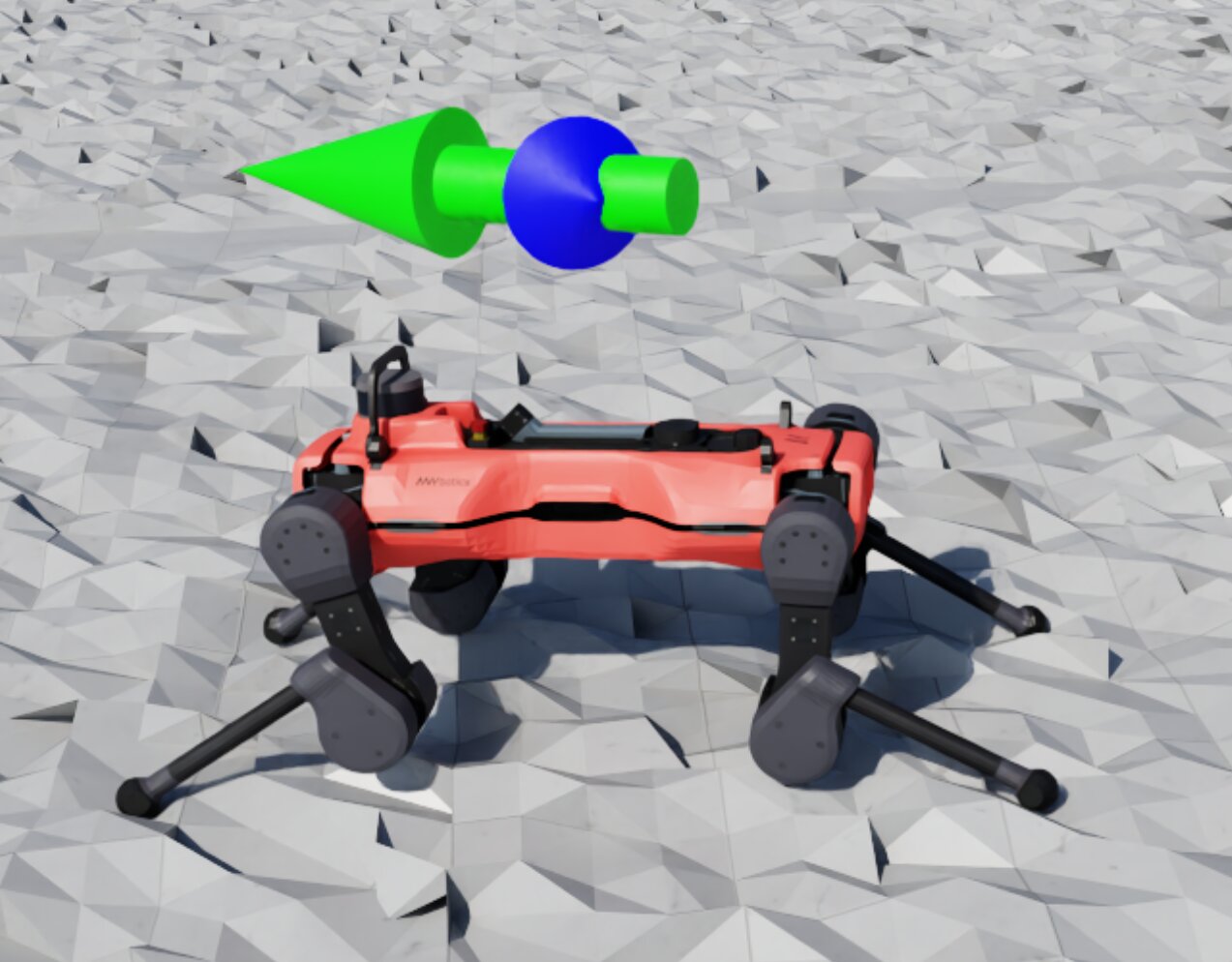
AnymalD 机器人上表示目标速度和基座速度的大型绿色、蓝色箭头标记
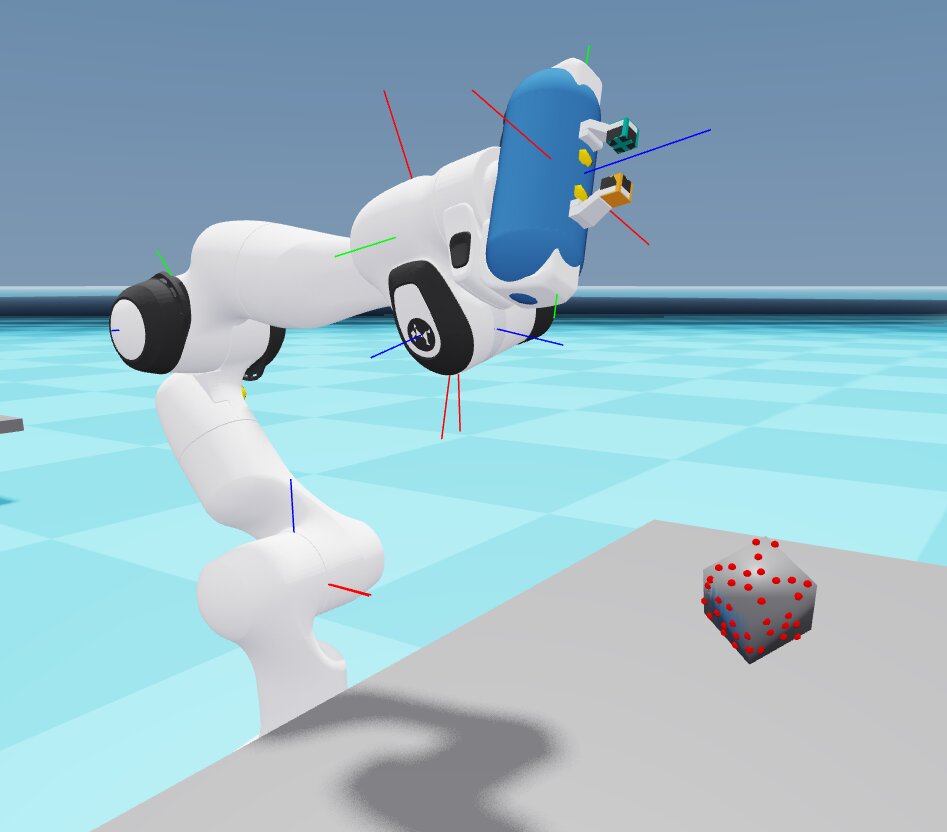
Franka 机械臂关节上的箭头标记,以及立方体上的接触传感器标记
创建和配置自定义标记的方法见 创建可视化标记 。
可视化标记分为两类:
内置标记类型:
传感器标记:接触/无接触球体、射线投射器命中点、可变形物体的运动学目标,以及视觉触觉接触点
坐标系标记:带有连接线的坐标系
彩色箭头(红、蓝、绿):表示方向和速度
目标形状:长方体、球体,以及具有多种状态的位置目标标记
质心标记
在 Newton GL 可视化器的 HUD 中,当前未启用的内置标记类型会显示为灰色。
自定义标记:
由各任务和 MDP 项定义,通过实例化各自的
VisualizationMarkersCfg创建示例:AnymalD 的速度指令以此方式绘制绿色和蓝色的速度箭头
示例:Isaac-Reorient-Cube-Allegro 任务定义自己的目标标记(DexCube 资产),用于显示立方体的目标姿态
备注
Kit、Newton GL、Rerun 和 Viser 支持可视化标记;Newton RTX(实验性)暂不支持。
实时曲线#
实时曲线将每一步的标量数据传输到可视化器中。
Newton GL 可视化器,打开了三个曲线图
Viser 可视化器,打开了一个曲线图
实时曲线窗口默认隐藏或折叠,Rerun 除外;在 Rerun 中,可通过点击“眼睛”图标折叠实时曲线。Kit、Newton GL、Rerun 和 Viser 支持此功能;Newton RTX(实验性)暂不支持。
绘制的数据: 每回合的总奖励和回合长度,以及基于管理器的环境中所有已启用的管理器项(例如 joint_pos )。
视频录制#
视频录制可以采集任意可视化器视图的画面,包括交互视图和相机流视图,也支持采集渲染器生成的传感器数据。
Kit 可视化器平铺串流
包含真值传感器视图的录像片段
在命令行传入 --video [SOURCE] 可快速录制,也可定义多个 VideoRecorderCfg 条目同时录制多个来源。--viz 仍决定哪些可视化器打开窗口;仅用于录制的可视化器以无窗口方式运行:
命令行参数 |
录制来源 |
|---|---|
|
使用 |
|
使用 |
|
选定的 |
|
运行 |
|
使用指定的场景传感器,不添加可视化器 |
--video 后的 Hydra 覆盖参数不会被当作视频来源:--video presets=newton_mjwarp 会从 viz 录制,并应用该预设。
Kit、Newton GL 和 Newton RTX 可视化器支持录制;基于 Web 的 Viser 和 Rerun 不支持。
完整指南和教程见 录制视频 。
使用方法#
常用示例#
无界面训练并录制视频
不打开窗口,从无窗口 Newton GL 可视化器录制片段;也可指定其他捕获源,例如 --video viz:kit:
uv run isaaclab train --rl_library rsl_rl --task Isaac-Cartpole --video
片段长度、录制间隔和多数据源选项见 录制视频 。
组合使用交互视图和无界面录制来源
使用 --viz kit --video viz:newton_gl,并为各可视化器分别配置相机,可一边在 Kit 中实时观察训练,一边从另一个无窗口 Newton GL 视角录制。配置方法见 从独立相机视角录制。
跟随移动的机器人(Kit)
运行时使用 --viz kit,可将 Kit 相机锁定到运动资产上,无需每一步自行更新 eye/lookat:
from isaaclab_visualizers.kit import KitVisualizerCfg

sim_cfg.visualizer_cfgs = [
    KitVisualizerCfg(
        origin_type="asset",
        origin_track_path="robot",  # or "robot/panda_hand" to track a specific body
        eye=(4.0, 4.0, 2.0),  # offset from the tracked asset
    )
]
与远程协作者共享实时画面
运行时使用 --viz viser,Viser 可为当前会话申请公开分享 URL,便于远程协作而无需共享屏幕:
from isaaclab_visualizers.viser import ViserVisualizerCfg

sim_cfg.visualizer_cfgs = [ViserVisualizerCfg(share=True, open_browser=True)]
启动时会在日志中输出分享链接。Rerun 没有对应的配置字段,但其原生界面中提供了分享按钮。
配置解析规则#
--viz (逗号分隔,例如 --viz kit,newton_gl)选择运行哪些可视化器,SimulationCfg.visualizer_cfgs 则配置其设置。每个选定类型使用已配置的设置,否则使用该类型的默认配置。未提供命令行选择时,具体可视化器配置按原样运行。SimulationCfg.visualizer_cfgs 默认为空列表。
命令行或配置选中 kit 时,Isaac Sim 打开窗口;但在 HEADLESS=1 或直播模式下不会打开。由 --video 来源额外添加的录制可视化器始终无窗口运行。
任务配置可用 MultiBackendVisualizerCfg 声明未启用的备选项,在任务配置组合时、启动前选中所需项。独立脚本可直接配置具体查看器:
from isaaclab.sim import SimulationCfg
from isaaclab_visualizers.kit import KitVisualizerCfg
from isaaclab_visualizers.newton import NewtonGLVisualizerCfg

sim_cfg = SimulationCfg(
    visualizer_cfgs=[
        KitVisualizerCfg(eye=(0.0, 0.0, 20.0)),
        NewtonGLVisualizerCfg(eye=(5.0, 5.0, 5.0), show_joints=True),
    ]
)
命令行参数 |
|
实际行为 |
|---|---|---|
不传入 |
|
不启动可视化器;没有窗口,也没有采集来源。 |
|
|
启动默认的 Kit 和 Newton GL 可视化器。 |
仅使用 |
|
启动无窗口 Newton GL,仅作为 |
|
|
启动默认 Kit 和自定义 Newton GL;不启动 Rerun。 |
不传入 |
|
启动两个已配置的可视化器。 |
不传入 |
任务预设: |
不启动可视化器,定制选项在被选中前保持未启用状态。 |
|
|
启动配置中的自定义 Newton GL 和 Rerun。 |
迁移背景见 迁移到 3.0。
仅显示部分环境#
可视化器可以配置为只显示部分环境,而非所有环境,这称为部分环境可视化。
VisualizerCfg 提供三个字段,用于选择要显示的环境:
max_visible_envs限制最多显示多少个环境。visible_env_indices按给定顺序显式指定要显示的环境,优先于randomly_sample_visible_envs,同时仍受max_visible_envs限制。randomly_sample_visible_envs默认为True。未设置visible_env_indices、但设置了max_visible_envs时,它决定是否随机抽取环境;关闭后则选择前max_visible_envs个环境。
命令行参数 --max_visible_envs 可在本次运行中覆盖 VisualizerCfg.max_visible_envs。
备注
默认情况下,选中的环境保留其仿真位置。因此,对于较大的环境网格,随机抽取或选择靠前的环境时,它们可能落在相机视野之外。可以选择靠近相机目标的环境索引,或调整 eye 和 lookat。
场景背景#
Kit 和 Newton RTX 默认使用场景中定义的灯光与 HDR 背景。在场景中统一配置环境即可,无需在可视化器中重复设置 HDR 路径或强度:
env_cfg.scene.sky_light.spawn.texture_file = "/path/to/evening.hdr"
env_cfg.scene.sky_light.spawn.intensity = 1000.0
VisualizerCfg.background_color 默认为 None。显式设置归一化 RGB 颜色只改变可见背景,场景灯光仍照亮物体并产生反射。Newton GL 在未覆盖颜色时使用程序生成的天空:
from isaaclab.visualizers import VisualizerCfg

env_cfg.sim.default_visualizer_cfg = VisualizerCfg(background_color=(0.1, 0.2, 0.3))
性能#
可视化器 |
提示 |
|---|---|
Newton GL |
开销最低;降低 |
Viser |
使用 Newton Warp 渲染器;可通过 |
Newton RTX |
原生 Newton RTX 渲染;可降低透视视图分辨率或 |
Rerun |
环境较多时,网页查看器可能变慢;可通过 |
Kit |
五种可视化器中开销最高;可减小 |
限制#
后端功能支持:
特性 |
Newton GL |
Newton RTX |
Viser |
Rerun |
Kit |
|---|---|---|---|---|---|
可视化标记 |
✓ |
✗ |
✓ |
✓ |
✓ |
实时曲线 |
✓ |
✗ |
✓ |
✓ |
✓ |
相机流面板 |
✓ |
✗ |
✓ |
✓ |
✓ |
视频录制, |
✓ |
✓ |
✗ |
✗ |
✓ |
暂停渲染 |
✓ |
✗ |
✓ |
✓ |
✓ |
无界面模式 |
✓ |
✓ |
✓ |
✓ |
✓ |
各可视化器的光照差异
各后端的光照方式不同,同一环境在不同可视化器中可能呈现明显差异。Kit 渲染场景中实际定义的 USD 灯光。Newton GL 使用固定的天空渐变及单个定向光颜色(sky_upper_color、sky_lower_color、light_color),不依赖场景 USD 灯光。Newton RTX 通过 Isaac Lab 的 OVRTX 渲染器渲染场景,并与采用相同 OVRTXRendererCfg 的相机共用渲染器。Newton GL 显示渲染后的 GPU 图像并处理窗口控制,不构造 Newton 的 ViewerRTX。场景变换、可变形几何和材质更新均遵循相机渲染器的正常同步流程。调整窗口大小时,透视分辨率保持不变,仅缩放图像以适配窗口。灯光和环境位置应在场景中配置。仅供查看器使用的 rtx_environment 灯光装置及 world_spacing 已不再支持:工作室光照应在场景中声明灯光,无光照场景应移除场景灯光,世界中的位置间距则通过 InteractiveSceneCfg.env_spacing 设置。粒子颜色覆盖和刚体拾取仍仅限 GL。Viser 使用单个环境光,没有定向主光,因此画面通常比其他后端更暗、更平。Rerun 使用查看器内置的固定着色,不受场景灯光驱动。
Kit:与 ovphysx / ovrtx 预设不兼容
--viz kit 不能在同一进程中与 presets=ovphysx 或 presets=ovrtx 配合使用。请在这些预设下使用 --viz newton_gl 、 --viz rerun 或 --viz viser ,也可以省略 --viz 进行无界面运行。
Newton RTX:与 Kit 不兼容
如果启用的物理后端是 isaacsim_physx (即 presets=isaacsim_physx ), --viz newton_rtx 会在启动时抛出 RuntimeError ,因为 OVRTX 不依赖 Kit,不能与 Kit 共用进程。 presets=ovphysx 本身不依赖 Kit,仍受支持。请将 --viz newton_rtx 与 presets=newton_mjwarp,ovrtx 或 presets=ovphysx,ovrtx 配合使用,或者改用 --viz newton_gl 、 --viz viser 、 --viz rerun ;也可以在兼容 Kit 的物理后端下使用 --viz kit 。
Rerun:大量环境下的性能
环境较多时,Rerun 网页查看器可能变慢或崩溃。可通过 --num_envs 降低负载:
uv run isaaclab train --rl_library rsl_rl --task Isaac-Cartpole --viz rerun --num_envs 512
Rerun:首批数据加载前页面为空白
Rerun 连接并接收场景数据时,浏览器标签页可能空白约 10 秒。等待第一帧即可,无需操作。
Newton GL:CUDA/OpenGL 互操作警告
在某些配置下,Newton GL 可视化器会输出关于 CUDA/OpenGL 互操作的警告:
Warning: Could not get MSAA config, falling back to non-AA.
Warp CUDA error 999: unknown error (in function wp_cuda_graphics_register_gl_buffer)
Warp UserWarning: Could not register GL buffer …
可视化器仍能正常工作,但会回退到 CPU 拷贝操作,性能会有所下降。
Newton GL:OpenGL 上下文创建失败
如果 pyglet 提示 glCreateShader 未导出,或需要 OpenGL 2.0,说明进程运行时没有 GPU 支持的显示上下文(例如服务会话,或未启用 GPU 加速的远程桌面)。请在具有 GPU 支持的交互式显示会话中运行,也可以省略 --viz newton_gl ,改为无界面运行。
进一步阅读#
在可视化器中显示相机流视图:逐步配置相机流视图
录制视频:从可视化器或传感器录制 MP4 视频片段
创建可视化标记:创建和配置自定义可视化标记
在训练期间采集传感器帧 :在训练期间保存逐帧传感器输出
渲染器 :渲染器后端(RTX、Newton Warp、OVRTX)
场景数据提供器:场景数据如何传递到可视化器
Newton :Newton 后端指南
迁移到 3.0:可视化器迁移参考