

射线投射器#
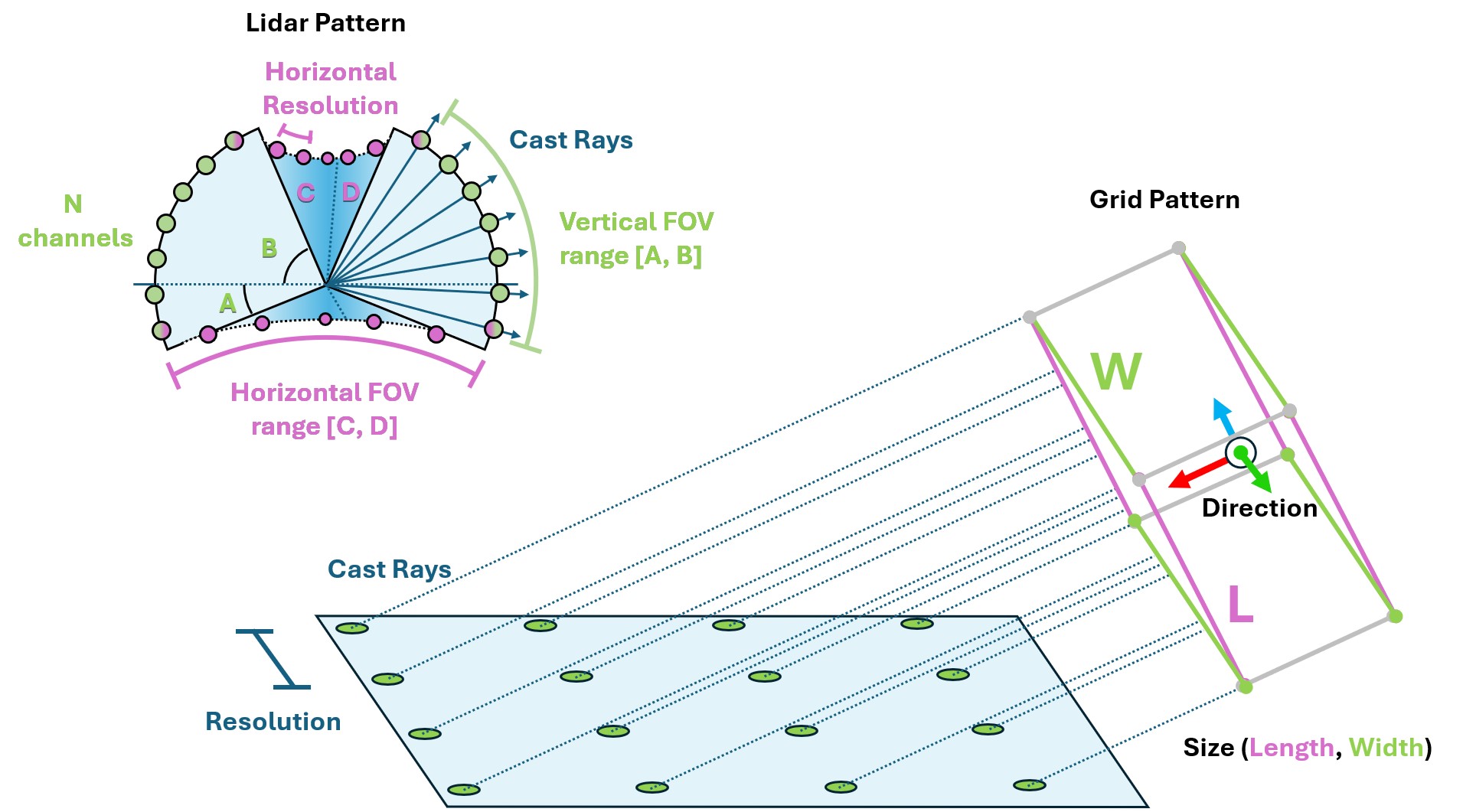
射线投射器报告所选模式中每条射线遇到的第一个碰撞点。射线不会反弹,也不受材质和不透明度影响。四足任务使用此传感器测量机器人周围的地形高度。
射线投射的实现取决于物理后端。在 PhysX 和 OV PhysX 上,配置的网格会在传感器初始化时加载到 Warp ,且必须保持静止。在 Newton 上,传感器查询实时场景的 BVH,因此能够感知所在环境中的所有碰撞形状、全局地形和动态刚体。Newton 会忽略 mesh_prim_paths ;可使用 isaaclab_newton.sensors.NewtonRaycastSensorCfg 明确指定这一行为,并访问 Newton 特有的选项。
选择射线模式和父坐标系:坐标系及传感器偏移决定其位姿,模式决定射线起点和方向。内置模式包括激光雷达和网格。
@configclass
class RaycasterSensorSceneCfg(InteractiveSceneCfg):
    """Design the scene with sensors on the robot."""

    # ground plane
    ground = AssetBaseCfg(
        prim_path="/World/Ground",
        spawn=sim_utils.UsdFileCfg(
            usd_path=f"{ISAAC_NUCLEUS_DIR}/Environments/Terrains/rough_plane.usd",
            scale=(1, 1, 1),
        ),
    )

    # lights
    dome_light = AssetBaseCfg(
        prim_path="/World/Light", spawn=sim_utils.DomeLightCfg(intensity=3000.0, color=(0.75, 0.75, 0.75))
    )

    # robot
    robot = replace(ANYMAL_C_CFG, prim_path="{ENV_REGEX_NS}/Robot")

    ray_caster = RayCasterCfg(
        prim_path="{ENV_REGEX_NS}/Robot/base",
        update_period=1 / 60,
        offset=RayCasterCfg.OffsetCfg(pos=(0, 0, 0.5)),
        mesh_prim_paths=["/World/Ground"],
        ray_alignment="yaw",
        pattern_cfg=patterns.LidarPatternCfg(
            channels=100, vertical_fov_range=[-90, 90], horizontal_fov_range=[-90, 90], horizontal_res=1.0
        ),
        debug_vis=bool(args_cli.visualizer),
    )
模式中的角度采用度。可启用调试可视化检查模式,测量性能时再关闭。
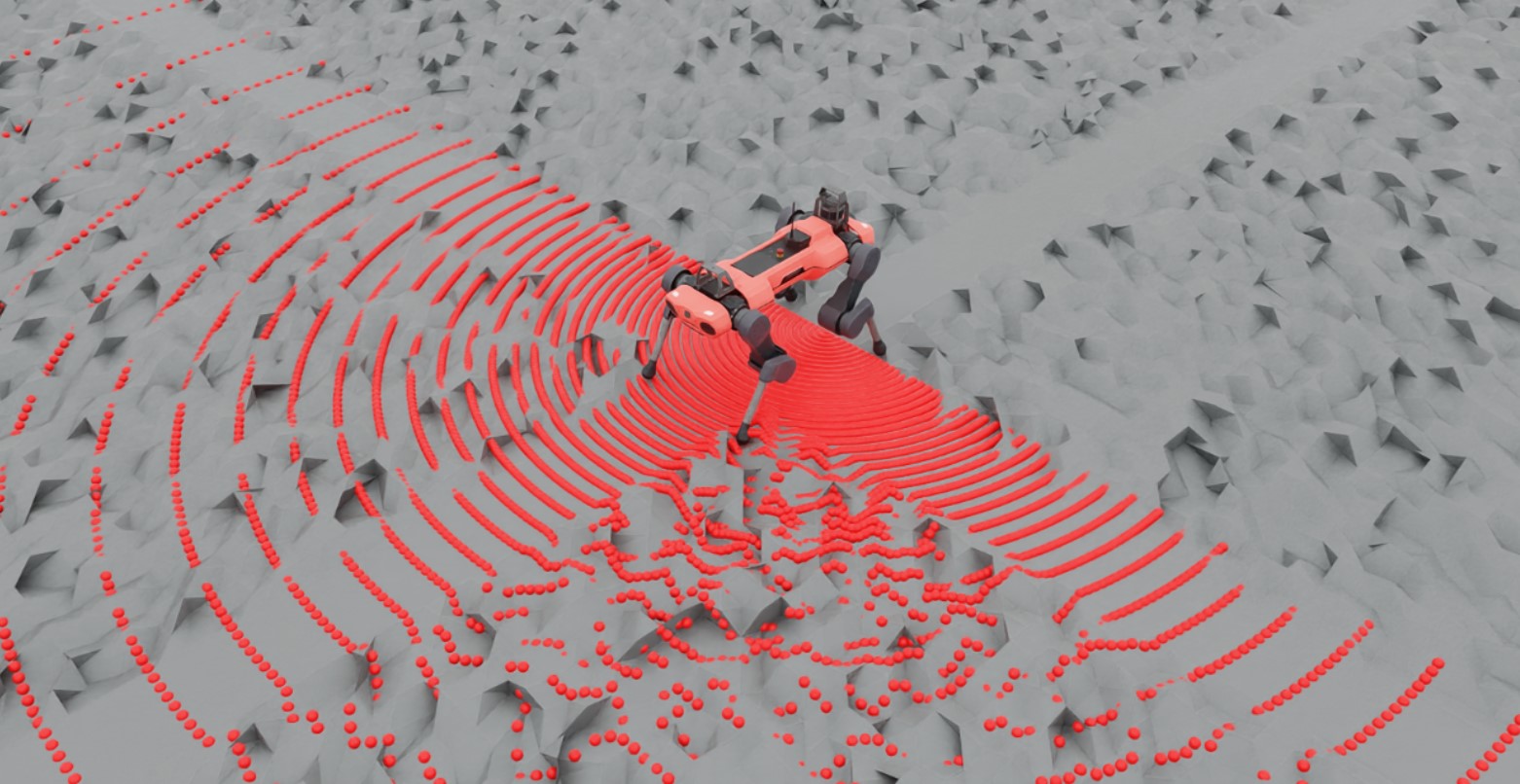
仿真期间,通过 data.ray_hits_w 读取命中位置:
def run_simulator(sim: sim_utils.SimulationContext, scene: InteractiveScene):
  .
  .
  .
  # Simulate physics
  while sim.is_running():
    .
    .
    .
    # print information from the sensors
      print("-------------------------------")
      print(scene["ray_caster"])
      print("Ray cast hit results: ", scene["ray_caster"].data.ray_hits_w)
-------------------------------
Ray-caster @ '/World/envs/env_.*/Robot/base/lidar_cage':
        view type            : <class 'isaacsim.core.experimental.prims.xform_prim.XformPrim'>
        update period (s)    : 0.016666666666666666
        number of meshes     : 1
        number of sensors    : 1
        number of rays/sensor: 18000
        total number of rays : 18000
Ray cast hit results:  tensor([[[-0.3698,  0.0357,  0.0000],
        [-0.3698,  0.0357,  0.0000],
        [-0.3698,  0.0357,  0.0000],
        ...,
        [    inf,     inf,     inf],
        [    inf,     inf,     inf],
        [    inf,     inf,     inf]]], device='cuda:0')
-------------------------------
命中位置的形状为 (N, B, 3),其中 N 是传感器数量,B 是射线数量。未命中的射线返回 inf。本例中的重复点来自半球激光雷达模式的底部极点,180 条水平方向的采样射线在那里重合。
在下面的示例中尝试不同模式,查看各自的命中位置。
raycaster_sensor.py 的代码
  1# Copyright (c) 2022-2026, The Isaac Lab Project Developers (https://github.com/isaac-sim/IsaacLab/blob/main/CONTRIBUTORS.md).
  2# All rights reserved.
  3#
  4# SPDX-License-Identifier: BSD-3-Clause
  5
  6"""Cast a lidar-style ray pattern against rough terrain."""
  7
  8import argparse
  9from typing import TYPE_CHECKING
 10
 11import torch
 12
 13import isaaclab.sim as sim_utils
 14from isaaclab.app import add_launcher_args, launch_simulation
 15from isaaclab.assets import AssetBaseCfg
 16from isaaclab.scene import InteractiveSceneCfg
 17from isaaclab.sensors.ray_caster import RayCasterCfg, patterns
 18from isaaclab.utils import configclass, instantiate, replace
 19from isaaclab.utils.assets import ISAAC_NUCLEUS_DIR
 20
 21from isaaclab_assets.robots.anymal import ANYMAL_C_CFG
 22
 23if TYPE_CHECKING:
 24    from isaaclab.scene import InteractiveScene
 25
 26parser = argparse.ArgumentParser(description="Example on using the raycaster sensor.")
 27parser.add_argument("--num_envs", type=int, default=1, help="Number of environments to spawn.")
 28parser.add_argument("--log_interval", type=int, default=100, help="Steps between compact sensor summaries.")
 29parser.add_argument("--max_steps", type=int, default=-1, help="Stop after this many steps; negative runs forever.")
 30parser.add_argument(
 31    "--physics",
 32    default="isaacsim_physx",
 33    choices=["isaacsim_physx"],
 34    help="Physics backend.",
 35)
 36add_launcher_args(parser)
 37parser.set_defaults(visualizer=["kit"])
 38args_cli = parser.parse_args()
 39if args_cli.log_interval < 1:
 40    parser.error("--log_interval must be at least 1.")
 41if args_cli.max_steps == 0 or args_cli.max_steps < -1:
 42    parser.error("--max_steps must be positive or -1.")
 43
 44
 45@configclass
 46class RaycasterSensorSceneCfg(InteractiveSceneCfg):
 47    """Design the scene with sensors on the robot."""
 48
 49    # ground plane
 50    ground = AssetBaseCfg(
 51        prim_path="/World/Ground",
 52        spawn=sim_utils.UsdFileCfg(
 53            usd_path=f"{ISAAC_NUCLEUS_DIR}/Environments/Terrains/rough_plane.usd",
 54            scale=(1, 1, 1),
 55        ),
 56    )
 57
 58    # lights
 59    dome_light = AssetBaseCfg(
 60        prim_path="/World/Light", spawn=sim_utils.DomeLightCfg(intensity=3000.0, color=(0.75, 0.75, 0.75))
 61    )
 62
 63    # robot
 64    robot = replace(ANYMAL_C_CFG, prim_path="{ENV_REGEX_NS}/Robot")
 65
 66    ray_caster = RayCasterCfg(
 67        prim_path="{ENV_REGEX_NS}/Robot/base",
 68        update_period=1 / 60,
 69        offset=RayCasterCfg.OffsetCfg(pos=(0, 0, 0.5)),
 70        mesh_prim_paths=["/World/Ground"],
 71        ray_alignment="yaw",
 72        pattern_cfg=patterns.LidarPatternCfg(
 73            channels=100, vertical_fov_range=[-90, 90], horizontal_fov_range=[-90, 90], horizontal_res=1.0
 74        ),
 75        debug_vis=bool(args_cli.visualizer),
 76    )
 77
 78
 79def run_simulator(sim: sim_utils.SimulationContext, scene: "InteractiveScene") -> None:
 80    """Run the simulator."""
 81    # Define simulation stepping
 82    sim_dt = sim.get_physics_dt()
 83    count = 0
 84
 85    while sim.is_running() and (args_cli.max_steps < 0 or count < args_cli.max_steps):
 86        if count % 500 == 0:
 87            # reset the scene entities
 88            # root state
 89            # we offset the root state by the origin since the states are written in simulation world frame
 90            # if this is not done, then the robots will be spawned at the (0, 0, 0) of the simulation world
 91            root_pose = scene["robot"].data.default_root_pose.torch.clone()
 92            root_pose[:, :3] += scene.env_origins
 93            scene["robot"].write_root_pose_to_sim_index(root_pose=root_pose)
 94            root_vel = scene["robot"].data.default_root_vel.torch.clone()
 95            scene["robot"].write_root_velocity_to_sim_index(root_velocity=root_vel)
 96            # set joint positions with some noise
 97            joint_pos, joint_vel = (
 98                scene["robot"].data.default_joint_pos.torch.clone(),
 99                scene["robot"].data.default_joint_vel.torch.clone(),
100            )
101            joint_pos += torch.rand_like(joint_pos) * 0.1
102            scene["robot"].write_joint_position_to_sim_index(position=joint_pos)
103            scene["robot"].write_joint_velocity_to_sim_index(velocity=joint_vel)
104            # clear internal buffers
105            scene.reset()
106            print("[INFO]: Resetting robot state...")
107        targets = scene["robot"].data.default_joint_pos.torch
108        scene["robot"].set_joint_position_target_index(target=targets)
109        scene.write_data_to_sim()
110        sim.step()
111        count += 1
112        scene.update(sim_dt)
113
114        if count % args_cli.log_interval == 0:
115            hits = scene["ray_caster"].data.ray_hits_w.torch
116            valid = torch.isfinite(hits).all(dim=-1)
117            print(f"[INFO] step={count} ray hit rate={valid.float().mean().item():.1%}")
118
119
120def main() -> None:
121    """Run the ray-caster example."""
122    sim_cfg = sim_utils.SimulationCfg(dt=0.005, device=args_cli.device)
123    with launch_simulation(sim_cfg, args_cli):
124        sim = sim_utils.SimulationContext(sim_cfg)
125        sim.set_camera_view(eye=[3.5, 3.5, 3.5], target=[0.0, 0.0, 0.0])
126        scene_cfg = RaycasterSensorSceneCfg(num_envs=args_cli.num_envs, env_spacing=2.0)
127        scene: InteractiveScene = instantiate(scene_cfg)
128        sim.reset()
129        print("[INFO]: Setup complete...")
130        run_simulator(sim, scene)
131
132
133if __name__ == "__main__":
134    main()