

创建基于管理器的强化学习环境#
使用 envs.ManagerBasedRLEnvCfg,将 创建基于管理器的基础环境 中的 Cartpole 环境扩展为强化学习任务。添加奖励和终止条件,定义智能体应学会什么,以及每个回合何时结束。配置中还可包含命令和课程。
环境类执行这些项,因此可通过配置修改任务。管理器式环境如何组织任务逻辑,见 直接式与管理器式 MDP。
代码#
本教程使用 isaaclab_tasks.core.cartpole 模块中定义的倒立摆环境。
cartpole_manager_env_cfg.py 代码
  1# Copyright (c) 2022-2026, The Isaac Lab Project Developers (https://github.com/isaac-sim/IsaacLab/blob/main/CONTRIBUTORS.md).
  2# All rights reserved.
  3#
  4# SPDX-License-Identifier: BSD-3-Clause
  5
  6"""Configuration for the manager-based cartpole environment."""
  7
  8import math
  9
 10import isaaclab.sim as sim_utils
 11from isaaclab.assets import ArticulationCfg, AssetBaseCfg
 12from isaaclab.envs import ManagerBasedRLEnvCfg
 13from isaaclab.managers import EventTermCfg as EventTerm
 14from isaaclab.managers import ObservationGroupCfg as ObsGroup
 15from isaaclab.managers import ObservationTermCfg as ObsTerm
 16from isaaclab.managers import RewardTermCfg as RewTerm
 17from isaaclab.managers import SceneEntityCfg
 18from isaaclab.managers import TerminationTermCfg as DoneTerm
 19from isaaclab.scene import InteractiveSceneCfg
 20from isaaclab.utils import configclass, replace
 21from isaaclab.visualizers import VisualizerCfg
 22
 23from isaaclab_assets.robots.cartpole import CARTPOLE_CFG
 24
 25from . import mdp
 26from .cartpole_common import LIGHT_ORIENTATION, CartpolePhysicsCfg
 27
 28##
 29# Scene definition
 30##
 31
 32
 33@configclass
 34class CartpoleSceneCfg(InteractiveSceneCfg):
 35    """Configuration for a cart-pole scene."""
 36
 37    # ground plane
 38    ground = AssetBaseCfg(
 39        prim_path="/World/ground",
 40        spawn=sim_utils.GroundPlaneCfg(size=(100.0, 100.0)),
 41    )
 42
 43    # cartpole
 44    robot: ArticulationCfg = replace(CARTPOLE_CFG, prim_path="{ENV_REGEX_NS}/Robot")
 45
 46    # lights
 47    distant_light = AssetBaseCfg(
 48        prim_path="/World/DistantLight",
 49        init_state=AssetBaseCfg.InitialStateCfg(rot=LIGHT_ORIENTATION),
 50        spawn=sim_utils.DistantLightCfg(color=(1.0, 1.0, 1.0), intensity=2000.0),
 51    )
 52
 53
 54##
 55# MDP settings
 56##
 57
 58
 59@configclass
 60class ActionsCfg:
 61    """Action specifications for the MDP."""
 62
 63    joint_effort = mdp.JointEffortActionCfg(asset_name="robot", joint_names=["slider_to_cart"], scale=100.0)
 64
 65
 66@configclass
 67class ObservationsCfg:
 68    """Observation specifications for the MDP."""
 69
 70    @configclass
 71    class PolicyCfg(ObsGroup):
 72        """Observations for policy group."""
 73
 74        # observation terms (order preserved)
 75        joint_pos_rel = ObsTerm(func=mdp.joint_pos_rel)
 76        joint_vel_rel = ObsTerm(func=mdp.joint_vel_rel)
 77
 78        def __post_init__(self):
 79            self.enable_corruption = False
 80            self.concatenate_terms = True
 81
 82    # observation groups
 83    policy: PolicyCfg = PolicyCfg()
 84
 85
 86@configclass
 87class EventCfg:
 88    """Configuration for events."""
 89
 90    # reset
 91    reset_cart_position = EventTerm(
 92        func=mdp.reset_joints_by_offset,
 93        mode="reset",
 94        params={
 95            "asset_cfg": SceneEntityCfg("robot", joint_names=["slider_to_cart"]),
 96            "position_range": (-1.0, 1.0),
 97            "velocity_range": (-0.5, 0.5),
 98        },
 99    )
100
101    reset_pole_position = EventTerm(
102        func=mdp.reset_joints_by_offset,
103        mode="reset",
104        params={
105            "asset_cfg": SceneEntityCfg("robot", joint_names=["cart_to_pole"]),
106            "position_range": (-0.25 * math.pi, 0.25 * math.pi),
107            "velocity_range": (-0.25 * math.pi, 0.25 * math.pi),
108        },
109    )
110
111
112@configclass
113class RewardsCfg:
114    """Reward terms for the MDP."""
115
116    # (1) Constant running reward
117    alive = RewTerm(func=mdp.is_alive, weight=1.0)
118    # (2) Failure penalty
119    terminating = RewTerm(func=mdp.is_terminated, weight=-2.0)
120    # (3) Primary task: keep pole upright
121    pole_pos = RewTerm(
122        func=mdp.joint_pos_target_l2,
123        weight=-1.0,
124        params={"asset_cfg": SceneEntityCfg("robot", joint_names=["cart_to_pole"]), "target": 0.0},
125    )
126    # (4) Shaping tasks: lower cart velocity
127    cart_vel = RewTerm(
128        func=mdp.joint_vel_l1,
129        weight=-0.01,
130        params={"asset_cfg": SceneEntityCfg("robot", joint_names=["slider_to_cart"])},
131    )
132    # (5) Shaping tasks: lower pole angular velocity
133    pole_vel = RewTerm(
134        func=mdp.joint_vel_l1,
135        weight=-0.005,
136        params={"asset_cfg": SceneEntityCfg("robot", joint_names=["cart_to_pole"])},
137    )
138    # (6) Success rate tracking (zero-weight, metric only)
139    success_rate = RewTerm(func=mdp.survival_success_rate, weight=0.0)
140
141
142@configclass
143class TerminationsCfg:
144    """Termination terms for the MDP."""
145
146    # (1) Time out
147    time_out = DoneTerm(func=mdp.time_out, time_out=True)
148    # (2) Cart out of bounds
149    cart_out_of_bounds = DoneTerm(
150        func=mdp.joint_pos_out_of_manual_limit,
151        params={"asset_cfg": SceneEntityCfg("robot", joint_names=["slider_to_cart"]), "bounds": (-3.0, 3.0)},
152    )
153
154
155##
156# Environment configuration
157##
158
159
160@configclass
161class CartpoleEnvCfg(ManagerBasedRLEnvCfg):
162    """Configuration for the cartpole environment."""
163
164    # Scene settings
165    scene: CartpoleSceneCfg = CartpoleSceneCfg(num_envs=4096, env_spacing=4.0)
166    # Basic settings
167    observations: ObservationsCfg = ObservationsCfg()
168    actions: ActionsCfg = ActionsCfg()
169    # MDP settings
170    rewards: RewardsCfg = RewardsCfg()
171    terminations: TerminationsCfg = TerminationsCfg()
172    events: EventCfg = EventCfg()
173
174    def __post_init__(self):
175        """Post initialization."""
176        # general settings
177        self.decimation = 2
178        self.episode_length_s = 5
179        # simulation settings
180        self.sim.dt = 1 / 120
181        self.sim.render_interval = self.decimation
182        self.sim.physics = CartpolePhysicsCfg()
183        # visualizer settings
184        self.sim.default_visualizer_cfg = VisualizerCfg(eye=(8.0, 0.0, 5.0))
用于运行环境的脚本 run_cartpole_rl_env.py 存在于 isaaclab/scripts/tutorials/03_envs 目录中。该脚本与前一个教程中的 cartpole_base_env.py 脚本类似,只是它使用 envs.ManagerBasedRLEnv 而不是 envs.ManagerBasedEnv 。
run_cartpole_rl_env.py 代码
 1# Copyright (c) 2022-2026, The Isaac Lab Project Developers (https://github.com/isaac-sim/IsaacLab/blob/main/CONTRIBUTORS.md).
 2# All rights reserved.
 3#
 4# SPDX-License-Identifier: BSD-3-Clause
 5
 6"""
 7This script demonstrates how to run the RL environment for the cartpole balancing task.
 8
 9.. code-block:: bash
10
11    uv run python scripts/tutorials/03_envs/run_cartpole_rl_env.py --num_envs 32 --viz kit
12
13Trailing ``key=value`` arguments (e.g. ``physics=isaacsim_physx``) are forwarded as Hydra-style
14overrides to the task configuration; see :func:`~isaaclab_tasks.utils.parse_env_cfg`.
15
16"""
17
18"""Parse the command-line arguments first."""
19
20import argparse
21
22from isaaclab.app import add_launcher_args, launch_simulation
23from isaaclab.utils import instantiate
24
25# add argparse arguments
26parser = argparse.ArgumentParser(description="Tutorial on running the cartpole RL environment.")
27parser.add_argument("--num_envs", type=int, default=16, help="Number of environments to spawn.")
28
29# append simulation launcher cli args
30add_launcher_args(parser)
31# parse the arguments, forwarding unrecognized ones as Hydra-style task config overrides
32args_cli, hydra_overrides = parser.parse_known_args()
33
34"""Rest everything follows."""
35
36import torch
37
38from isaaclab_tasks.utils import parse_env_cfg
39
40
41def main():
42    """Main function."""
43    # create environment configuration
44    env_cfg = parse_env_cfg(
45        "Isaac-Cartpole", device=args_cli.device, num_envs=args_cli.num_envs, overrides=hydra_overrides
46    )
47    # Launch the simulator runtime that the configuration needs
48    with launch_simulation(env_cfg, args_cli):
49        # setup RL environment
50        env = instantiate(env_cfg)
51
52        # simulate physics
53        count = 0
54        while env.sim.is_running():
55            with torch.inference_mode():
56                # reset
57                if count % 300 == 0:
58                    count = 0
59                    env.reset()
60                    print("-" * 80)
61                    print("[INFO]: Resetting environment...")
62                # sample random actions
63                joint_efforts = torch.randn_like(env.action_manager.action)
64                # step the environment
65                obs, rew, terminated, truncated, info = env.step(joint_efforts)
66                # print current orientation of pole
67                print("[Env 0]: Pole joint: ", obs["policy"][0][1].item())
68                # update counter
69                count += 1
70
71        # close the environment
72        env.close()
73
74
75if __name__ == "__main__":
76    # run the main function
77    main()
代码解释#
我们已经在 创建基于管理器的基础环境 教程中学习了上述部分,以了解如何指定场景、观测、动作和事件。因此,在本教程中,我们将只专注于环境的强化学习组件。
Isaac Lab 的 envs.mdp 模块提供了多种项的实现。本教程会使用其中一些,也可以自行定义。自定义项通常放在对应任务的子包中,例如 isaaclab_tasks.core.cartpole.mdp 。
定义奖励#
managers.RewardManager 用于计算智能体的奖励项。与其他管理器类似,它的术语是使用 managers.RewardTermCfg 配置的。 managers.RewardTermCfg 类指定了计算奖励的函数或可调用类,以及与之相关联的权重。它还使用 "params" 的参数字典,在奖励函数被调用时传递参数。
对于 cartpole 任务,我们将使用以下奖励项:
存活奖励: 鼓励智能体尽可能长时间保持存活状态。
终止奖励: 同样惩罚智能体的终止。
杆角度奖励: 鼓励智能体保持杆在期望的直立位置。
小车速度奖励: 鼓励智能体尽可能保持小车速度较小。
杆速度奖励: 鼓励智能体尽可能保持杆速度较小。
@configclass
class RewardsCfg:
    """Reward terms for the MDP."""

    # (1) Constant running reward
    alive = RewTerm(func=mdp.is_alive, weight=1.0)
    # (2) Failure penalty
    terminating = RewTerm(func=mdp.is_terminated, weight=-2.0)
    # (3) Primary task: keep pole upright
    pole_pos = RewTerm(
        func=mdp.joint_pos_target_l2,
        weight=-1.0,
        params={"asset_cfg": SceneEntityCfg("robot", joint_names=["cart_to_pole"]), "target": 0.0},
    )
    # (4) Shaping tasks: lower cart velocity
    cart_vel = RewTerm(
        func=mdp.joint_vel_l1,
        weight=-0.01,
        params={"asset_cfg": SceneEntityCfg("robot", joint_names=["slider_to_cart"])},
    )
    # (5) Shaping tasks: lower pole angular velocity
    pole_vel = RewTerm(
        func=mdp.joint_vel_l1,
        weight=-0.005,
        params={"asset_cfg": SceneEntityCfg("robot", joint_names=["cart_to_pole"])},
    )
    # (6) Success rate tracking (zero-weight, metric only)
    success_rate = RewTerm(func=mdp.survival_success_rate, weight=0.0)
定义终止条件#
大多数学习任务在有限数量的步骤中进行,我们称之为一个回合。例如,在 cartpole 任务中,我们希望智能体尽可能长时间地保持杆的平衡。然而,如果智能体达到不稳定或不安全状态,我们希望终止回合。另一方面,如果智能体能够长时间保持杆平衡,我们希望终止回合并开始新的回合,以便智能体可以学会从不同的起始配置中平衡杆。
managers.TerminationsCfg 配置了何时终止一个回合。在本例中,我们希望当满足以下任一条件时终止任务:
回合长度: 回合长度大于定义的最大回合长度。
小车越界: 小车走出边界 [-3, 3]。
标志 managers.TerminationsCfg.time_out 指定了术语是时间限制(截断)术语还是终止术语。这些用于指示 Gymnasium's documentation 中描述的两种终止类型。
@configclass
class TerminationsCfg:
    """Termination terms for the MDP."""

    # (1) Time out
    time_out = DoneTerm(func=mdp.time_out, time_out=True)
    # (2) Cart out of bounds
    cart_out_of_bounds = DoneTerm(
        func=mdp.joint_pos_out_of_manual_limit,
        params={"asset_cfg": SceneEntityCfg("robot", joint_names=["slider_to_cart"]), "bounds": (-3.0, 3.0)},
    )
定义命令#
对于各种目标条件的任务,指定智能体的目标或命令是有用的。这通过 managers.CommandManager 处理。命令管理器在每一步中处理重新采样和更新命令。它还可以用作向智能体提供命令的观测。
对于这个简单的任务,我们不使用任何命令。因此,我们将这个属性保留为默认值,即 None。您可以在其他运动或操控任务中看到如何定义命令管理器的示例。
定义课程#
在训练学习智能体时,往往从一个简单的任务开始,并随着智能体的训练逐渐增加任务的难度。这就是课程学习的理念。在 Isaac Lab 中,我们提供了一个 managers.CurriculumManager 类,可以用来为您的环境定义课程。
在本教程中,为了简单起见,我们不实现课程,但是您可以在其他 locomotion 或 manipulation 任务中看到课程定义的示例。我们使用一个简单的经过课程来定义一个不修改环境的课程管理器。
将所有内容联系起来#
通过定义上述所有组件,我们现在可以为 cartpole 环境创建 ManagerBasedRLEnvCfg 配置。这类似于 创建基于管理器的基础环境 中定义的 ManagerBasedEnvCfg ,只是在上述部分中添加了解释的强化学习组件。
@configclass
class CartpoleEnvCfg(ManagerBasedRLEnvCfg):
    """Configuration for the cartpole environment."""

    # Scene settings
    scene: CartpoleSceneCfg = CartpoleSceneCfg(num_envs=4096, env_spacing=4.0)
    # Basic settings
    observations: ObservationsCfg = ObservationsCfg()
    actions: ActionsCfg = ActionsCfg()
    # MDP settings
    rewards: RewardsCfg = RewardsCfg()
    terminations: TerminationsCfg = TerminationsCfg()
    events: EventCfg = EventCfg()

    def __post_init__(self):
        """Post initialization."""
        # general settings
        self.decimation = 2
        self.episode_length_s = 5
        # simulation settings
        self.sim.dt = 1 / 120
        self.sim.render_interval = self.decimation
        self.sim.physics = CartpolePhysicsCfg()
        # visualizer settings
        self.sim.default_visualizer_cfg = VisualizerCfg(eye=(8.0, 0.0, 5.0))
运行仿真循环#
回到 run_cartpole_rl_env.py 脚本,其仿真循环与上一教程相似。区别在于,配置中的 class_type 创建的是 envs.ManagerBasedRLEnv 实例,而不是 envs.ManagerBasedEnv 。因此, envs.ManagerBasedRLEnv.step() 现在会返回奖励和终止状态等额外信号。信息字典还会记录各项对奖励的贡献、各项的终止状态、回合长度等量。
def main():
    """Main function."""
    # create environment configuration
    env_cfg = parse_env_cfg(
        "Isaac-Cartpole", device=args_cli.device, num_envs=args_cli.num_envs, overrides=hydra_overrides
    )
    # Launch the simulator runtime that the configuration needs
    with launch_simulation(env_cfg, args_cli):
        # setup RL environment
        env = instantiate(env_cfg)

        # simulate physics
        count = 0
        while env.sim.is_running():
            with torch.inference_mode():
                # reset
                if count % 300 == 0:
                    count = 0
                    env.reset()
                    print("-" * 80)
                    print("[INFO]: Resetting environment...")
                # sample random actions
                joint_efforts = torch.randn_like(env.action_manager.action)
                # step the environment
                obs, rew, terminated, truncated, info = env.step(joint_efforts)
                # print current orientation of pole
                print("[Env 0]: Pole joint: ", obs["policy"][0][1].item())
                # update counter
                count += 1

        # close the environment
        env.close()
代码执行#
与之前的教程类似,可以通过执行 run_cartpole_rl_env.py 脚本来运行环境。
python scripts/tutorials/03_envs/run_cartpole_rl_env.py --num_envs 32 --viz kit
这应该会打开与上一个教程中类似的仿真。然而,这次,环境返回了更多的信号,指定了奖励和终止状态。此外,各个环境在根据配置中指定的终止条件终止时会重新进行重置。
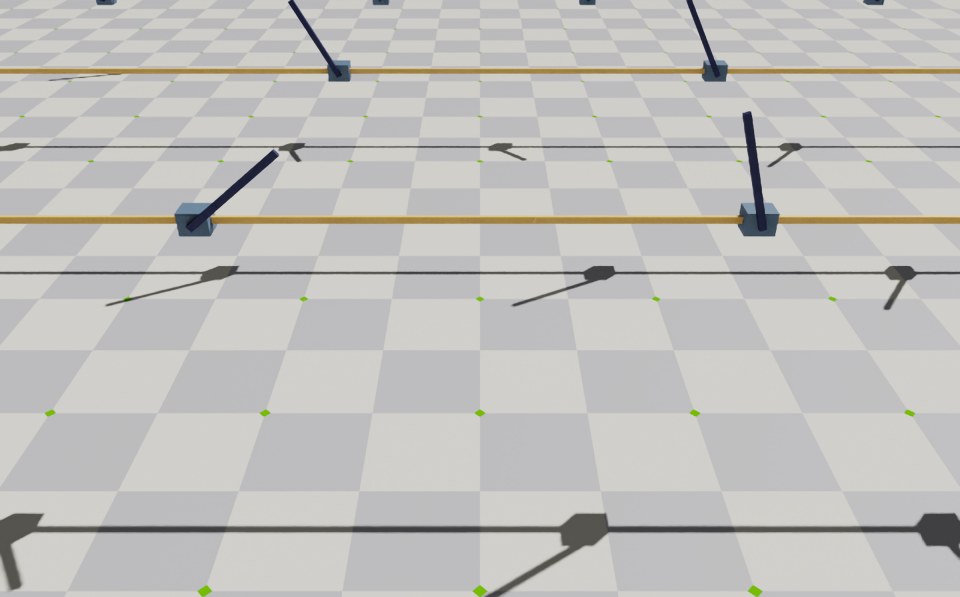
要停止仿真,您可以关闭窗口,或者在启动仿真的终端中按 Ctrl+C 。
在本教程中,我们学习了如何为强化学习创建任务环境。我们通过扩展基础环境来包括奖励、终止条件、命令和课程术语来实现这一点。我们还学习了如何使用 envs.ManagerBasedRLEnv 类来运行环境并从中接收各种信号。
虽然可以手动为所需的任务创建 envs.ManagerBasedRLEnv 类的实例,但这并不可伸缩,因为它需要为每个任务使用专门的脚本。因此,我们利用 gymnasium.make() 函数来创建具有 gym 接口的环境。我们将在下一个教程中学习如何做到这一点。