

使用操作空间控制器#
使用 controllers.OperationalSpaceController,通过关节力/力矩控制末端运动与接触力。本例向倾斜墙面施压,同时在不受约束的方向跟踪位姿。控制方法及其要求见 控制器。
操作空间控制的参考资料:
O Khatib. A unified approach for motion and force control of robot manipulators: The operational space formulation. IEEE Journal of Robotics and Automation, 3(1):43–53, 1987. URL http://dx.doi.org/10.1109/JRA.1987.1087068.
Robot Dynamics Lecture Notes by Marco Hutter (ETH Zurich). URL https://ethz.ch/content/dam/ethz/special-interest/mavt/robotics-n-intelligent-systems/rsl-dam/documents/RobotDynamics2017/RD_HS2017script.pdf
本教程使用 Isaac Sim PhysX,需要安装 Isaac Sim。目标四元数采用 (x, y, z, w) 顺序,使末端执行器朝向倾斜墙面。控制器选择和控制循环的说明见 控制器 。
代码#
教程对应于 scripts/tutorials/05_controllers 目录中的 run_osc.py 脚本。
run_osc.py 的代码
  1# Copyright (c) 2022-2026, The Isaac Lab Project Developers (https://github.com/isaac-sim/IsaacLab/blob/main/CONTRIBUTORS.md).
  2# All rights reserved.
  3#
  4# SPDX-License-Identifier: BSD-3-Clause
  5
  6"""
  7This script demonstrates how to use the operational space controller (OSC) with the simulator.
  8
  9The OSC controller can be configured in different modes. It uses the dynamical quantities such as Jacobians and
 10mass matricescomputed by PhysX.
 11
 12.. code-block:: bash
 13
 14    # Usage
 15    uv run python scripts/tutorials/05_controllers/run_osc.py
 16
 17"""
 18
 19"""Parse the command-line arguments first."""
 20
 21import argparse
 22from typing import TYPE_CHECKING
 23
 24from isaaclab.app import add_launcher_args, launch_simulation
 25
 26# add argparse arguments
 27parser = argparse.ArgumentParser(description="Tutorial on using the operational space controller.")
 28parser.add_argument("--num_envs", type=int, default=128, help="Number of environments to spawn.")
 29# append simulation launcher cli args
 30add_launcher_args(parser)
 31# parse the arguments
 32args_cli = parser.parse_args()
 33
 34"""Rest everything follows."""
 35
 36import torch
 37
 38import isaaclab.sim as sim_utils
 39from isaaclab.assets import Articulation, AssetBaseCfg
 40from isaaclab.controllers import OperationalSpaceController, OperationalSpaceControllerCfg
 41from isaaclab.markers import VisualizationMarkers
 42from isaaclab.markers.config import FRAME_MARKER_CFG
 43from isaaclab.scene import InteractiveSceneCfg
 44from isaaclab.sensors import ContactSensorCfg
 45from isaaclab.utils import clone, configclass, instantiate, replace
 46from isaaclab.utils.math import (
 47    combine_frame_transforms,
 48    matrix_from_quat,
 49    quat_apply_inverse,
 50    quat_inv,
 51    subtract_frame_transforms,
 52)
 53
 54if TYPE_CHECKING:
 55    from isaaclab.scene import InteractiveScene
 56
 57##
 58# Pre-defined configs
 59##
 60from isaaclab_assets import FRANKA_PANDA_HIGH_PD_CFG  # isort:skip
 61
 62
 63@configclass
 64class SceneCfg(InteractiveSceneCfg):
 65    """Configuration for a simple scene with a tilted wall."""
 66
 67    # ground plane
 68    ground = AssetBaseCfg(
 69        prim_path="/World/defaultGroundPlane",
 70        spawn=sim_utils.GroundPlaneCfg(),
 71    )
 72
 73    # lights
 74    dome_light = AssetBaseCfg(
 75        prim_path="/World/Light", spawn=sim_utils.DomeLightCfg(intensity=3000.0, color=(0.75, 0.75, 0.75))
 76    )
 77
 78    # Tilted wall
 79    tilted_wall = AssetBaseCfg(
 80        prim_path="{ENV_REGEX_NS}/TiltedWall",
 81        spawn=sim_utils.CuboidCfg(
 82            size=(2.0, 1.5, 0.01),
 83            collision_props=sim_utils.UsdPhysicsCollisionCfg(),
 84            visual_material=sim_utils.PreviewSurfaceCfg(diffuse_color=(1.0, 0.0, 0.0), opacity=0.1),
 85            rigid_props=sim_utils.UsdPhysicsRigidBodyCfg(kinematic_enabled=True),
 86            activate_contact_sensors=True,
 87        ),
 88        init_state=AssetBaseCfg.InitialStateCfg(
 89            pos=(0.6 + 0.085, 0.0, 0.3), rot=(0.0, -0.3826834324, 0.0, 0.9238795325)
 90        ),
 91    )
 92
 93    contact_forces = ContactSensorCfg(
 94        prim_path="/World/envs/env_.*/TiltedWall",
 95        update_period=0.0,
 96        history_length=2,
 97        debug_vis=False,
 98    )
 99
100    robot = replace(FRANKA_PANDA_HIGH_PD_CFG, prim_path="{ENV_REGEX_NS}/Robot")
101    robot.spawn.variants["Physics"] = "physx"
102    robot.actuators["panda_arm"].stiffness = 0.0
103    robot.actuators["panda_arm"].damping = 0.0
104    robot.spawn.rigid_props.disable_gravity = True
105
106
107def run_simulator(sim: sim_utils.SimulationContext, scene: "InteractiveScene"):
108    """Runs the simulation loop.
109
110    Args:
111        sim: (SimulationContext) Simulation context.
112        scene: (InteractiveScene) Interactive scene.
113    """
114
115    # Extract scene entities for readability.
116    robot = scene["robot"]
117    contact_forces = scene["contact_forces"]
118
119    # Obtain indices for the end-effector and arm joints
120    ee_frame_name = "panda_leftfinger"
121    arm_joint_names = ["panda_joint.*"]
122    ee_frame_idx = robot.find_bodies(ee_frame_name)[0][0]
123    arm_joint_ids = robot.find_joints(arm_joint_names)[0]
124
125    # Create the OSC
126    osc_cfg = OperationalSpaceControllerCfg(
127        target_types=["pose_abs", "wrench_abs"],
128        impedance_mode="variable_kp",
129        inertial_dynamics_decoupling=True,
130        partial_inertial_dynamics_decoupling=False,
131        gravity_compensation=False,
132        motion_damping_ratio_task=1.0,
133        contact_wrench_stiffness_task=[0.0, 0.0, 0.1, 0.0, 0.0, 0.0],
134        motion_control_axes_task=[1, 1, 0, 1, 1, 1],
135        contact_wrench_control_axes_task=[0, 0, 1, 0, 0, 0],
136        nullspace_control="position",
137    )
138    osc = OperationalSpaceController(osc_cfg, num_envs=scene.num_envs, device=sim.device)
139
140    # Markers
141    frame_marker_cfg = clone(FRAME_MARKER_CFG)
142    frame_marker_cfg.markers["frame"].scale = (0.1, 0.1, 0.1)
143    ee_marker = VisualizationMarkers(replace(frame_marker_cfg, prim_path="/Visuals/ee_current"))
144    goal_marker = VisualizationMarkers(replace(frame_marker_cfg, prim_path="/Visuals/ee_goal"))
145
146    # Define targets for the arm (x,y,z,qx,qy,qz,qw)
147    ee_goal_pose_set_tilted_b = torch.tensor(
148        [
149            [0.6, 0.15, 0.3, 0.92387953, 0.0, 0.38268343, 0.0],
150            [0.6, -0.3, 0.3, 0.92387953, 0.0, 0.38268343, 0.0],
151            [0.8, 0.0, 0.5, 0.92387953, 0.0, 0.38268343, 0.0],
152        ],
153        device=sim.device,
154    )
155    ee_goal_wrench_set_tilted_task = torch.tensor(
156        [
157            [0.0, 0.0, 10.0, 0.0, 0.0, 0.0],
158            [0.0, 0.0, 10.0, 0.0, 0.0, 0.0],
159            [0.0, 0.0, 10.0, 0.0, 0.0, 0.0],
160        ],
161        device=sim.device,
162    )
163    kp_set_task = torch.tensor(
164        [
165            [360.0, 360.0, 360.0, 360.0, 360.0, 360.0],
166            [420.0, 420.0, 420.0, 420.0, 420.0, 420.0],
167            [320.0, 320.0, 320.0, 320.0, 320.0, 320.0],
168        ],
169        device=sim.device,
170    )
171    ee_target_set = torch.cat([ee_goal_pose_set_tilted_b, ee_goal_wrench_set_tilted_task, kp_set_task], dim=-1)
172
173    # Define simulation stepping
174    sim_dt = sim.get_physics_dt()
175
176    # Update existing buffers
177    # Note: We need to update buffers before the first step for the controller.
178    robot.update(dt=sim_dt)
179
180    # Get the center of the robot soft joint limits
181    joint_centers = torch.mean(robot.data.soft_joint_pos_limits.torch[:, arm_joint_ids, :], dim=-1)
182
183    # get the updated states
184    (
185        jacobian_b,
186        mass_matrix,
187        gravity,
188        ee_pose_b,
189        ee_vel_b,
190        root_pose_w,
191        ee_pose_w,
192        ee_force_b,
193        joint_pos,
194        joint_vel,
195    ) = update_states(sim, scene, robot, ee_frame_idx, arm_joint_ids, contact_forces)
196
197    # Track the given target command
198    current_goal_idx = 0  # Current goal index for the arm
199    command = torch.zeros(
200        scene.num_envs, osc.action_dim, device=sim.device
201    )  # Generic target command, which can be pose, position, force, etc.
202    ee_target_pose_b = torch.zeros(scene.num_envs, 7, device=sim.device)  # Target pose in the body frame
203    ee_target_pose_w = torch.zeros(scene.num_envs, 7, device=sim.device)  # Target pose in the world frame (for marker)
204
205    # Set joint efforts to zero
206    zero_joint_efforts = torch.zeros(scene.num_envs, robot.num_joints, device=sim.device)
207    joint_efforts = torch.zeros(scene.num_envs, len(arm_joint_ids), device=sim.device)
208
209    count = 0
210    # Simulation loop
211    while sim.is_running():
212        # reset every 500 steps
213        if count % 500 == 0:
214            # reset joint state to default
215            default_joint_pos = robot.data.default_joint_pos.torch.clone()
216            default_joint_vel = robot.data.default_joint_vel.torch.clone()
217            robot.write_joint_position_to_sim_index(position=default_joint_pos)
218            robot.write_joint_velocity_to_sim_index(velocity=default_joint_vel)
219            robot.set_joint_effort_target_index(target=zero_joint_efforts)  # Set zero torques in the initial step
220            robot.write_data_to_sim()
221            robot.reset()
222            # reset contact sensor
223            contact_forces.reset()
224            # reset target pose
225            robot.update(sim_dt)
226            _, _, _, ee_pose_b, _, _, _, _, _, _ = update_states(
227                sim, scene, robot, ee_frame_idx, arm_joint_ids, contact_forces
228            )  # at reset, the jacobians are not updated to the latest state
229            command, ee_target_pose_b, ee_target_pose_w, current_goal_idx = update_target(
230                sim, scene, osc, root_pose_w, ee_target_set, current_goal_idx
231            )
232            # set the osc command
233            osc.reset()
234            command, task_frame_pose_b = convert_to_task_frame(osc, command=command, ee_target_pose_b=ee_target_pose_b)
235            osc.set_command(command=command, current_ee_pose_b=ee_pose_b, current_task_frame_pose_b=task_frame_pose_b)
236        else:
237            # get the updated states
238            (
239                jacobian_b,
240                mass_matrix,
241                gravity,
242                ee_pose_b,
243                ee_vel_b,
244                root_pose_w,
245                ee_pose_w,
246                ee_force_b,
247                joint_pos,
248                joint_vel,
249            ) = update_states(sim, scene, robot, ee_frame_idx, arm_joint_ids, contact_forces)
250            # compute the joint commands
251            joint_efforts = osc.compute(
252                jacobian_b=jacobian_b,
253                current_ee_pose_b=ee_pose_b,
254                current_ee_vel_b=ee_vel_b,
255                current_ee_force_b=ee_force_b,
256                mass_matrix=mass_matrix,
257                gravity=gravity,
258                current_joint_pos=joint_pos,
259                current_joint_vel=joint_vel,
260                nullspace_joint_pos_target=joint_centers,
261            )
262            # apply actions
263            robot.set_joint_effort_target_index(target=joint_efforts, joint_ids=arm_joint_ids)
264            robot.write_data_to_sim()
265
266        # update marker positions
267        ee_marker.visualize(ee_pose_w[:, 0:3], ee_pose_w[:, 3:7])
268        goal_marker.visualize(ee_target_pose_w[:, 0:3], ee_target_pose_w[:, 3:7])
269
270        # perform step
271        sim.step(render=True)
272        # update robot buffers
273        robot.update(sim_dt)
274        # update buffers
275        scene.update(sim_dt)
276        # update sim-time
277        count += 1
278
279
280# Update robot states
281def update_states(
282    sim: sim_utils.SimulationContext,
283    scene: "InteractiveScene",
284    robot: Articulation,
285    ee_frame_idx: int,
286    arm_joint_ids: list[int],
287    contact_forces,
288):
289    """Update the robot states.
290
291    Args:
292        sim: (SimulationContext) Simulation context.
293        scene: (InteractiveScene) Interactive scene.
294        robot: (Articulation) Robot articulation.
295        ee_frame_idx: (int) End-effector frame index.
296        arm_joint_ids: (list[int]) Arm joint indices.
297        contact_forces: (ContactSensor) Contact sensor.
298
299    Returns:
300        jacobian_b (torch.tensor): Jacobian in the body frame.
301        mass_matrix (torch.tensor): Mass matrix.
302        gravity (torch.tensor): Gravity vector.
303        ee_pose_b (torch.tensor): End-effector pose in the body frame.
304        ee_vel_b (torch.tensor): End-effector velocity in the body frame.
305        root_pose_w (torch.tensor): Root pose in the world frame.
306        ee_pose_w (torch.tensor): End-effector pose in the world frame.
307        ee_force_b (torch.tensor): End-effector force in the body frame.
308        joint_pos (torch.tensor): The joint positions.
309        joint_vel (torch.tensor): The joint velocities.
310
311    Raises:
312        ValueError: Undefined target_type.
313    """
314    # obtain dynamics related quantities from simulation
315    ee_jacobi_idx = ee_frame_idx - 1
316    # The J / M / g DoF axis prepends ``num_base_dofs`` floating-base columns
317    # (0 for fixed-base, 6 for floating-base); shift the actuated-joint ids by
318    # ``num_base_dofs`` to address the actuated-joint columns directly.
319    jacobi_joint_ids = [j + robot.num_base_dofs for j in arm_joint_ids]
320    jacobian_w = robot.data.body_link_jacobian_w.torch[:, ee_jacobi_idx, :, jacobi_joint_ids]
321    mass_matrix = robot.data.mass_matrix.torch[:, jacobi_joint_ids, :][:, :, jacobi_joint_ids]
322    gravity = robot.data.gravity_compensation_forces.torch[:, jacobi_joint_ids]
323    # Convert the Jacobian from world to root frame
324    jacobian_b = jacobian_w.clone()
325    root_rot_matrix = matrix_from_quat(quat_inv(robot.data.root_quat_w.torch))
326    jacobian_b[:, :3, :] = torch.bmm(root_rot_matrix, jacobian_b[:, :3, :])
327    jacobian_b[:, 3:, :] = torch.bmm(root_rot_matrix, jacobian_b[:, 3:, :])
328
329    # Compute current pose of the end-effector
330    root_pos_w = robot.data.root_pos_w.torch
331    root_quat_w = robot.data.root_quat_w.torch
332    ee_pos_w = robot.data.body_pos_w.torch[:, ee_frame_idx]
333    ee_quat_w = robot.data.body_quat_w.torch[:, ee_frame_idx]
334    ee_pos_b, ee_quat_b = subtract_frame_transforms(root_pos_w, root_quat_w, ee_pos_w, ee_quat_w)
335    root_pose_w = torch.cat([root_pos_w, root_quat_w], dim=-1)
336    ee_pose_w = torch.cat([ee_pos_w, ee_quat_w], dim=-1)
337    ee_pose_b = torch.cat([ee_pos_b, ee_quat_b], dim=-1)
338
339    # Compute the current velocity of the end-effector
340    ee_vel_w = robot.data.body_vel_w.torch[:, ee_frame_idx, :]  # Extract end-effector velocity in the world frame
341    root_vel_w = robot.data.root_vel_w.torch  # Extract root velocity in the world frame
342    relative_vel_w = ee_vel_w - root_vel_w  # Compute the relative velocity in the world frame
343    ee_lin_vel_b = quat_apply_inverse(robot.data.root_quat_w.torch, relative_vel_w[:, 0:3])  # From world to root frame
344    ee_ang_vel_b = quat_apply_inverse(robot.data.root_quat_w.torch, relative_vel_w[:, 3:6])
345    ee_vel_b = torch.cat([ee_lin_vel_b, ee_ang_vel_b], dim=-1)
346
347    # Calculate the contact force
348    ee_force_w = torch.zeros(scene.num_envs, 3, device=sim.device)
349    sim_dt = sim.get_physics_dt()
350    contact_forces.update(sim_dt)  # update contact sensor
351    # Calculate the contact force by averaging over last four time steps (i.e., to smoothen) and
352    # taking the max of three surfaces as only one should be the contact of interest
353    ee_force_w, _ = torch.max(torch.mean(contact_forces.data.net_normal_forces_w_history, dim=1), dim=1)
354
355    # This is a simplification, only for the sake of testing.
356    ee_force_b = ee_force_w
357
358    # Get joint positions and velocities
359    joint_pos = robot.data.joint_pos.torch[:, arm_joint_ids]
360    joint_vel = robot.data.joint_vel.torch[:, arm_joint_ids]
361
362    return (
363        jacobian_b,
364        mass_matrix,
365        gravity,
366        ee_pose_b,
367        ee_vel_b,
368        root_pose_w,
369        ee_pose_w,
370        ee_force_b,
371        joint_pos,
372        joint_vel,
373    )
374
375
376# Update the target commands
377def update_target(
378    sim: sim_utils.SimulationContext,
379    scene: "InteractiveScene",
380    osc: OperationalSpaceController,
381    root_pose_w: torch.tensor,
382    ee_target_set: torch.tensor,
383    current_goal_idx: int,
384):
385    """Update the targets for the operational space controller.
386
387    Args:
388        sim: (SimulationContext) Simulation context.
389        scene: (InteractiveScene) Interactive scene.
390        osc: (OperationalSpaceController) Operational space controller.
391        root_pose_w: (torch.tensor) Root pose in the world frame.
392        ee_target_set: (torch.tensor) End-effector target set.
393        current_goal_idx: (int) Current goal index.
394
395    Returns:
396        command (torch.tensor): Updated target command.
397        ee_target_pose_b (torch.tensor): Updated target pose in the body frame.
398        ee_target_pose_w (torch.tensor): Updated target pose in the world frame.
399        next_goal_idx (int): Next goal index.
400
401    Raises:
402        ValueError: Undefined target_type.
403    """
404
405    # update the ee desired command
406    command = torch.zeros(scene.num_envs, osc.action_dim, device=sim.device)
407    command[:] = ee_target_set[current_goal_idx]
408
409    # update the ee desired pose
410    ee_target_pose_b = torch.zeros(scene.num_envs, 7, device=sim.device)
411    for target_type in osc.cfg.target_types:
412        if target_type == "pose_abs":
413            ee_target_pose_b[:] = command[:, :7]
414        elif target_type == "wrench_abs":
415            pass  # ee_target_pose_b could stay at the root frame for force control, what matters is ee_target_b
416        else:
417            raise ValueError("Undefined target_type within update_target().")
418
419    # update the target desired pose in world frame (for marker)
420    ee_target_pos_w, ee_target_quat_w = combine_frame_transforms(
421        root_pose_w[:, 0:3], root_pose_w[:, 3:7], ee_target_pose_b[:, 0:3], ee_target_pose_b[:, 3:7]
422    )
423    ee_target_pose_w = torch.cat([ee_target_pos_w, ee_target_quat_w], dim=-1)
424
425    next_goal_idx = (current_goal_idx + 1) % len(ee_target_set)
426
427    return command, ee_target_pose_b, ee_target_pose_w, next_goal_idx
428
429
430# Convert the target commands to the task frame
431def convert_to_task_frame(osc: OperationalSpaceController, command: torch.tensor, ee_target_pose_b: torch.tensor):
432    """Converts the target commands to the task frame.
433
434    Args:
435        osc: OperationalSpaceController object.
436        command: Command to be converted.
437        ee_target_pose_b: Target pose in the body frame.
438
439    Returns:
440        command (torch.tensor): Target command in the task frame.
441        task_frame_pose_b (torch.tensor): Target pose in the task frame.
442
443    Raises:
444        ValueError: Undefined target_type.
445    """
446    command = command.clone()
447    task_frame_pose_b = ee_target_pose_b.clone()
448
449    cmd_idx = 0
450    for target_type in osc.cfg.target_types:
451        if target_type == "pose_abs":
452            command[:, :3], command[:, 3:7] = subtract_frame_transforms(
453                task_frame_pose_b[:, :3], task_frame_pose_b[:, 3:], command[:, :3], command[:, 3:7]
454            )
455            cmd_idx += 7
456        elif target_type == "wrench_abs":
457            # These are already defined in target frame for ee_goal_wrench_set_tilted_task (since it is
458            # easier), so not transforming
459            cmd_idx += 6
460        else:
461            raise ValueError("Undefined target_type within _convert_to_task_frame().")
462
463    return command, task_frame_pose_b
464
465
466def main():
467    """Main function."""
468    # Configure the simulation
469    sim_cfg = sim_utils.SimulationCfg(dt=0.01, device=args_cli.device)
470    # Launch the simulator runtime that the configuration needs
471    with launch_simulation(sim_cfg, args_cli):
472        # Initialize the simulation context
473        sim = sim_utils.SimulationContext(sim_cfg)
474        # Set main camera
475        sim.set_camera_view([2.5, 2.5, 2.5], [0.0, 0.0, 0.0])
476        # Design scene
477        scene_cfg = SceneCfg(num_envs=args_cli.num_envs, env_spacing=2.0)
478        scene = instantiate(scene_cfg)
479        # Play the simulator
480        sim.reset()
481        # Now we are ready!
482        print("[INFO]: Setup complete...")
483        # Run the simulator
484        run_simulator(sim, scene)
485
486
487if __name__ == "__main__":
488    # run the main function
489    main()
创建一个操作空间控制器#
OperationalSpaceController 类计算机器人在任务空间中同时进行运动和力控制时的关节力/扭矩。
这个任务空间的参考坐标系可以是欧几里德空间中的任意坐标系。默认情况下,它是机器人的基坐标系。然而,在某些情况下,相对于其他坐标系定义目标坐标会更容易。在这种情况下,应该在 set_command 方法的 current_task_frame_pose_b 参数中提供该任务参考坐标系相对于机器人基坐标系的姿态。例如,在这个教程中,将目标命令相对于与墙面平行的坐标系定义是有意义的,因为这样力控制方向将仅在该坐标系的 z 轴上非零。设置为具有与墙面相同方向的目标姿态就是这样一个候选项,并在本教程中作为任务坐标系使用。因此,应该以这个任务参考坐标系为考虑来设置所有到 OperationalSpaceControllerCfg 的参数。
运动控制的任务空间目标可用绝对值表示(相对于机器人基座, target_types: "pose_abs" ),也可相对于末端执行器当前位姿表示( target_types: "pose_rel" )。力控制的任务空间目标可用绝对值表示(相对于机器人基座, target_types: "wrench_abs" )。如果希望同时施加位姿与力控制, target_types 应为 ["pose_abs", "wrench_abs"] 或 ["pose_rel", "wrench_abs"] 等列表。
运动控制和力控制的作用轴,分别由 motion_control_axes_task 和 contact_wrench_control_axes_task 指定。这两个列表应为六个轴(平移和旋转)分别填写 0 或 1,且彼此互补。例如,x 轴的 motion_control_axes_task 为 0 时, contact_wrench_control_axes_task 应为 1 。
运动控制轴的目标刚度和阻尼比通过 motion_stiffness_task 和 motion_damping_ratio_task 设置。它们可以是标量,表示所有轴使用相同值;也可以是包含六个标量的列表,分别对应各轴。刚度和阻尼比也可以作为指令的一部分,例如让强化学习算法学习这些值,或在运行中调整。此时,将 impedance_mode 设为 "variable_kp" 可在指令中加入刚度,设为 "variable" 则同时加入刚度和阻尼比。还应设置 motion_stiffness_limits_task 和 motion_damping_ratio_limits_task,限制刚度和阻尼比的取值范围。
对于接触力控制,可以通过不设置 contact_wrench_stiffness_task 来应用开环力控制,或者通过设置所需刚度值来应用带有前馈项的闭环力控制,其使用 contact_wrench_stiffness_task 参数,该参数可以是一个标量或六个标量的列表。请注意,目前只有接触力矩的线性部分(因此是 contact_wrench_stiffness_task 的前三个元素)在闭环控制中被考虑,因为接触传感器无法测量旋转部分。
对于运动控制,应将 inertial_dynamics_decoupling 设置为 True ,以使用机器人的惯性矩阵来解耦任务空间中的期望加速度。这对于运动控制的精确性非常重要,特别是对于快速运动。这种惯性解耦考虑了所有六个运动轴之间的耦合。如果需要,可以通过将 partial_inertial_dynamics_decoupling 设置为 True 来忽略平移和旋转轴之间的惯性耦合。
如果希望在操作空间指令中包含重力补偿,则应将 gravity_compensation 设置为 True 。
关于操作空间控制的一个最终考虑是如何处理冗余机器人运动学中的零空间。零空间是关节空间的子空间,它不会影响任务空间坐标。如果没有采取措施来控制零空间,机器人关节将会浮动而不移动末端执行器。这可能是不可取的(例如,机器人关节可能会接近它们的极限),因此可能希望在零空间内控制机器人的行为。一个方法是将 nullspace_control 设置为 "position" (默认值为 "none" ),这将集成一个零空间 PD 控制器,将机器人关节吸引到期望目标,而不影响任务空间。此零空间控制器的行为可以通过 nullspace_stiffness 和 nullspace_damping_ratio 参数来定义。请注意,零空间和任务空间加速度的理论解耦只有在 inertial_dynamics_decoupling 设置为 True 且 partial_inertial_dynamics_decoupling 设置为 False 时才可能。
包含的 OSC 实现以批处理格式进行计算,并使用 PyTorch 操作。
在本教程中,我们将使用 "pose_abs" 控制除 z 轴以外的所有轴的运动,使用 "wrench_abs" 控制 z 轴上的力。此外,我们将在运动控制中包括完整的惯性解耦,并且不包括重力补偿,因为机器人配置中禁用了重力。我们将将阻抗模式设置为 "variable_kp" ,以动态更改刚度值( motion_damping_ratio_task 设置为 1:kd 值会根据 kp 值自适应以保持过阻尼响应)。最后,将 nullspace_control 设置为使用 "position" ,其中关节设定点被设置为关节位置限制的中心。
    # Create the OSC
    osc_cfg = OperationalSpaceControllerCfg(
        target_types=["pose_abs", "wrench_abs"],
        impedance_mode="variable_kp",
        inertial_dynamics_decoupling=True,
        partial_inertial_dynamics_decoupling=False,
        gravity_compensation=False,
        motion_damping_ratio_task=1.0,
        contact_wrench_stiffness_task=[0.0, 0.0, 0.1, 0.0, 0.0, 0.0],
        motion_control_axes_task=[1, 1, 0, 1, 1, 1],
        contact_wrench_control_axes_task=[0, 0, 1, 0, 0, 0],
        nullspace_control="position",
    )
    osc = OperationalSpaceController(osc_cfg, num_envs=scene.num_envs, device=sim.device)
更新机器人的状态#
OSC 实现是一个纯计算类。因此,它期望用户提供有关机器人的必要信息。这包括机器人的雅可比矩阵、质量/惯性矩阵、末端执行器姿态、速度和接触力,均在根坐标系中,最后是关节位置和速度。此外,如果需要,用户应提供重力补偿矢量和零空间关节位置目标。
# Update robot states
def update_states(
    sim: sim_utils.SimulationContext,
    scene: "InteractiveScene",
    robot: Articulation,
    ee_frame_idx: int,
    arm_joint_ids: list[int],
    contact_forces,
):
    """Update the robot states.

    Args:
        sim: (SimulationContext) Simulation context.
        scene: (InteractiveScene) Interactive scene.
        robot: (Articulation) Robot articulation.
        ee_frame_idx: (int) End-effector frame index.
        arm_joint_ids: (list[int]) Arm joint indices.
        contact_forces: (ContactSensor) Contact sensor.

    Returns:
        jacobian_b (torch.tensor): Jacobian in the body frame.
        mass_matrix (torch.tensor): Mass matrix.
        gravity (torch.tensor): Gravity vector.
        ee_pose_b (torch.tensor): End-effector pose in the body frame.
        ee_vel_b (torch.tensor): End-effector velocity in the body frame.
        root_pose_w (torch.tensor): Root pose in the world frame.
        ee_pose_w (torch.tensor): End-effector pose in the world frame.
        ee_force_b (torch.tensor): End-effector force in the body frame.
        joint_pos (torch.tensor): The joint positions.
        joint_vel (torch.tensor): The joint velocities.

    Raises:
        ValueError: Undefined target_type.
    """
    # obtain dynamics related quantities from simulation
    ee_jacobi_idx = ee_frame_idx - 1
    # The J / M / g DoF axis prepends ``num_base_dofs`` floating-base columns
    # (0 for fixed-base, 6 for floating-base); shift the actuated-joint ids by
    # ``num_base_dofs`` to address the actuated-joint columns directly.
    jacobi_joint_ids = [j + robot.num_base_dofs for j in arm_joint_ids]
    jacobian_w = robot.data.body_link_jacobian_w.torch[:, ee_jacobi_idx, :, jacobi_joint_ids]
    mass_matrix = robot.data.mass_matrix.torch[:, jacobi_joint_ids, :][:, :, jacobi_joint_ids]
    gravity = robot.data.gravity_compensation_forces.torch[:, jacobi_joint_ids]
    # Convert the Jacobian from world to root frame
    jacobian_b = jacobian_w.clone()
    root_rot_matrix = matrix_from_quat(quat_inv(robot.data.root_quat_w.torch))
    jacobian_b[:, :3, :] = torch.bmm(root_rot_matrix, jacobian_b[:, :3, :])
    jacobian_b[:, 3:, :] = torch.bmm(root_rot_matrix, jacobian_b[:, 3:, :])

    # Compute current pose of the end-effector
    root_pos_w = robot.data.root_pos_w.torch
    root_quat_w = robot.data.root_quat_w.torch
    ee_pos_w = robot.data.body_pos_w.torch[:, ee_frame_idx]
    ee_quat_w = robot.data.body_quat_w.torch[:, ee_frame_idx]
    ee_pos_b, ee_quat_b = subtract_frame_transforms(root_pos_w, root_quat_w, ee_pos_w, ee_quat_w)
    root_pose_w = torch.cat([root_pos_w, root_quat_w], dim=-1)
    ee_pose_w = torch.cat([ee_pos_w, ee_quat_w], dim=-1)
    ee_pose_b = torch.cat([ee_pos_b, ee_quat_b], dim=-1)

    # Compute the current velocity of the end-effector
    ee_vel_w = robot.data.body_vel_w.torch[:, ee_frame_idx, :]  # Extract end-effector velocity in the world frame
    root_vel_w = robot.data.root_vel_w.torch  # Extract root velocity in the world frame
    relative_vel_w = ee_vel_w - root_vel_w  # Compute the relative velocity in the world frame
    ee_lin_vel_b = quat_apply_inverse(robot.data.root_quat_w.torch, relative_vel_w[:, 0:3])  # From world to root frame
    ee_ang_vel_b = quat_apply_inverse(robot.data.root_quat_w.torch, relative_vel_w[:, 3:6])
    ee_vel_b = torch.cat([ee_lin_vel_b, ee_ang_vel_b], dim=-1)

    # Calculate the contact force
    ee_force_w = torch.zeros(scene.num_envs, 3, device=sim.device)
    sim_dt = sim.get_physics_dt()
    contact_forces.update(sim_dt)  # update contact sensor
    # Calculate the contact force by averaging over last four time steps (i.e., to smoothen) and
    # taking the max of three surfaces as only one should be the contact of interest
    ee_force_w, _ = torch.max(torch.mean(contact_forces.data.net_normal_forces_w_history, dim=1), dim=1)

    # This is a simplification, only for the sake of testing.
    ee_force_b = ee_force_w

    # Get joint positions and velocities
    joint_pos = robot.data.joint_pos.torch[:, arm_joint_ids]
    joint_vel = robot.data.joint_vel.torch[:, arm_joint_ids]

    return (
        jacobian_b,
        mass_matrix,
        gravity,
        ee_pose_b,
        ee_vel_b,
        root_pose_w,
        ee_pose_w,
        ee_force_b,
        joint_pos,
        joint_vel,
    )
计算机器人命令#
OSC 将设置目标指令和计算目标关节力/力矩分为两个操作。设置指令时,需要提供指令向量,按 OSC 配置中 target_types 的顺序拼接目标指令;impedance_mode 为 "variable_kp" 或 "variable" 时,还需加入目标刚度和相应的阻尼比。这些指令都应在任务坐标系中表示,例如使用下标 _task 标示,然后拼接到一起。
在本教程中,期望的力矩已经相对于任务框架进行了定义,并且期望的姿势被转换到任务框架中,如下所示:
# Convert the target commands to the task frame
def convert_to_task_frame(osc: OperationalSpaceController, command: torch.tensor, ee_target_pose_b: torch.tensor):
    """Converts the target commands to the task frame.

    Args:
        osc: OperationalSpaceController object.
        command: Command to be converted.
        ee_target_pose_b: Target pose in the body frame.

    Returns:
        command (torch.tensor): Target command in the task frame.
        task_frame_pose_b (torch.tensor): Target pose in the task frame.

    Raises:
        ValueError: Undefined target_type.
    """
    command = command.clone()
    task_frame_pose_b = ee_target_pose_b.clone()

    cmd_idx = 0
    for target_type in osc.cfg.target_types:
        if target_type == "pose_abs":
            command[:, :3], command[:, 3:7] = subtract_frame_transforms(
                task_frame_pose_b[:, :3], task_frame_pose_b[:, 3:], command[:, :3], command[:, 3:7]
            )
            cmd_idx += 7
        elif target_type == "wrench_abs":
            # These are already defined in target frame for ee_goal_wrench_set_tilted_task (since it is
            # easier), so not transforming
            cmd_idx += 6
        else:
            raise ValueError("Undefined target_type within _convert_to_task_frame().")

    return command, task_frame_pose_b
OSC 命令是使用任务坐标系中的命令向量设置的,基坐标系中的末端执行器姿势和基坐标系中的任务(参考)坐标系姿势如下。这些信息是必要的,因为内部计算是在基坐标系中完成的。
            # set the osc command
            osc.reset()
            command, task_frame_pose_b = convert_to_task_frame(osc, command=command, ee_target_pose_b=ee_target_pose_b)
            osc.set_command(command=command, current_ee_pose_b=ee_pose_b, current_task_frame_pose_b=task_frame_pose_b)
使用提供的机器人状态和所需命令计算关节力/扭矩值,如下所示:
            # compute the joint commands
            joint_efforts = osc.compute(
                jacobian_b=jacobian_b,
                current_ee_pose_b=ee_pose_b,
                current_ee_vel_b=ee_vel_b,
                current_ee_force_b=ee_force_b,
                mass_matrix=mass_matrix,
                gravity=gravity,
                current_joint_pos=joint_pos,
                current_joint_vel=joint_vel,
                nullspace_joint_pos_target=joint_centers,
            )
计算得出的关节努力/力矩目标随后可以应用于机器人中。
            # apply actions
            robot.set_joint_effort_target_index(target=joint_efforts, joint_ids=arm_joint_ids)
            robot.write_data_to_sim()
代码执行#
你现在可以运行脚本并查看结果:
uv run isaaclab -p scripts/tutorials/05_controllers/run_osc.py --num_envs 128 --viz kit
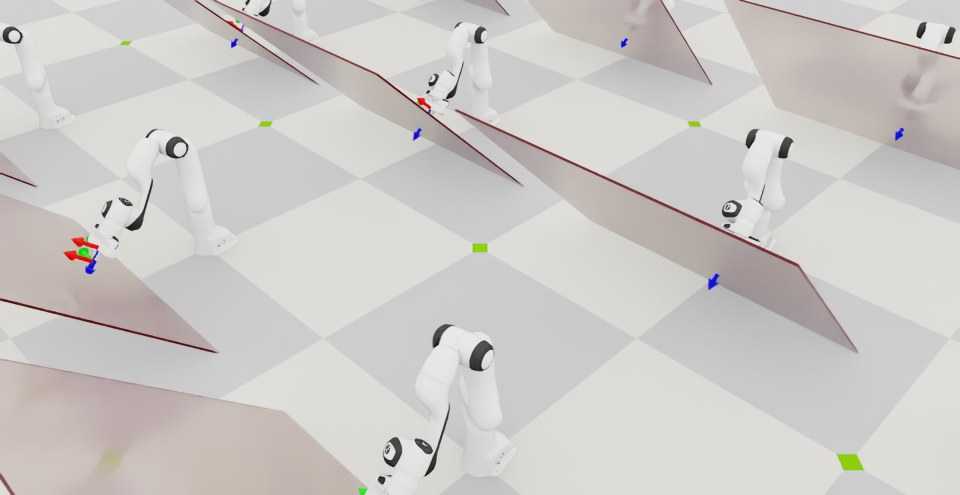
该脚本将启动一个包含 128 个机器人的仿真。将使用 OSC 进行机器人的控制。当前和期望的末端执行器姿势应该使用框架标记显示,除了红色倾斜墙之外。您应该看到机器人在施加垂直于墙面的恒定力的同时到达期望姿势。
在终端按 Ctrl+C 可停止仿真。