

使用任务空间控制器#
使用 controllers.DifferentialIKController 指定末端位姿,并计算关节位置目标。这适用于到达与遥操作任务,因为指定手部位姿通常比逐个选择关节角更方便。
本教程使用 Isaac Sim PhysX,需要安装 Isaac Sim。控制器选择和控制循环的说明见 控制器 。
代码#
该教程对应于 scripts/tutorials/05_controllers 目录中的 run_diff_ik.py 脚本。
run_diff_ik.py 的代码
  1# Copyright (c) 2022-2026, The Isaac Lab Project Developers (https://github.com/isaac-sim/IsaacLab/blob/main/CONTRIBUTORS.md).
  2# All rights reserved.
  3#
  4# SPDX-License-Identifier: BSD-3-Clause
  5
  6"""
  7This script demonstrates how to use the differential inverse kinematics controller with the simulator.
  8
  9The differential IK controller can be configured in different modes. It uses the Jacobians computed by
 10PhysX. This helps perform parallelized computation of the inverse kinematics.
 11
 12The Franka high-PD preset uses the same USD and effort limits as the base preset, with stiffer gains
 13for tracking IK targets. Other tasks can retain their calibrated actuator gains.
 14
 15.. code-block:: bash
 16
 17    # Usage
 18    uv run python scripts/tutorials/05_controllers/run_diff_ik.py
 19
 20"""
 21
 22"""Parse the command-line arguments first."""
 23
 24import argparse
 25from typing import TYPE_CHECKING
 26
 27from isaaclab.app import add_launcher_args, launch_simulation
 28
 29# add argparse arguments
 30parser = argparse.ArgumentParser(description="Tutorial on using the differential IK controller.")
 31parser.add_argument("--robot", type=str, default="franka_panda", help="Name of the robot.")
 32parser.add_argument("--num_envs", type=int, default=128, help="Number of environments to spawn.")
 33# append simulation launcher cli args
 34add_launcher_args(parser)
 35# parse the arguments
 36args_cli = parser.parse_args()
 37
 38"""Rest everything follows."""
 39
 40import torch
 41
 42import isaaclab.sim as sim_utils
 43from isaaclab.assets import AssetBaseCfg
 44from isaaclab.controllers import DifferentialIKController, DifferentialIKControllerCfg
 45from isaaclab.managers import SceneEntityCfg
 46from isaaclab.markers import VisualizationMarkers
 47from isaaclab.markers.config import FRAME_MARKER_CFG
 48from isaaclab.scene import InteractiveSceneCfg
 49from isaaclab.utils import clone, configclass, instantiate, replace
 50from isaaclab.utils.assets import ISAAC_NUCLEUS_DIR
 51from isaaclab.utils.math import subtract_frame_transforms
 52
 53if TYPE_CHECKING:
 54    from isaaclab.scene import InteractiveScene
 55
 56##
 57# Pre-defined configs
 58##
 59from isaaclab_assets import FRANKA_PANDA_HIGH_PD_CFG, UR10_CFG  # isort:skip
 60
 61
 62@configclass
 63class TableTopSceneCfg(InteractiveSceneCfg):
 64    """Configuration for a cart-pole scene."""
 65
 66    # ground plane
 67    ground = AssetBaseCfg(
 68        prim_path="/World/defaultGroundPlane",
 69        spawn=sim_utils.GroundPlaneCfg(),
 70        init_state=AssetBaseCfg.InitialStateCfg(pos=(0.0, 0.0, -1.05)),
 71    )
 72
 73    # lights
 74    dome_light = AssetBaseCfg(
 75        prim_path="/World/Light", spawn=sim_utils.DomeLightCfg(intensity=3000.0, color=(0.75, 0.75, 0.75))
 76    )
 77
 78    # mount
 79    table = AssetBaseCfg(
 80        prim_path="{ENV_REGEX_NS}/Table",
 81        spawn=sim_utils.UsdFileCfg(
 82            usd_path=f"{ISAAC_NUCLEUS_DIR}/Props/Mounts/Stand/stand_instanceable.usd", scale=(2.0, 2.0, 2.0)
 83        ),
 84    )
 85
 86    # articulation
 87    if args_cli.robot == "franka_panda":
 88        robot = replace(FRANKA_PANDA_HIGH_PD_CFG, prim_path="{ENV_REGEX_NS}/Robot")
 89        robot.spawn.variants["Physics"] = "physx"
 90    elif args_cli.robot == "ur10":
 91        robot = replace(UR10_CFG, prim_path="{ENV_REGEX_NS}/Robot")
 92    else:
 93        raise ValueError(f"Robot {args_cli.robot} is not supported. Valid: franka_panda, ur10")
 94
 95
 96def run_simulator(sim: sim_utils.SimulationContext, scene: "InteractiveScene"):
 97    """Runs the simulation loop."""
 98    # Extract scene entities
 99    # note: we only do this here for readability.
100    robot = scene["robot"]
101
102    # Create controller
103    diff_ik_cfg = DifferentialIKControllerCfg(command_type="pose", use_relative_mode=False, ik_method="dls")
104    diff_ik_controller = DifferentialIKController(diff_ik_cfg, num_envs=scene.num_envs, device=sim.device)
105
106    # Markers
107    frame_marker_cfg = clone(FRAME_MARKER_CFG)
108    frame_marker_cfg.markers["frame"].scale = (0.1, 0.1, 0.1)
109    ee_marker = VisualizationMarkers(replace(frame_marker_cfg, prim_path="/Visuals/ee_current"))
110    goal_marker = VisualizationMarkers(replace(frame_marker_cfg, prim_path="/Visuals/ee_goal"))
111
112    # Define goals for the arm (x,y,z,qx,qy,qz,qw)
113    ee_goals = [
114        [0.5, 0.5, 0.7, 0, 0.707, 0, 0.707],
115        [0.5, -0.4, 0.6, 0.707, 0, 0, 0.707],
116        [0.5, 0, 0.5, 1.0, 0.0, 0.0, 0.0],
117    ]
118    ee_goals = torch.tensor(ee_goals, device=sim.device)
119    # Track the given command
120    current_goal_idx = 0
121    # Create buffers to store actions
122    ik_commands = torch.zeros(scene.num_envs, diff_ik_controller.action_dim, device=robot.device)
123    ik_commands[:] = ee_goals[current_goal_idx]
124
125    # Specify robot-specific parameters
126    if args_cli.robot == "franka_panda":
127        robot_entity_cfg = SceneEntityCfg("robot", joint_names=["panda_joint.*"], body_names=["panda_hand"])
128    elif args_cli.robot == "ur10":
129        robot_entity_cfg = SceneEntityCfg("robot", joint_names=[".*"], body_names=["ee_link"])
130    else:
131        raise ValueError(f"Robot {args_cli.robot} is not supported. Valid: franka_panda, ur10")
132    # Resolving the scene entities
133    robot_entity_cfg.resolve(scene)
134    # Obtain the frame index of the end-effector
135    # For a fixed base robot, the frame index is one less than the body index. This is because
136    # the root body is not included in the returned Jacobians.
137    if robot.is_fixed_base:
138        ee_jacobi_idx = robot_entity_cfg.body_ids[0] - 1
139    else:
140        ee_jacobi_idx = robot_entity_cfg.body_ids[0]
141
142    # Define simulation stepping
143    sim_dt = sim.get_physics_dt()
144    count = 0
145    # Simulation loop
146    while sim.is_running():
147        # reset
148        if count % 150 == 0:
149            # reset time
150            count = 0
151            # reset joint state
152            joint_pos = robot.data.default_joint_pos.torch.clone()
153            joint_vel = robot.data.default_joint_vel.torch.clone()
154            robot.write_joint_position_to_sim_index(position=joint_pos)
155            robot.write_joint_velocity_to_sim_index(velocity=joint_vel)
156            robot.reset()
157            # reset actions
158            ik_commands[:] = ee_goals[current_goal_idx]
159            joint_pos_des = joint_pos[:, robot_entity_cfg.joint_ids].clone()
160            # reset controller
161            diff_ik_controller.reset()
162            diff_ik_controller.set_command(ik_commands)
163            # change goal
164            current_goal_idx = (current_goal_idx + 1) % len(ee_goals)
165        else:
166            # obtain quantities from simulation. The Jacobian DoF axis prepends
167            # ``num_base_dofs`` floating-base columns (0 for fixed-base, 6 for
168            # floating-base); shift the actuated-joint ids accordingly.
169            jacobi_joint_ids = [j + robot.num_base_dofs for j in robot_entity_cfg.joint_ids]
170            jacobian = robot.data.body_link_jacobian_w.torch[:, ee_jacobi_idx, :, jacobi_joint_ids]
171            ee_pose_w = robot.data.body_pose_w.torch[:, robot_entity_cfg.body_ids[0]]
172            root_pose_w = robot.data.root_pose_w.torch
173            joint_pos = robot.data.joint_pos.torch[:, robot_entity_cfg.joint_ids]
174            # compute frame in root frame
175            ee_pos_b, ee_quat_b = subtract_frame_transforms(
176                root_pose_w[:, 0:3], root_pose_w[:, 3:7], ee_pose_w[:, 0:3], ee_pose_w[:, 3:7]
177            )
178            # compute the joint commands
179            joint_pos_des = diff_ik_controller.compute(ee_pos_b, ee_quat_b, jacobian, joint_pos)
180
181        # apply actions
182        robot.set_joint_position_target_index(target=joint_pos_des, joint_ids=robot_entity_cfg.joint_ids)
183        scene.write_data_to_sim()
184        # perform step
185        sim.step()
186        # update sim-time
187        count += 1
188        # update buffers
189        scene.update(sim_dt)
190
191        # obtain quantities from simulation
192        ee_pose_w = robot.data.body_state_w.torch[:, robot_entity_cfg.body_ids[0], 0:7]
193        # update marker positions
194        ee_marker.visualize(ee_pose_w[:, 0:3], ee_pose_w[:, 3:7])
195        goal_marker.visualize(ik_commands[:, 0:3] + scene.env_origins, ik_commands[:, 3:7])
196
197
198def main():
199    """Main function."""
200    # Configure the simulation
201    sim_cfg = sim_utils.SimulationCfg(dt=0.01, device=args_cli.device)
202    # Launch the simulator runtime that the configuration needs
203    with launch_simulation(sim_cfg, args_cli):
204        # Initialize the simulation context
205        sim = sim_utils.SimulationContext(sim_cfg)
206        # Set main camera
207        sim.set_camera_view([2.5, 2.5, 2.5], [0.0, 0.0, 0.0])
208        # Design scene
209        scene_cfg = TableTopSceneCfg(num_envs=args_cli.num_envs, env_spacing=2.0)
210        scene = instantiate(scene_cfg)
211        # Play the simulator
212        sim.reset()
213        # Now we are ready!
214        print("[INFO]: Setup complete...")
215        # Run the simulator
216        run_simulator(sim, scene)
217
218
219if __name__ == "__main__":
220    # run the main function
221    main()
代码解释#
使用任务空间控制器时,必须确保输入量采用正确的坐标系。多个并行环境实例位于同一个仿真世界坐标系中,但通常希望各环境有自己的局部坐标系。可通过 scene.InteractiveScene.env_origins 获取各环境的原点。
API 使用以下符号表示坐标系:
仿真世界坐标系(记为
w):整个仿真的坐标系。环境局部坐标系(记为
e):各环境自身的坐标系。机器人基座坐标系(记为
b):机器人基座连杆的坐标系。
资产实例不感知环境的局部坐标系,返回的状态采用仿真世界坐标系。因此,需要将这些量转换到环境局部坐标系;对于这里的位置量,减去环境原点即可。
创建一个 IK 控制器#
DifferentialIKController 计算机器人达到期望末端位姿所需的关节位置。实现采用 PyTorch 批量运算,支持阻尼最小二乘法、伪逆法等逆运动学求解器,可通过 ik_method 选择。控制器既支持相对位姿指令,也支持绝对位姿指令。
本教程使用阻尼最小二乘法计算期望关节位置,并采用绝对位姿指令模式跟踪末端执行器的目标位姿。
    # Create controller
    diff_ik_cfg = DifferentialIKControllerCfg(command_type="pose", use_relative_mode=False, ik_method="dls")
    diff_ik_controller = DifferentialIKController(diff_ik_cfg, num_envs=scene.num_envs, device=sim.device)
获取机器人的关节和刚体索引#
IK 控制器只负责计算,需要用户提供机器人的关节位置、当前末端执行器位姿和雅可比矩阵。
assets.ArticulationData.joint_pos 提供所有关节的位置,但这里仅需机械臂关节的数据,不需要夹爪关节。同样, assets.ArticulationData.body_state_w 提供所有刚体的状态,而这里只需末端执行器的状态。因此,需要通过索引从数组中取出所需数据。
关节体类提供 find_joints() 和 find_bodies() 方法,根据关节和刚体名称返回对应索引。
虽然可以直接调用这些方法获取索引,但推荐使用 SceneEntityCfg 解析索引。API 的多个部分都使用该类从场景实体中提取信息。它内部会调用上述方法获取索引,并额外检查所提供名称是否有效,因此更加稳妥。
    # Specify robot-specific parameters
    if args_cli.robot == "franka_panda":
        robot_entity_cfg = SceneEntityCfg("robot", joint_names=["panda_joint.*"], body_names=["panda_hand"])
    elif args_cli.robot == "ur10":
        robot_entity_cfg = SceneEntityCfg("robot", joint_names=[".*"], body_names=["ee_link"])
    else:
        raise ValueError(f"Robot {args_cli.robot} is not supported. Valid: franka_panda, ur10")
    # Resolving the scene entities
    robot_entity_cfg.resolve(scene)
    # Obtain the frame index of the end-effector
    # For a fixed base robot, the frame index is one less than the body index. This is because
    # the root body is not included in the returned Jacobians.
    if robot.is_fixed_base:
        ee_jacobi_idx = robot_entity_cfg.body_ids[0] - 1
    else:
        ee_jacobi_idx = robot_entity_cfg.body_ids[0]
计算机器人命令#
IK 控制器将设置目标指令与计算目标关节位置分为两个操作,以便用户以不同于机器人控制频率的频率运行 IK 计算。
set_command() 接收批量数组形式的期望末端执行器位姿,位姿采用机器人基座坐标系。
            # reset controller
            diff_ik_controller.reset()
            diff_ik_controller.set_command(ik_commands)
随后,通过 compute() 计算期望关节位置。输入包括基座坐标系下的当前末端执行器位姿、雅可比矩阵和当前关节位置。雅可比矩阵从机器人数据中读取,其数值由物理引擎计算。
            # obtain quantities from simulation. The Jacobian DoF axis prepends
            # ``num_base_dofs`` floating-base columns (0 for fixed-base, 6 for
            # floating-base); shift the actuated-joint ids accordingly.
            jacobi_joint_ids = [j + robot.num_base_dofs for j in robot_entity_cfg.joint_ids]
            jacobian = robot.data.body_link_jacobian_w.torch[:, ee_jacobi_idx, :, jacobi_joint_ids]
            ee_pose_w = robot.data.body_pose_w.torch[:, robot_entity_cfg.body_ids[0]]
            root_pose_w = robot.data.root_pose_w.torch
            joint_pos = robot.data.joint_pos.torch[:, robot_entity_cfg.joint_ids]
            # compute frame in root frame
            ee_pos_b, ee_quat_b = subtract_frame_transforms(
                root_pose_w[:, 0:3], root_pose_w[:, 3:7], ee_pose_w[:, 0:3], ee_pose_w[:, 3:7]
            )
            # compute the joint commands
            joint_pos_des = diff_ik_controller.compute(ee_pos_b, ee_quat_b, jacobian, joint_pos)
与此前教程一样,将计算得到的关节位置目标应用到机器人即可。
        # apply actions
        robot.set_joint_position_target_index(target=joint_pos_des, joint_ids=robot_entity_cfg.joint_ids)
        scene.write_data_to_sim()
代码执行#
运行脚本,查看结果:
uv run isaaclab -p scripts/tutorials/05_controllers/run_diff_ik.py --robot franka_panda --num_envs 128 --viz kit
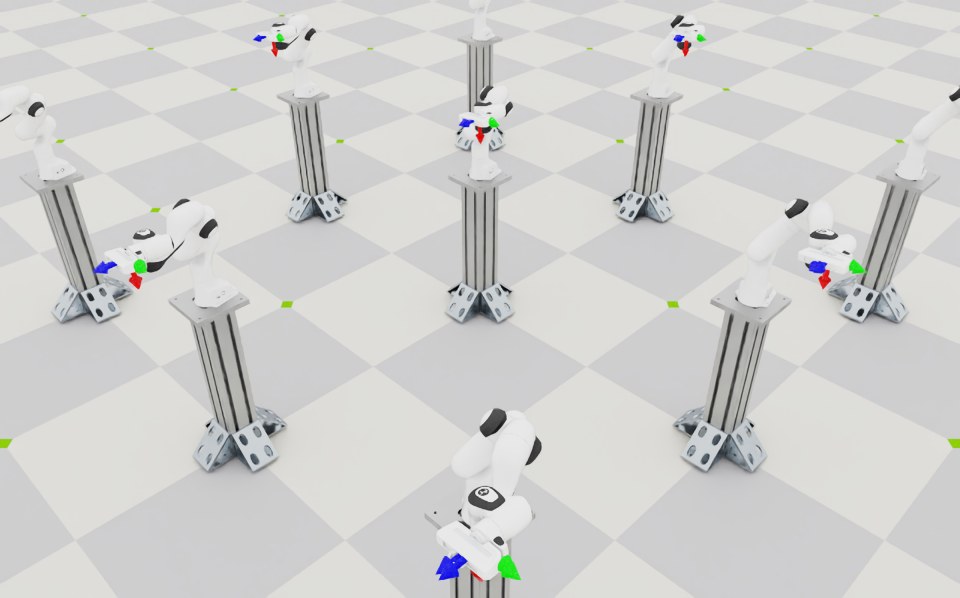
脚本会启动包含 128 个机器人的仿真,由 IK 控制器控制机器人。坐标系标记会显示当前和目标末端执行器位姿。脚本每隔 150 个仿真步重置机器人并更换目标,循环使用脚本中指定的位姿。
在终端按 Ctrl+C 可停止仿真。