


[isaacsim.sensors.physics.nodes] Isaac Sim Physics Sensor OmniGraph Nodes#
Version: 1.5.2
Overview#
The isaacsim.sensors.physics.nodes extension provides OmniGraph nodes for reading physics-based sensor data in Isaac Sim. The extension offers four specialized sensor reader nodes that integrate with Isaac Sim’s physics simulation to output real-time sensor measurements for robotics applications.
Key Components#
IsaacReadIMU Node#
The IsaacReadIMU node reads data from IsaacImuSensor prims to output inertial measurement data. It provides linear acceleration, angular velocity, and orientation measurements with configurable gravity inclusion.
Inputs:
imuPrim: Target IMU sensor prim pathreadGravity: Whether to include gravity in acceleration readingsuseLatestData: Use most recent sensor data availableexecIn: Execution trigger
Outputs:
linAcc: Linear acceleration measurementsangVel: Angular velocity measurementsorientation: Sensor orientationsensorTime: Timestamp of sensor readingexecOut: Execution signal
IsaacReadContactSensor Node#
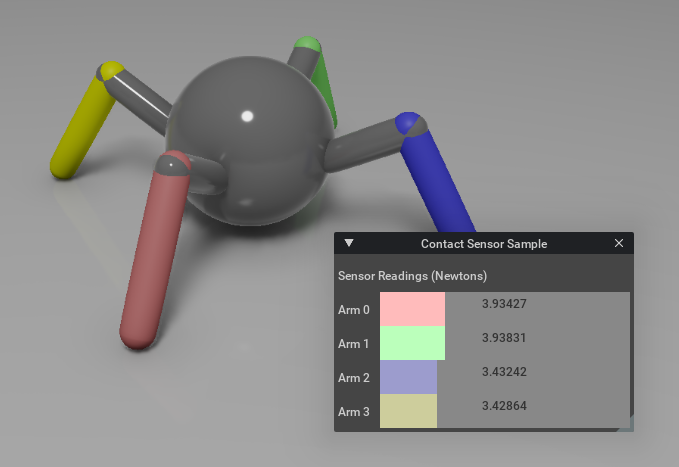
The IsaacReadContactSensor node monitors contact events and force measurements from IsaacContactSensor prims. It outputs both contact state and force magnitude data.
Inputs:
csPrim: Target contact sensor prim pathuseLatestData: Use most recent sensor data availableexecIn: Execution trigger
Outputs:
inContact: Boolean contact statevalue: Contact force magnitudesensorTime: Timestamp of sensor readingexecOut: Execution signal
IsaacReadEffortSensor Node#
The IsaacReadEffortSensor node measures joint effort (torque/force) from articulated bodies. It provides configurable sensor periods and can be enabled/disabled dynamically.
Inputs:
prim: Target articulated body prim pathenabled: Enable/disable sensor readingssensorPeriod: Sensor measurement frequencyuseLatestData: Use most recent sensor data availableexecIn: Execution trigger
Outputs:
value: Joint effort measurementssensorTime: Timestamp of sensor readingexecOut: Execution signal
IsaacReadJointState Node#
The IsaacReadJointState node reads full joint state from an articulation: joint names, positions, velocities, efforts, per-DOF types, and stage units. It uses the joint state sensor backend from isaacsim.sensors.experimental.physics.
Inputs:
prim: Path to the articulation root primexecIn: Execution trigger
Outputs:
jointNames: Joint names in articulation orderjointPositions: Joint positions (rad or m)jointVelocities: Joint velocities (rad/s or m/s)jointEfforts: Joint efforts (Nm or N)jointDofTypes: Per-DOF type (0 = revolute, 1 = prismatic)stageMetersPerUnit: Stage meters per USD unit for SI conversionsensorTime: Timestamp of the sensor readingexecOut: Execution signal
Functionality#
Each sensor node maintains internal state through dedicated state classes that inherit from BaseResetNode, providing automatic reset handling when simulation parameters change. The nodes use a compute-based execution model where sensor data is read and output attributes are updated each time the node executes.
All nodes support both latest data mode and historical data access, allowing flexibility in how sensor information is consumed by downstream graph nodes. Sensor initialization occurs during the first compute cycle, with error handling for invalid prim paths or sensor configurations.
C++ Plugin#
The sensor reader nodes are implemented in C++ as a Carbonite plugin (isaacsim::sensors::physics::nodes::IPhysicsSensorNodes). The native plugin registers the OGN nodes at startup and provides the compute implementations for reading IMU, contact sensor, effort sensor, and joint state data directly from the physics simulation. Python bindings expose the IPhysicsSensorNodes interface through the _physics_sensor_nodes module for plugin lifecycle management.
Relationships#
The extension depends on isaacsim.sensors.experimental.physics for the underlying sensor backend implementations. Each OmniGraph node acts as a bridge between the physics sensor systems and the visual scripting environment, enabling sensor data to flow through OmniGraph workflows for robotics applications and automation tasks.
Enable Extension#
The extension can be enabled (if not already) in one of the following ways:
Define the next entry as an application argument from a terminal.
APP_SCRIPT.(sh|bat) --enable isaacsim.sensors.physics.nodes
Define the next entry under [dependencies] in an experience (.kit) file or an extension configuration (extension.toml) file.
[dependencies]
"isaacsim.sensors.physics.nodes" = {}
Open the Window > Extensions menu in a running application instance and search for isaacsim.sensors.physics.nodes.
Then, toggle the enable control button if it is not already active.
Omnigraph Nodes#
The extension exposes the following Omnigraph nodes: