


[isaacsim.asset.exporter.urdf] Isaac Sim USD to URDF exporter#
Version: 2.0.3
Overview#
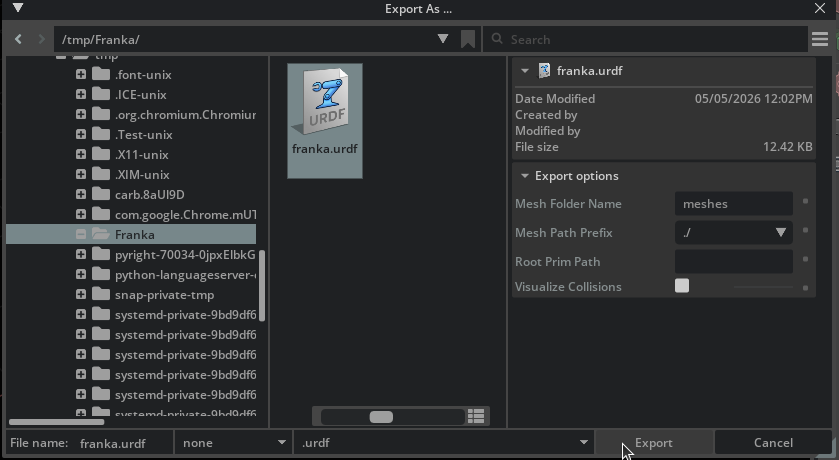
The isaacsim.asset.exporter.urdf extension exports USD robot assets to URDF (Unified Robot Description Format) files. It extracts joint hierarchies, link geometries, inertia properties, and physics parameters from USD stages and writes them in standard URDF XML format for use with ROS and other robotics frameworks.
Functionality#
USD to URDF conversion: Exports articulated robot assets with proper joint types, limits, and dynamics
Inertia extraction: Retrieves mass, center of mass, and inertia tensors from USD physics properties or PhysX-computed values
Mesh export: Exports visual and collision meshes with configurable path prefixes (
file://,package://, or relative paths) for ROS package compatibilityCollision visualization: Supports visualization of exported collision geometry for validation
Enable Extension#
The extension can be enabled (if not already) in one of the following ways:
Define the next entry as an application argument from a terminal.
APP_SCRIPT.(sh|bat) --enable isaacsim.asset.exporter.urdf
Define the next entry under [dependencies] in an experience (.kit) file or an extension configuration (extension.toml) file.
[dependencies]
"isaacsim.asset.exporter.urdf" = {}
Open the Window > Extensions menu in a running application instance and search for isaacsim.asset.exporter.urdf.
Then, toggle the enable control button if it is not already active.
URDF Export Extension [isaacsim.asset.exporter.urdf]#
URDF Exporter API#
The URDF exporter provides a Python API for converting USD articulated robots to URDF format. Below is a sample demonstrating how to export a robot from an open USD stage.
 1import omni.usd
 2from isaacsim.asset.exporter.urdf import UsdToUrdfConverter
 3
 4# Get the current stage.
 5stage = omni.usd.get_context().get_stage()
 6
 7# Configure and export.
 8converter = UsdToUrdfConverter(
 9    stage=stage,
10    root_prim_path=None,       # Uses the default prim
11    mesh_dir_name="meshes",
12    mesh_path_prefix="./",
13)
14
15output_path = converter.convert("/tmp/my_robot.urdf")
16print(f"Exported URDF to: {output_path}")
- class UsdToUrdfConverter(
- stage: Usd.Stage | str | os.PathLike,
- root_prim_path: str | None = None,
- mesh_dir_name: str = 'meshes',
- mesh_path_prefix: str = './',
- visualize_collision_meshes: bool = False,
- variant_selections: dict[str, str] | None = None,
Convert a USD stage’s articulated robot to URDF.
Discovers robot structure from physics graph, reads link/joint/material data, exports meshes to OBJ, and writes URDF XML.
- Parameters:
stage – An open
Usd.Stageor a file-system path (str / os.PathLike) to a USD file (.usd,.usda,.usdc). When a path is given the stage is opened withUsd.Stage.Open.root_prim_path – Prim path of the articulation root.
Noneuses the stage default prim.mesh_dir_name – Subdirectory name for exported mesh files.
mesh_path_prefix – Path prefix written into URDF mesh references.
visualize_collision_meshes – If
True, duplicate collision meshes as visual geometry.variant_selections – Optional mapping of variant-set names to variant selections to apply on the root prim before conversion. For example
{"Physics": "PhysX", "LOD": "high"}. Selections are applied before robot discovery, so the chosen composition arcs determine which links, joints, and meshes are exported. Variant sets that already have a selection are overridden.
Initialize the converter; see class docstring for parameter descriptions.
- convert(output_path: str | None = None) str#
Convert the USD stage to URDF and write to output_path.
When output_path is
Nonethe URDF is written next to the source USD file using the same base name (robot.usd->robot.urdf). For stages loaded fromomniverse://URLs,omni.clientis used to parse the source path; if the source is remote the current working directory is used as the output location.- Raises:
ValueError – If output_path is
Noneand no source path can be determined from the stage.