


[isaacsim.app.about] Isaac Sim About Window#
Version: 2.3.0
Overview#
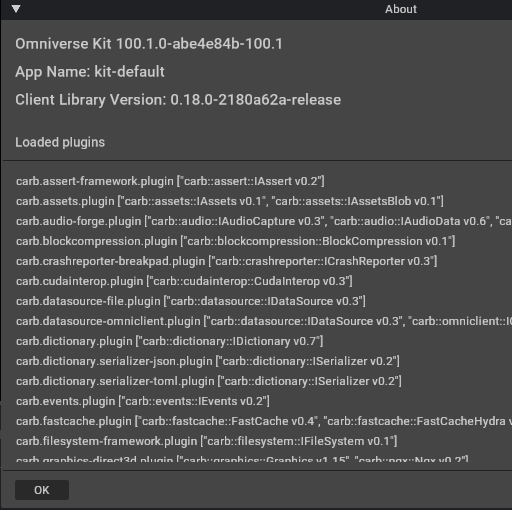
The Isaac Sim About Window extension provides an About dialog that displays application information and system details. This dialog shows the Isaac Sim application name and version, Kit SDK version, client library version, and a comprehensive list of all currently loaded plugins.
UI Components#
About Dialog Window#
The main component is an About dialog window that presents system information in a user-friendly format. The dialog consolidates key version information and plugin details into a single view, helping users understand their current Isaac Sim configuration.
The window displays:
Isaac Sim application name and version
Kit SDK version information
Client library version details
Complete list of loaded plugins
Functionality#
Version Information Display: The extension retrieves and caches version information from multiple sources including the Kit SDK and client libraries. This information is formatted and presented in the About dialog for easy reference.
Plugin Enumeration: The dialog displays all currently loaded plugins, providing insight into the active components of the Isaac Sim environment. This helps users understand what functionality is available in their current session.
Dynamic Content Loading: Version and plugin information is loaded dynamically when the About dialog is requested, ensuring the displayed information reflects the current state of the application.
Relationships#
This extension depends on isaacsim.core.version to retrieve Isaac Sim-specific version information and integrates with **omni.client** for client library version details. The menu integration is implemented through **omni.kit.menu.utils**, which handles the registration of menu items that trigger the About dialog.
Enable Extension#
The extension can be enabled (if not already) in one of the following ways:
Define the next entry as an application argument from a terminal.
APP_SCRIPT.(sh|bat) --enable isaacsim.app.about
Define the next entry under [dependencies] in an experience (.kit) file or an extension configuration (extension.toml) file.
[dependencies]
"isaacsim.app.about" = {}
Open the Window > Extensions menu in a running application instance and search for isaacsim.app.about.
Then, toggle the enable control button if it is not already active.
Actions in isaacsim.app.about#
ID |
Display Name |
Description |
|---|---|---|
show_about |
Show About Dialog |
Show the About dialog |