

[isaacsim.sensors.experimental.physics] Isaac Sim Physics Sensor Simulation#

Version: 3.0.1

Overview#

The isaacsim.sensors.experimental.physics extension provides experimental physics-based sensors for Isaac Sim robotics applications. It offers five types of sensors — contact sensors for detecting collisions and forces, effort sensors for measuring joint torque and force, IMU sensors for capturing inertial measurements, joint state sensors for reading full articulation DOF state, and raycast sensors for emitting cast rays — with a runtime/authoring split that mirrors isaacsim.sensors.experimental.rtx.
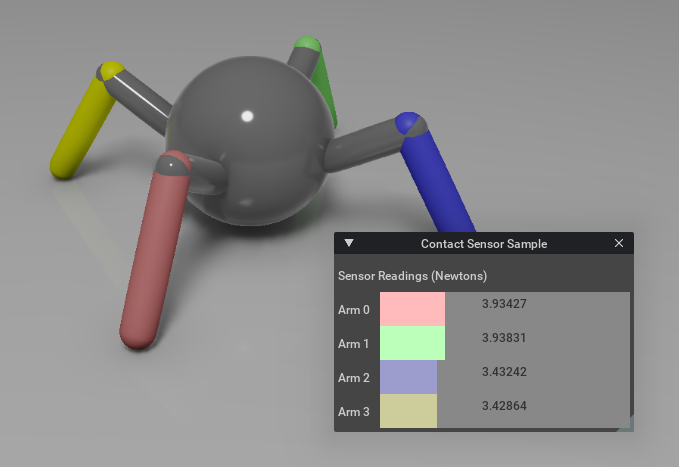
../../../../_images/preview27.png

Key Components#

Contact Sensor#

ContactSensor provides collision detection and force measurement capabilities with configurable thresholds and radius filtering. Pair it with the Contact authoring class to create a new prim, which automatically applies the necessary PhysxContactReportAPI to enable contact reporting.

from isaacsim.sensors.experimental.physics import Contact, ContactSensor

# Create the prim with the authoring class, then wrap with the runtime
sensor = ContactSensor(
    Contact.create(
        "/World/Robot/foot/contact_sensor",
        min_threshold=1.0,
        max_threshold=1000.0,
        radius=0.05,
    )
)

# Get current contact data
frame = sensor.get_data()
if frame["in_contact"]:
    print(f"Contact force: {frame['force']}")

The sensor returns structured frame data including contact status, force magnitude, simulation time, and optional raw contact details when enabled via add_raw_contact_data_to_frame().

Effort Sensor#

EffortSensor measures joint effort (torque or force) from articulated bodies using the physics tensor API. It requires a valid articulation hierarchy and monitors specific degrees of freedom within joints.

from isaacsim.sensors.experimental.physics import EffortSensor

# Create sensor for a robot joint
sensor = EffortSensor("/World/Robot/joint_1")

# Read joint effort
reading = sensor.get_sensor_reading()
if reading.is_valid:
    print(f"Joint torque: {reading.value}")

The sensor provides EffortSensorReading objects containing validity status, simulation time, and effort values. It supports configurable data buffering and dynamic DOF name updates.

IMU Sensor#

IMUSensor captures inertial measurements including linear acceleration, angular velocity, and orientation. Pair it with the IMU authoring class to create a new prim. It supports configurable rolling average filters for each measurement type to reduce noise.

from isaacsim.sensors.experimental.physics import IMU, IMUSensor

sensor = IMUSensor(
    IMU.create(
        "/World/Robot/body/imu",
        linear_acceleration_filter_size=5,
    )
)

# Get current IMU data
frame = sensor.get_data()
print(f"Linear acceleration: {frame['linear_acceleration']}")
print(f"Angular velocity: {frame['angular_velocity']}")
print(f"Orientation: {frame['orientation']}")

The sensor returns structured frame data with filtered measurements and supports gravity inclusion control for acceleration readings.

Joint State Sensor#

JointStateSensor reads positions, velocities, and efforts for every degree of freedom in an articulation in a single call, analogous to a ROS2 JointState message. It is backed by the C++ IJointStateSensor plugin and requires a valid articulation root prim.

from isaacsim.sensors.experimental.physics import JointStateSensor

# Create sensor for an articulation
sensor = JointStateSensor("/World/Robot")

# After playing the simulation, get full joint state
reading = sensor.get_sensor_reading()
if reading.is_valid:
    for name, pos in zip(reading.dof_names, reading.positions):
        print(f"{name}: {pos:.4f} rad")

The sensor returns JointStateSensorReading objects with validity, simulation time, DOF names, and arrays for positions (rad or m), velocities (rad/s or m/s), efforts (Nm or N), and per-DOF joint types. It supports pause/resume via the enabled property.

Raycast Sensor#

RaycastSensor emits a configurable pattern of physics rays from the sensor’s local frame and reports the closest hit on each ray. Pair it with the Raycast authoring class to create a new prim. It supports both static patterns and time-offset rotating sweeps.

from isaacsim.sensors.experimental.physics import Raycast, RaycastSensor

sensor = RaycastSensor(
    Raycast.create(
        "/World/Robot/body/raycast",
        ray_origins=[[0, 0, 0]],
        ray_directions=[[1, 0, 0]],
        min_range=0.4,
        max_range=100.0,
        output_frame="WORLD",
    )
)

frame = sensor.get_data()
print(f"Depths: {frame['depths']}")

Functionality#

Programmatic Sensor Creation#

Contact, IMU, and Raycast (the authoring classes) each provide a create() static method that handles USD prim creation, schema application, and attribute configuration. The returned authoring object is then wrapped with the matching runtime sensor (ContactSensor, IMUSensor, RaycastSensor) for data access. EffortSensor and JointStateSensor have no schema-bearing prim and are constructed directly from a path. This shape mirrors isaacsim.sensors.experimental.rtx, where create() similarly lives only on authoring classes.

Frame-Based Data Access#

All sensors implement a consistent frame-based data interface through get_data(), returning dictionaries with measurement values, timestamps, and validity information. For lower-level access, each sensor also exposes get_sensor_reading(), which returns the raw C++ sensor reading struct directly. This standardized approach simplifies sensor data processing across different sensor types.

Sensor Control#

Each sensor supports pause/resume functionality for runtime control of data collection, and provides methods for querying and modifying sensor-specific parameters like thresholds, filter sizes, and detection radius.

Integration#

The extension integrates with isaacsim.core.experimental.prims for prim management, using XformPrim and Articulation base classes. It leverages omni.timeline for simulation synchronization and requires the physics simulation framework for sensor data generation.

Preview

Enable Extension#

The extension can be enabled (if not already) in one of the following ways:

Define the next entry as an application argument from a terminal.

APP_SCRIPT.(sh|bat) --enable isaacsim.sensors.experimental.physics

Define the next entry under [dependencies] in an experience (.kit) file or an extension configuration (extension.toml) file.

[dependencies]
"isaacsim.sensors.experimental.physics" = {}

Open the Window > Extensions menu in a running application instance and search for isaacsim.sensors.experimental.physics. Then, toggle the enable control button if it is not already active.

Python API#

Authoring (USD prim)

Contact

Authoring wrapper for an Isaac contact sensor USD prim.

IMU

Authoring wrapper for an Isaac IMU sensor USD prim.

Raycast

Authoring wrapper for an Isaac raycast sensor USD prim.

Sensors (runtime)

ContactSensor

Runtime wrapper for an Isaac contact sensor with frame-based data access.

EffortSensorReading

Effort sensor reading data.

EffortSensor

Sensor for measuring joint effort (torque/force).

IMUSensor

Runtime wrapper for an Isaac IMU sensor with frame-based data access.

JointStateSensorReading

Joint state sensor reading data for all DOFs of an articulation.

JointStateSensor

Sensor for reading all DOF joint states from an articulation.

RaycastSensor

Runtime wrapper for an Isaac raycast sensor with frame-based data access.


Authoring#

class Contact(
path: str,
*,
positions: list | np.ndarray | wp.array | None = None,
translations: list | np.ndarray | wp.array | None = None,
orientations: list | np.ndarray | wp.array | None = None,
scales: list | np.ndarray | wp.array | None = None,
reset_xform_op_properties: bool = True,
min_threshold: float | None = None,
max_threshold: float | None = None,
radius: float | None = None,
color: Gf.Vec4f = pxr.Gf.Vec4f,
)#

Bases: _PhysicsSensorAuthoring

Authoring wrapper for an Isaac contact sensor USD prim.

Creates or wraps an IsaacContactSensor prim. Use this class when you only need to author the prim (set transforms, configure thresholds and radius) without bringing up the C++ backend. For data acquisition, use ContactSensor.

Parameters:
  • path – USD path where the sensor should be located.

  • positions – World-frame positions (shape (N, 3)). Mutually exclusive with translations.

  • translations – Local-frame translations (shape (N, 3)).

  • orientations – Orientations as wxyz quaternions (shape (N, 4)).

  • min_threshold – Minimum force threshold in Newtons. When wrapping an existing prim, applied as an override; None leaves the prim unchanged.

  • max_threshold – Maximum force threshold in Newtons. When wrapping an existing prim, applied as an override; None leaves the prim unchanged.

  • radius – Contact detection radius. Negative means no radius filtering. When wrapping an existing prim, applied as an override; None leaves the prim unchanged.

  • color – Sensor visualization color as RGBA. Applied only when creating a new prim.

Raises:

ValueError – If the sensor does not have an enabled rigid-body ancestor.

Example:

>>> from isaacsim.sensors.experimental.physics import Contact
>>>
>>> contact = Contact.create(
...     "/World/Robot/foot/contact_sensor",
...     min_threshold=1.0,
...     max_threshold=1000.0,
...     translations=[[0.0, 0.0, 0.0]],
... )  
apply_visual_materials(
materials: type['VisualMaterial'] | list[type['VisualMaterial']],
*,
weaker_than_descendants: bool | list | np.ndarray | wp.array | None = None,
indices: int | list | np.ndarray | wp.array | None = None,
) None#

Apply visual materials to the prims, and optionally, to their descendants.

Backends: usd.

Parameters:
  • materials – Visual materials to be applied to the prims (shape (N,)). If the input shape is smaller than expected, data will be broadcasted (following NumPy broadcast rules).

  • weaker_than_descendants – Boolean flags to indicate whether descendant materials should be overridden (shape (N, 1)). If the input shape is smaller than expected, data will be broadcasted (following NumPy broadcast rules).

  • indices – Indices of prims to process (shape (N,)). If not defined, all wrapped prims are processed.

Raises:

AssertionError – Wrapped prims are not valid.

Example:

>>> from isaacsim.core.experimental.materials import OmniGlassMaterial
>>>
>>> # create a dark-red glass visual material
>>> material = OmniGlassMaterial("/World/material/glass")
>>> material.set_input_values("glass_ior", [1.25])
>>> material.set_input_values("depth", [0.001])
>>> material.set_input_values("thin_walled", [False])
>>> material.set_input_values("glass_color", [0.5, 0.0, 0.0])
>>>
>>> prims.apply_visual_materials(material)
classmethod create(
path: str,
**kwargs: Any,
) _PhysicsSensorAuthoring#

Create a new sensor at the specified path.

Always creates a fresh prim, auto-numbering the path if it already exists (e.g. /World/Cube/Sensor/World/Cube/Sensor_01).

Parameters:
  • path – Full USD path for the sensor (e.g. /World/Robot/body/sensor). Trailing slashes are stripped.

  • **kwargs – Sensor-specific keyword arguments forwarded to __init__.

Returns:

New authoring instance wrapping the created prim.

Raises:

RuntimeError – If the path does not include a parent prim.

static ensure_api(
prims: list[Usd.Prim],
api: type,
*args: Any,
**kwargs: Any,
) list[type['UsdAPISchemaBase']]#

Ensure that all prims have the specified API schema applied.

Backends: usd.

If a prim doesn’t have the API schema, it will be applied. If it already has it, the existing API schema will be returned.

Parameters:
  • prims – List of USD Prims to ensure API schema on.

  • api – The API schema type to ensure.

  • *args – Additional positional arguments passed to API schema when applying it.

  • **kwargs – Additional keyword arguments passed to API schema when applying it.

Returns:

List of API schema objects, one for each input prim.

Example:

>>> import isaacsim.core.experimental.utils.prim as prim_utils
>>> from pxr import UsdPhysics
>>> from isaacsim.core.experimental.prims import Prim
>>>
>>> # given a USD stage with 3 prims at paths /World/prim_0, /World/prim_1, /World/prim_2,
>>> # ensure all prims have physics API schema
>>> usd_prims = [prim_utils.get_prim_at_path(f"/World/prim_{i}") for i in range(3)]
>>> physics_apis = Prim.ensure_api(usd_prims, UsdPhysics.RigidBodyAPI)
get_applied_visual_materials(
*,
indices: int | list | np.ndarray | wp.array | None = None,
) list[type['VisualMaterial'] | None]#

Get the applied visual materials.

Backends: usd.

Parameters:

indices – Indices of prims to process (shape (N,)). If not defined, all wrapped prims are processed.

Returns:

List of applied visual materials (shape (N,)). If a prim does not have a material, None is returned.

Raises:

AssertionError – Wrapped prims are not valid.

Example:

>>> # get the applied visual material of the last wrapped prim
>>> prims.get_applied_visual_materials(indices=[2])[0]
<isaacsim.core.experimental.materials.impl.visual_materials.omni_glass.OmniGlassMaterial object at 0x...>
get_default_state(
*,
indices: int | list | np.ndarray | wp.array | None = None,
) tuple[wp.array | None, wp.array | None]#

Get the default state (positions and orientations) of the prims.

Backends: usd.

Parameters:

indices – Indices of prims to process (shape (N,)). If not defined, all wrapped prims are processed.

Returns:

Two-elements tuple. 1) The default positions in the world frame (shape (N, 3)). 2) The default orientations in the world frame (shape (N, 4), quaternion wxyz). If the default state is not set using the set_default_state() method, None is returned.

Raises:
  • AssertionError – Wrapped prims are not valid.

  • AssertionError – If prims are non-root articulation links.

get_local_poses(
*,
indices: int | list | np.ndarray | wp.array | None = None,
) tuple[wp.array, wp.array]#

Get the poses (translations and orientations) in the local frame of the prims.

Backends: usd, usdrt, fabric.

Parameters:

indices – Indices of prims to process (shape (N,)). If not defined, all wrapped prims are processed.

Returns:

Two-elements tuple. 1) The translations in the local frame (shape (N, 3)). 2) The orientations in the local frame (shape (N, 4), quaternion wxyz).

Raises:

AssertionError – Wrapped prims are not valid.

Example:

>>> # get the local poses of all prims
>>> translations, orientations = prims.get_local_poses()
>>> translations.shape, orientations.shape
((3, 3), (3, 4))
>>>
>>> # get the local pose of the first prim
>>> translations, orientations = prims.get_local_poses(indices=[0])
>>> translations.shape, orientations.shape
((1, 3), (1, 4))
get_local_scales(
*,
indices: int | list | np.ndarray | wp.array | None = None,
) wp.array#

Get the local scales of the prims.

Backends: usd, usdrt, fabric.

Parameters:

indices – Indices of prims to process (shape (N,)). If not defined, all wrapped prims are processed.

Returns:

Scales of the prims (shape (N, 3)).

Raises:

AssertionError – Wrapped prims are not valid.

Example:

>>> # get local scales of all prims
>>> scales = prims.get_local_scales()
>>> scales.shape
(3, 3)
get_max_threshold() float | None#

Maximum force threshold in Newtons.

Returns:

Maximum threshold in Newtons, or None if not set.

get_min_threshold() float | None#

Minimum force threshold in Newtons.

Returns:

Minimum threshold in Newtons, or None if not set.

get_radius() float | None#

Get the contact detection radius.

Returns:

Radius in stage units. Negative means no radius filtering.

get_visibilities(
*,
indices: int | list | np.ndarray | wp.array | None = None,
) wp.array#

Get the visibility state (whether prims are visible or invisible during rendering) of the prims.

Backends: usd.

Parameters:

indices – Indices of prims to process (shape (N,)). If not defined, all wrapped prims are processed.

Returns:

Boolean flags indicating the visibility state (shape (N, 1)).

Raises:

AssertionError – Wrapped prims are not valid.

Example:

>>> # get the visibility states of all prims
>>> visibilities = prims.get_visibilities()
>>> print(visibilities)
[[ True] [ True] [ True]]
>>>
>>> # get the visibility states of the first and last prims
>>> visibilities = prims.get_visibilities(indices=[0, 2])
>>> print(visibilities)
[[ True] [ True]]
get_world_poses(
*,
indices: int | list | np.ndarray | wp.array | None = None,
) tuple[wp.array, wp.array]#

Get the poses (positions and orientations) in the world frame of the prims.

Backends: usd, usdrt, fabric.

Parameters:

indices – Indices of prims to process (shape (N,)). If not defined, all wrapped prims are processed.

Returns:

Two-elements tuple. 1) The positions in the world frame (shape (N, 3)). 2) The orientations in the world frame (shape (N, 4), quaternion wxyz).

Raises:

AssertionError – Wrapped prims are not valid.

Example:

>>> # get the world poses of all prims
>>> positions, orientations = prims.get_world_poses()
>>> positions.shape, orientations.shape
((3, 3), (3, 4))
>>>
>>> # get the world pose of the first prim
>>> positions, orientations = prims.get_world_poses(indices=[0])
>>> positions.shape, orientations.shape
((1, 3), (1, 4))
reset_to_default_state(
*,
warn_on_non_default_state: bool = False,
) None#

Reset the prims to the specified default state.

Backends: usd, usdrt, fabric.

This method applies the default state defined using the set_default_state() method.

Note

This method teleports prims to the specified default state (positions and orientations).

Warning

This method has no effect on non-root articulation links or when no default state is set. In this case, a warning message is logged if warn_on_non_default_state is True.

Parameters:

warn_on_non_default_state – Whether to log a warning message when no default state is set.

Raises:

AssertionError – Wrapped prims are not valid.

Example:

>>> # get default state (no default state set at this point)
>>> prims.get_default_state()
(None, None)
>>>
>>> # set default state
>>> # - random positions for each prim
>>> # - same fixed orientation for all prim
>>> positions = np.random.uniform(low=-1, high=1, size=(3, 3))
>>> prims.set_default_state(positions, orientations=[1.0, 0.0, 0.0, 0.0])
>>>
>>> # get default state (default state is set)
>>> prims.get_default_state()
(array(shape=(3, 3), dtype=float32), array(shape=(3, 4), dtype=float32))
>>>
>>> # reset prims to default state
>>> prims.reset_to_default_state()
reset_xform_op_properties() None#

Reset the transformation operation attributes of the prims to a standard set.

Backends: usd.

USD Xform schema supports a wide range of transformation operation types. This method ensures that each wrapped prim has only the following transformations in the specified order. Any other transformation operations are removed, so they are not consumed.

  1. xformOp:translate (double precision)

  2. xformOp:orient (double precision)

  3. xformOp:scale (double precision)

Note

This method preserves the poses of the prims in the world frame while reorganizing the transformation operations.

Raises:

AssertionError – Wrapped prims are not valid.

Example:

>>> # reset transform operations of all prims
>>> prims.reset_xform_op_properties()
>>>
>>> # verify transform operations of the first wrapped prim
>>> prims.prims[0].GetPropertyNames()
[... 'xformOp:orient', 'xformOp:scale', 'xformOp:translate', 'xformOpOrder']
static resolve_paths(
paths: str | list[str],
raise_on_mixed_paths: bool = True,
) tuple[list[str], list[str]]#

Resolve paths to prims in the stage to get existing and non-existing paths.

Backends: usd.

Parameters:
  • paths – Single path or list of paths to USD prims. Paths may contain regular expressions to match multiple prims.

  • raise_on_mixed_paths – Whether to raise an error if resulting paths are mixed or invalid.

Returns:

Two-elements tuple. 1) List of existing paths. 2) List of non-existing paths.

Raises:

ValueError – If resulting paths are mixed or invalid and raise_on_mixed_paths is True.

set_default_state(
positions: list | np.ndarray | wp.array | None = None,
orientations: list | np.ndarray | wp.array | None = None,
*,
indices: int | list | np.ndarray | wp.array | None = None,
) None#

Set the default state (positions and orientations) of the prims.

Backends: usd.

Hint

Prims can be reset to their default state by calling the reset_to_default_state() method.

Parameters:
  • positions – Default positions in the world frame (shape (N, 3)). If the input shape is smaller than expected, data will be broadcasted (following NumPy broadcast rules).

  • orientations – Default orientations in the world frame (shape (N, 4), quaternion wxyz). If the input shape is smaller than expected, data will be broadcasted (following NumPy broadcast rules).

  • indices – Indices of prims to process (shape (N,)). If not defined, all wrapped prims are processed.

Raises:
  • AssertionError – If neither positions nor orientations are specified.

  • AssertionError – Wrapped prims are not valid.

  • AssertionError – If prims are non-root articulation links.

set_local_poses(
translations: list | np.ndarray | wp.array | None = None,
orientations: list | np.ndarray | wp.array | None = None,
*,
indices: int | list | np.ndarray | wp.array | None = None,
) None#

Set the poses (translations and orientations) in the local frame of the prims.

Backends: usd, usdrt, fabric.

Note

This method teleports prims to the specified poses.

Parameters:
  • translations – Translations in the local frame (shape (N, 3)). If the input shape is smaller than expected, data will be broadcasted (following NumPy broadcast rules).

  • orientations – Orientations in the local frame (shape (N, 4), quaternion wxyz). If the input shape is smaller than expected, data will be broadcasted (following NumPy broadcast rules).

  • indices – Indices of prims to process (shape (N,)). If not defined, all wrapped prims are processed.

Raises:
  • AssertionError – If neither translations nor orientations are specified.

  • AssertionError – Wrapped prims are not valid.

Example:

>>> # set random poses for all prims
>>> translations = np.random.uniform(low=-1, high=1, size=(3, 3))
>>> orientations = np.random.randn(3, 4)
>>> orientations = orientations / np.linalg.norm(orientations, axis=-1, keepdims=True)  # normalize quaternions
>>> prims.set_local_poses(translations, orientations)
set_local_scales(
scales: list | np.ndarray | wp.array | None = None,
*,
indices: int | list | np.ndarray | wp.array | None = None,
) None#

Set the local scales of the prims.

Backends: usd, usdrt, fabric.

Parameters:
  • scales – Scales to be applied to the prims (shape (N, 3)). If the input shape is smaller than expected, data will be broadcasted (following NumPy broadcast rules).

  • indices – Indices of prims to process (shape (N,)). If not defined, all wrapped prims are processed.

Raises:

AssertionError – Wrapped prims are not valid.

Example:

>>> # set random positive scales for all prims
>>> scales = np.random.uniform(low=0.5, high=1.5, size=(3, 3))
>>> prims.set_local_scales(scales)
set_max_threshold(value: float) None#

Set the maximum force threshold.

Contact forces are clamped to this maximum value.

Parameters:

value – Threshold in Newtons.

set_min_threshold(value: float) None#

Set the minimum force threshold.

Contacts with force below this threshold are ignored.

Parameters:

value – Threshold in Newtons.

set_radius(value: float) None#

Set the contact detection radius.

Parameters:

value – Radius in stage units. Use negative to disable radius filtering.

set_visibilities(
visibilities: bool | list | np.ndarray | wp.array,
*,
indices: int | list | np.ndarray | wp.array | None = None,
) None#

Set the visibility state (whether prims are visible or invisible during rendering) of the prims.

Backends: usd.

Parameters:
  • visibilities – Boolean flags to set the visibility state (shape (N, 1)). If the input shape is smaller than expected, data will be broadcasted (following NumPy broadcast rules).

  • indices – Indices of prims to process (shape (N,)). If not defined, all wrapped prims are processed.

Raises:

AssertionError – Wrapped prims are not valid.

Example:

>>> # make all prims invisible
>>> prims.set_visibilities([False])
>>>
>>> # make first and last prims invisible
>>> prims.set_visibilities([True])  # restore visibility from previous call
>>> prims.set_visibilities([False], indices=[0, 2])
set_world_poses(
positions: list | np.ndarray | wp.array | None = None,
orientations: list | np.ndarray | wp.array | None = None,
*,
indices: int | list | np.ndarray | wp.array | None = None,
) None#

Set the poses (positions and orientations) in the world frame of the prims.

Backends: usd, usdrt, fabric.

Note

This method teleports prims to the specified poses.

Parameters:
  • positions – Positions in the world frame (shape (N, 3)). If the input shape is smaller than expected, data will be broadcasted (following NumPy broadcast rules).

  • orientations – Orientations in the world frame (shape (N, 4), quaternion wxyz). If the input shape is smaller than expected, data will be broadcasted (following NumPy broadcast rules).

  • indices – Indices of prims to process (shape (N,)). If not defined, all wrapped prims are processed.

Raises:
  • AssertionError – If neither positions nor orientations are specified.

  • AssertionError – Wrapped prims are not valid.

Example:

>>> # set random poses for all prims
>>> positions = np.random.uniform(low=-1, high=1, size=(3, 3))
>>> orientations = np.random.randn(3, 4)
>>> orientations = orientations / np.linalg.norm(orientations, axis=-1, keepdims=True)  # normalize quaternions
>>> prims.set_world_poses(positions, orientations)

Indicate if the wrapped prims are a non-root link in an articulation tree.

Backends: usd.

Warning

Transformation of the poses of non-root links in an articulation tree are not supported.

Returns:

Whether the prims are a non-root link in an articulation tree.

property paths: list[str]#

Prim paths in the stage encapsulated by the wrapper.

Returns:

List of prim paths as strings.

Example:

>>> prims.paths
['/World/prim_0', '/World/prim_1', '/World/prim_2']
property prims: list[pxr.Usd.Prim]#

USD Prim objects encapsulated by the wrapper.

Returns:

List of USD Prim objects.

Example:

>>> prims.prims
[Usd.Prim(</World/prim_0>), Usd.Prim(</World/prim_1>), Usd.Prim(</World/prim_2>)]
property valid: bool#

Whether all prims in the wrapper are valid.

Returns:

True if all prim paths specified in the wrapper correspond to valid prims in stage, False otherwise.

Example:

>>> prims.valid
True
class IMU(
path: str,
*,
positions: list | np.ndarray | wp.array | None = None,
translations: list | np.ndarray | wp.array | None = None,
orientations: list | np.ndarray | wp.array | None = None,
scales: list | np.ndarray | wp.array | None = None,
reset_xform_op_properties: bool = True,
linear_acceleration_filter_size: int | None = 1,
angular_velocity_filter_size: int | None = 1,
orientation_filter_size: int | None = 1,
)#

Bases: _PhysicsSensorAuthoring

Authoring wrapper for an Isaac IMU sensor USD prim.

Creates or wraps an IsaacImuSensor prim. Use this class when you only need to author the prim (set transforms, configure filter widths) without bringing up the C++ backend. For data acquisition, use IMUSensor.

Parameters:
  • path – USD path where the sensor should be located.

  • positions – World-frame positions (shape (N, 3)). Mutually exclusive with translations.

  • translations – Local-frame translations (shape (N, 3)).

  • orientations – Orientations as wxyz quaternions (shape (N, 4)).

  • linear_acceleration_filter_size – Rolling average window for acceleration. Applied only when creating a new prim; ignored when wrapping an existing one.

  • angular_velocity_filter_size – Rolling average window for angular velocity. Applied only when creating a new prim; ignored when wrapping an existing one.

  • orientation_filter_size – Rolling average window for orientation. Applied only when creating a new prim; ignored when wrapping an existing one.

Example:

>>> from isaacsim.sensors.experimental.physics import IMU
>>>
>>> imu = IMU.create(
...     "/World/Robot/body/imu",
...     translations=[[0.0, 0.0, 0.0]],
...     orientations=[[1.0, 0.0, 0.0, 0.0]],
...     linear_acceleration_filter_size=5,
... )  
apply_visual_materials(
materials: type['VisualMaterial'] | list[type['VisualMaterial']],
*,
weaker_than_descendants: bool | list | np.ndarray | wp.array | None = None,
indices: int | list | np.ndarray | wp.array | None = None,
) None#

Apply visual materials to the prims, and optionally, to their descendants.

Backends: usd.

Parameters:
  • materials – Visual materials to be applied to the prims (shape (N,)). If the input shape is smaller than expected, data will be broadcasted (following NumPy broadcast rules).

  • weaker_than_descendants – Boolean flags to indicate whether descendant materials should be overridden (shape (N, 1)). If the input shape is smaller than expected, data will be broadcasted (following NumPy broadcast rules).

  • indices – Indices of prims to process (shape (N,)). If not defined, all wrapped prims are processed.

Raises:

AssertionError – Wrapped prims are not valid.

Example:

>>> from isaacsim.core.experimental.materials import OmniGlassMaterial
>>>
>>> # create a dark-red glass visual material
>>> material = OmniGlassMaterial("/World/material/glass")
>>> material.set_input_values("glass_ior", [1.25])
>>> material.set_input_values("depth", [0.001])
>>> material.set_input_values("thin_walled", [False])
>>> material.set_input_values("glass_color", [0.5, 0.0, 0.0])
>>>
>>> prims.apply_visual_materials(material)
classmethod create(
path: str,
**kwargs: Any,
) _PhysicsSensorAuthoring#

Create a new sensor at the specified path.

Always creates a fresh prim, auto-numbering the path if it already exists (e.g. /World/Cube/Sensor/World/Cube/Sensor_01).

Parameters:
  • path – Full USD path for the sensor (e.g. /World/Robot/body/sensor). Trailing slashes are stripped.

  • **kwargs – Sensor-specific keyword arguments forwarded to __init__.

Returns:

New authoring instance wrapping the created prim.

Raises:

RuntimeError – If the path does not include a parent prim.

static ensure_api(
prims: list[Usd.Prim],
api: type,
*args: Any,
**kwargs: Any,
) list[type['UsdAPISchemaBase']]#

Ensure that all prims have the specified API schema applied.

Backends: usd.

If a prim doesn’t have the API schema, it will be applied. If it already has it, the existing API schema will be returned.

Parameters:
  • prims – List of USD Prims to ensure API schema on.

  • api – The API schema type to ensure.

  • *args – Additional positional arguments passed to API schema when applying it.

  • **kwargs – Additional keyword arguments passed to API schema when applying it.

Returns:

List of API schema objects, one for each input prim.

Example:

>>> import isaacsim.core.experimental.utils.prim as prim_utils
>>> from pxr import UsdPhysics
>>> from isaacsim.core.experimental.prims import Prim
>>>
>>> # given a USD stage with 3 prims at paths /World/prim_0, /World/prim_1, /World/prim_2,
>>> # ensure all prims have physics API schema
>>> usd_prims = [prim_utils.get_prim_at_path(f"/World/prim_{i}") for i in range(3)]
>>> physics_apis = Prim.ensure_api(usd_prims, UsdPhysics.RigidBodyAPI)
get_applied_visual_materials(
*,
indices: int | list | np.ndarray | wp.array | None = None,
) list[type['VisualMaterial'] | None]#

Get the applied visual materials.

Backends: usd.

Parameters:

indices – Indices of prims to process (shape (N,)). If not defined, all wrapped prims are processed.

Returns:

List of applied visual materials (shape (N,)). If a prim does not have a material, None is returned.

Raises:

AssertionError – Wrapped prims are not valid.

Example:

>>> # get the applied visual material of the last wrapped prim
>>> prims.get_applied_visual_materials(indices=[2])[0]
<isaacsim.core.experimental.materials.impl.visual_materials.omni_glass.OmniGlassMaterial object at 0x...>
get_default_state(
*,
indices: int | list | np.ndarray | wp.array | None = None,
) tuple[wp.array | None, wp.array | None]#

Get the default state (positions and orientations) of the prims.

Backends: usd.

Parameters:

indices – Indices of prims to process (shape (N,)). If not defined, all wrapped prims are processed.

Returns:

Two-elements tuple. 1) The default positions in the world frame (shape (N, 3)). 2) The default orientations in the world frame (shape (N, 4), quaternion wxyz). If the default state is not set using the set_default_state() method, None is returned.

Raises:
  • AssertionError – Wrapped prims are not valid.

  • AssertionError – If prims are non-root articulation links.

get_local_poses(
*,
indices: int | list | np.ndarray | wp.array | None = None,
) tuple[wp.array, wp.array]#

Get the poses (translations and orientations) in the local frame of the prims.

Backends: usd, usdrt, fabric.

Parameters:

indices – Indices of prims to process (shape (N,)). If not defined, all wrapped prims are processed.

Returns:

Two-elements tuple. 1) The translations in the local frame (shape (N, 3)). 2) The orientations in the local frame (shape (N, 4), quaternion wxyz).

Raises:

AssertionError – Wrapped prims are not valid.

Example:

>>> # get the local poses of all prims
>>> translations, orientations = prims.get_local_poses()
>>> translations.shape, orientations.shape
((3, 3), (3, 4))
>>>
>>> # get the local pose of the first prim
>>> translations, orientations = prims.get_local_poses(indices=[0])
>>> translations.shape, orientations.shape
((1, 3), (1, 4))
get_local_scales(
*,
indices: int | list | np.ndarray | wp.array | None = None,
) wp.array#

Get the local scales of the prims.

Backends: usd, usdrt, fabric.

Parameters:

indices – Indices of prims to process (shape (N,)). If not defined, all wrapped prims are processed.

Returns:

Scales of the prims (shape (N, 3)).

Raises:

AssertionError – Wrapped prims are not valid.

Example:

>>> # get local scales of all prims
>>> scales = prims.get_local_scales()
>>> scales.shape
(3, 3)
get_visibilities(
*,
indices: int | list | np.ndarray | wp.array | None = None,
) wp.array#

Get the visibility state (whether prims are visible or invisible during rendering) of the prims.

Backends: usd.

Parameters:

indices – Indices of prims to process (shape (N,)). If not defined, all wrapped prims are processed.

Returns:

Boolean flags indicating the visibility state (shape (N, 1)).

Raises:

AssertionError – Wrapped prims are not valid.

Example:

>>> # get the visibility states of all prims
>>> visibilities = prims.get_visibilities()
>>> print(visibilities)
[[ True] [ True] [ True]]
>>>
>>> # get the visibility states of the first and last prims
>>> visibilities = prims.get_visibilities(indices=[0, 2])
>>> print(visibilities)
[[ True] [ True]]
get_world_poses(
*,
indices: int | list | np.ndarray | wp.array | None = None,
) tuple[wp.array, wp.array]#

Get the poses (positions and orientations) in the world frame of the prims.

Backends: usd, usdrt, fabric.

Parameters:

indices – Indices of prims to process (shape (N,)). If not defined, all wrapped prims are processed.

Returns:

Two-elements tuple. 1) The positions in the world frame (shape (N, 3)). 2) The orientations in the world frame (shape (N, 4), quaternion wxyz).

Raises:

AssertionError – Wrapped prims are not valid.

Example:

>>> # get the world poses of all prims
>>> positions, orientations = prims.get_world_poses()
>>> positions.shape, orientations.shape
((3, 3), (3, 4))
>>>
>>> # get the world pose of the first prim
>>> positions, orientations = prims.get_world_poses(indices=[0])
>>> positions.shape, orientations.shape
((1, 3), (1, 4))
reset_to_default_state(
*,
warn_on_non_default_state: bool = False,
) None#

Reset the prims to the specified default state.

Backends: usd, usdrt, fabric.

This method applies the default state defined using the set_default_state() method.

Note

This method teleports prims to the specified default state (positions and orientations).

Warning

This method has no effect on non-root articulation links or when no default state is set. In this case, a warning message is logged if warn_on_non_default_state is True.

Parameters:

warn_on_non_default_state – Whether to log a warning message when no default state is set.

Raises:

AssertionError – Wrapped prims are not valid.

Example:

>>> # get default state (no default state set at this point)
>>> prims.get_default_state()
(None, None)
>>>
>>> # set default state
>>> # - random positions for each prim
>>> # - same fixed orientation for all prim
>>> positions = np.random.uniform(low=-1, high=1, size=(3, 3))
>>> prims.set_default_state(positions, orientations=[1.0, 0.0, 0.0, 0.0])
>>>
>>> # get default state (default state is set)
>>> prims.get_default_state()
(array(shape=(3, 3), dtype=float32), array(shape=(3, 4), dtype=float32))
>>>
>>> # reset prims to default state
>>> prims.reset_to_default_state()
reset_xform_op_properties() None#

Reset the transformation operation attributes of the prims to a standard set.

Backends: usd.

USD Xform schema supports a wide range of transformation operation types. This method ensures that each wrapped prim has only the following transformations in the specified order. Any other transformation operations are removed, so they are not consumed.

  1. xformOp:translate (double precision)

  2. xformOp:orient (double precision)

  3. xformOp:scale (double precision)

Note

This method preserves the poses of the prims in the world frame while reorganizing the transformation operations.

Raises:

AssertionError – Wrapped prims are not valid.

Example:

>>> # reset transform operations of all prims
>>> prims.reset_xform_op_properties()
>>>
>>> # verify transform operations of the first wrapped prim
>>> prims.prims[0].GetPropertyNames()
[... 'xformOp:orient', 'xformOp:scale', 'xformOp:translate', 'xformOpOrder']
static resolve_paths(
paths: str | list[str],
raise_on_mixed_paths: bool = True,
) tuple[list[str], list[str]]#

Resolve paths to prims in the stage to get existing and non-existing paths.

Backends: usd.

Parameters:
  • paths – Single path or list of paths to USD prims. Paths may contain regular expressions to match multiple prims.

  • raise_on_mixed_paths – Whether to raise an error if resulting paths are mixed or invalid.

Returns:

Two-elements tuple. 1) List of existing paths. 2) List of non-existing paths.

Raises:

ValueError – If resulting paths are mixed or invalid and raise_on_mixed_paths is True.

set_default_state(
positions: list | np.ndarray | wp.array | None = None,
orientations: list | np.ndarray | wp.array | None = None,
*,
indices: int | list | np.ndarray | wp.array | None = None,
) None#

Set the default state (positions and orientations) of the prims.

Backends: usd.

Hint

Prims can be reset to their default state by calling the reset_to_default_state() method.

Parameters:
  • positions – Default positions in the world frame (shape (N, 3)). If the input shape is smaller than expected, data will be broadcasted (following NumPy broadcast rules).

  • orientations – Default orientations in the world frame (shape (N, 4), quaternion wxyz). If the input shape is smaller than expected, data will be broadcasted (following NumPy broadcast rules).

  • indices – Indices of prims to process (shape (N,)). If not defined, all wrapped prims are processed.

Raises:
  • AssertionError – If neither positions nor orientations are specified.

  • AssertionError – Wrapped prims are not valid.

  • AssertionError – If prims are non-root articulation links.

set_local_poses(
translations: list | np.ndarray | wp.array | None = None,
orientations: list | np.ndarray | wp.array | None = None,
*,
indices: int | list | np.ndarray | wp.array | None = None,
) None#

Set the poses (translations and orientations) in the local frame of the prims.

Backends: usd, usdrt, fabric.

Note

This method teleports prims to the specified poses.

Parameters:
  • translations – Translations in the local frame (shape (N, 3)). If the input shape is smaller than expected, data will be broadcasted (following NumPy broadcast rules).

  • orientations – Orientations in the local frame (shape (N, 4), quaternion wxyz). If the input shape is smaller than expected, data will be broadcasted (following NumPy broadcast rules).

  • indices – Indices of prims to process (shape (N,)). If not defined, all wrapped prims are processed.

Raises:
  • AssertionError – If neither translations nor orientations are specified.

  • AssertionError – Wrapped prims are not valid.

Example:

>>> # set random poses for all prims
>>> translations = np.random.uniform(low=-1, high=1, size=(3, 3))
>>> orientations = np.random.randn(3, 4)
>>> orientations = orientations / np.linalg.norm(orientations, axis=-1, keepdims=True)  # normalize quaternions
>>> prims.set_local_poses(translations, orientations)
set_local_scales(
scales: list | np.ndarray | wp.array | None = None,
*,
indices: int | list | np.ndarray | wp.array | None = None,
) None#

Set the local scales of the prims.

Backends: usd, usdrt, fabric.

Parameters:
  • scales – Scales to be applied to the prims (shape (N, 3)). If the input shape is smaller than expected, data will be broadcasted (following NumPy broadcast rules).

  • indices – Indices of prims to process (shape (N,)). If not defined, all wrapped prims are processed.

Raises:

AssertionError – Wrapped prims are not valid.

Example:

>>> # set random positive scales for all prims
>>> scales = np.random.uniform(low=0.5, high=1.5, size=(3, 3))
>>> prims.set_local_scales(scales)
set_visibilities(
visibilities: bool | list | np.ndarray | wp.array,
*,
indices: int | list | np.ndarray | wp.array | None = None,
) None#

Set the visibility state (whether prims are visible or invisible during rendering) of the prims.

Backends: usd.

Parameters:
  • visibilities – Boolean flags to set the visibility state (shape (N, 1)). If the input shape is smaller than expected, data will be broadcasted (following NumPy broadcast rules).

  • indices – Indices of prims to process (shape (N,)). If not defined, all wrapped prims are processed.

Raises:

AssertionError – Wrapped prims are not valid.

Example:

>>> # make all prims invisible
>>> prims.set_visibilities([False])
>>>
>>> # make first and last prims invisible
>>> prims.set_visibilities([True])  # restore visibility from previous call
>>> prims.set_visibilities([False], indices=[0, 2])
set_world_poses(
positions: list | np.ndarray | wp.array | None = None,
orientations: list | np.ndarray | wp.array | None = None,
*,
indices: int | list | np.ndarray | wp.array | None = None,
) None#

Set the poses (positions and orientations) in the world frame of the prims.

Backends: usd, usdrt, fabric.

Note

This method teleports prims to the specified poses.

Parameters:
  • positions – Positions in the world frame (shape (N, 3)). If the input shape is smaller than expected, data will be broadcasted (following NumPy broadcast rules).

  • orientations – Orientations in the world frame (shape (N, 4), quaternion wxyz). If the input shape is smaller than expected, data will be broadcasted (following NumPy broadcast rules).

  • indices – Indices of prims to process (shape (N,)). If not defined, all wrapped prims are processed.

Raises:
  • AssertionError – If neither positions nor orientations are specified.

  • AssertionError – Wrapped prims are not valid.

Example:

>>> # set random poses for all prims
>>> positions = np.random.uniform(low=-1, high=1, size=(3, 3))
>>> orientations = np.random.randn(3, 4)
>>> orientations = orientations / np.linalg.norm(orientations, axis=-1, keepdims=True)  # normalize quaternions
>>> prims.set_world_poses(positions, orientations)

Indicate if the wrapped prims are a non-root link in an articulation tree.

Backends: usd.

Warning

Transformation of the poses of non-root links in an articulation tree are not supported.

Returns:

Whether the prims are a non-root link in an articulation tree.

property paths: list[str]#

Prim paths in the stage encapsulated by the wrapper.

Returns:

List of prim paths as strings.

Example:

>>> prims.paths
['/World/prim_0', '/World/prim_1', '/World/prim_2']
property prims: list[pxr.Usd.Prim]#

USD Prim objects encapsulated by the wrapper.

Returns:

List of USD Prim objects.

Example:

>>> prims.prims
[Usd.Prim(</World/prim_0>), Usd.Prim(</World/prim_1>), Usd.Prim(</World/prim_2>)]
property valid: bool#

Whether all prims in the wrapper are valid.

Returns:

True if all prim paths specified in the wrapper correspond to valid prims in stage, False otherwise.

Example:

>>> prims.valid
True
class Raycast(
path: str,
*,
positions: list | np.ndarray | wp.array | None = None,
translations: list | np.ndarray | wp.array | None = None,
orientations: list | np.ndarray | wp.array | None = None,
scales: list | np.ndarray | wp.array | None = None,
reset_xform_op_properties: bool = True,
min_range: float | None = None,
max_range: float | None = None,
ray_origins: list | np.ndarray | None = None,
ray_directions: list | np.ndarray | None = None,
ray_time_offsets: list | np.ndarray | None = None,
output_frame: str | None = None,
report_hit_prim_paths: bool | None = None,
)#

Bases: _PhysicsSensorAuthoring

Authoring wrapper for an Isaac raycast sensor USD prim.

Creates or wraps an IsaacRaycastSensor prim. Use this class when you only need to author the prim (set transforms, configure ray geometry) without bringing up the C++ backend. For data acquisition, use RaycastSensor.

Parameters:
  • path – USD path where the sensor should be located.

  • positions – World-frame positions (shape (N, 3)). Mutually exclusive with translations.

  • translations – Local-frame translations (shape (N, 3)).

  • orientations – Orientations as wxyz quaternions (shape (N, 4)).

  • min_range – Minimum detection range in stage length units. When wrapping an existing prim, applied as an override; None leaves the prim unchanged.

  • max_range – Maximum detection range in stage length units. When wrapping an existing prim, applied as an override; None leaves the prim unchanged.

  • ray_origins – Per-ray origin translations as Nx3 array. When wrapping an existing prim, applied as an override; None leaves the prim unchanged.

  • ray_directions – Per-ray direction vectors as Nx3 array. When wrapping an existing prim, applied as an override; None leaves the prim unchanged.

  • ray_time_offsets – Per-ray time offsets in seconds. When wrapping an existing prim, applied as an override; None leaves the prim unchanged.

  • output_frame – Output coordinate frame ("SENSOR" or "WORLD"). When wrapping an existing prim, applied as an override; None leaves the prim unchanged.

  • report_hit_prim_paths – Whether to resolve hit prim USD paths. When wrapping an existing prim, applied as an override; None leaves the prim unchanged.

Example:

>>> from isaacsim.sensors.experimental.physics import Raycast
>>>
>>> raycast = Raycast.create(
...     "/World/Robot/body/raycast",
...     ray_origins=[[0, 0, 0]],
...     ray_directions=[[1, 0, 0]],
...     translations=[[0.0, 0.0, 0.0]],
... )  
apply_visual_materials(
materials: type['VisualMaterial'] | list[type['VisualMaterial']],
*,
weaker_than_descendants: bool | list | np.ndarray | wp.array | None = None,
indices: int | list | np.ndarray | wp.array | None = None,
) None#

Apply visual materials to the prims, and optionally, to their descendants.

Backends: usd.

Parameters:
  • materials – Visual materials to be applied to the prims (shape (N,)). If the input shape is smaller than expected, data will be broadcasted (following NumPy broadcast rules).

  • weaker_than_descendants – Boolean flags to indicate whether descendant materials should be overridden (shape (N, 1)). If the input shape is smaller than expected, data will be broadcasted (following NumPy broadcast rules).

  • indices – Indices of prims to process (shape (N,)). If not defined, all wrapped prims are processed.

Raises:

AssertionError – Wrapped prims are not valid.

Example:

>>> from isaacsim.core.experimental.materials import OmniGlassMaterial
>>>
>>> # create a dark-red glass visual material
>>> material = OmniGlassMaterial("/World/material/glass")
>>> material.set_input_values("glass_ior", [1.25])
>>> material.set_input_values("depth", [0.001])
>>> material.set_input_values("thin_walled", [False])
>>> material.set_input_values("glass_color", [0.5, 0.0, 0.0])
>>>
>>> prims.apply_visual_materials(material)
classmethod create(
path: str,
**kwargs: Any,
) _PhysicsSensorAuthoring#

Create a new sensor at the specified path.

Always creates a fresh prim, auto-numbering the path if it already exists (e.g. /World/Cube/Sensor/World/Cube/Sensor_01).

Parameters:
  • path – Full USD path for the sensor (e.g. /World/Robot/body/sensor). Trailing slashes are stripped.

  • **kwargs – Sensor-specific keyword arguments forwarded to __init__.

Returns:

New authoring instance wrapping the created prim.

Raises:

RuntimeError – If the path does not include a parent prim.

static ensure_api(
prims: list[Usd.Prim],
api: type,
*args: Any,
**kwargs: Any,
) list[type['UsdAPISchemaBase']]#

Ensure that all prims have the specified API schema applied.

Backends: usd.

If a prim doesn’t have the API schema, it will be applied. If it already has it, the existing API schema will be returned.

Parameters:
  • prims – List of USD Prims to ensure API schema on.

  • api – The API schema type to ensure.

  • *args – Additional positional arguments passed to API schema when applying it.

  • **kwargs – Additional keyword arguments passed to API schema when applying it.

Returns:

List of API schema objects, one for each input prim.

Example:

>>> import isaacsim.core.experimental.utils.prim as prim_utils
>>> from pxr import UsdPhysics
>>> from isaacsim.core.experimental.prims import Prim
>>>
>>> # given a USD stage with 3 prims at paths /World/prim_0, /World/prim_1, /World/prim_2,
>>> # ensure all prims have physics API schema
>>> usd_prims = [prim_utils.get_prim_at_path(f"/World/prim_{i}") for i in range(3)]
>>> physics_apis = Prim.ensure_api(usd_prims, UsdPhysics.RigidBodyAPI)
get_applied_visual_materials(
*,
indices: int | list | np.ndarray | wp.array | None = None,
) list[type['VisualMaterial'] | None]#

Get the applied visual materials.

Backends: usd.

Parameters:

indices – Indices of prims to process (shape (N,)). If not defined, all wrapped prims are processed.

Returns:

List of applied visual materials (shape (N,)). If a prim does not have a material, None is returned.

Raises:

AssertionError – Wrapped prims are not valid.

Example:

>>> # get the applied visual material of the last wrapped prim
>>> prims.get_applied_visual_materials(indices=[2])[0]
<isaacsim.core.experimental.materials.impl.visual_materials.omni_glass.OmniGlassMaterial object at 0x...>
get_default_state(
*,
indices: int | list | np.ndarray | wp.array | None = None,
) tuple[wp.array | None, wp.array | None]#

Get the default state (positions and orientations) of the prims.

Backends: usd.

Parameters:

indices – Indices of prims to process (shape (N,)). If not defined, all wrapped prims are processed.

Returns:

Two-elements tuple. 1) The default positions in the world frame (shape (N, 3)). 2) The default orientations in the world frame (shape (N, 4), quaternion wxyz). If the default state is not set using the set_default_state() method, None is returned.

Raises:
  • AssertionError – Wrapped prims are not valid.

  • AssertionError – If prims are non-root articulation links.

get_local_poses(
*,
indices: int | list | np.ndarray | wp.array | None = None,
) tuple[wp.array, wp.array]#

Get the poses (translations and orientations) in the local frame of the prims.

Backends: usd, usdrt, fabric.

Parameters:

indices – Indices of prims to process (shape (N,)). If not defined, all wrapped prims are processed.

Returns:

Two-elements tuple. 1) The translations in the local frame (shape (N, 3)). 2) The orientations in the local frame (shape (N, 4), quaternion wxyz).

Raises:

AssertionError – Wrapped prims are not valid.

Example:

>>> # get the local poses of all prims
>>> translations, orientations = prims.get_local_poses()
>>> translations.shape, orientations.shape
((3, 3), (3, 4))
>>>
>>> # get the local pose of the first prim
>>> translations, orientations = prims.get_local_poses(indices=[0])
>>> translations.shape, orientations.shape
((1, 3), (1, 4))
get_local_scales(
*,
indices: int | list | np.ndarray | wp.array | None = None,
) wp.array#

Get the local scales of the prims.

Backends: usd, usdrt, fabric.

Parameters:

indices – Indices of prims to process (shape (N,)). If not defined, all wrapped prims are processed.

Returns:

Scales of the prims (shape (N, 3)).

Raises:

AssertionError – Wrapped prims are not valid.

Example:

>>> # get local scales of all prims
>>> scales = prims.get_local_scales()
>>> scales.shape
(3, 3)
get_visibilities(
*,
indices: int | list | np.ndarray | wp.array | None = None,
) wp.array#

Get the visibility state (whether prims are visible or invisible during rendering) of the prims.

Backends: usd.

Parameters:

indices – Indices of prims to process (shape (N,)). If not defined, all wrapped prims are processed.

Returns:

Boolean flags indicating the visibility state (shape (N, 1)).

Raises:

AssertionError – Wrapped prims are not valid.

Example:

>>> # get the visibility states of all prims
>>> visibilities = prims.get_visibilities()
>>> print(visibilities)
[[ True] [ True] [ True]]
>>>
>>> # get the visibility states of the first and last prims
>>> visibilities = prims.get_visibilities(indices=[0, 2])
>>> print(visibilities)
[[ True] [ True]]
get_world_poses(
*,
indices: int | list | np.ndarray | wp.array | None = None,
) tuple[wp.array, wp.array]#

Get the poses (positions and orientations) in the world frame of the prims.

Backends: usd, usdrt, fabric.

Parameters:

indices – Indices of prims to process (shape (N,)). If not defined, all wrapped prims are processed.

Returns:

Two-elements tuple. 1) The positions in the world frame (shape (N, 3)). 2) The orientations in the world frame (shape (N, 4), quaternion wxyz).

Raises:

AssertionError – Wrapped prims are not valid.

Example:

>>> # get the world poses of all prims
>>> positions, orientations = prims.get_world_poses()
>>> positions.shape, orientations.shape
((3, 3), (3, 4))
>>>
>>> # get the world pose of the first prim
>>> positions, orientations = prims.get_world_poses(indices=[0])
>>> positions.shape, orientations.shape
((1, 3), (1, 4))
reset_to_default_state(
*,
warn_on_non_default_state: bool = False,
) None#

Reset the prims to the specified default state.

Backends: usd, usdrt, fabric.

This method applies the default state defined using the set_default_state() method.

Note

This method teleports prims to the specified default state (positions and orientations).

Warning

This method has no effect on non-root articulation links or when no default state is set. In this case, a warning message is logged if warn_on_non_default_state is True.

Parameters:

warn_on_non_default_state – Whether to log a warning message when no default state is set.

Raises:

AssertionError – Wrapped prims are not valid.

Example:

>>> # get default state (no default state set at this point)
>>> prims.get_default_state()
(None, None)
>>>
>>> # set default state
>>> # - random positions for each prim
>>> # - same fixed orientation for all prim
>>> positions = np.random.uniform(low=-1, high=1, size=(3, 3))
>>> prims.set_default_state(positions, orientations=[1.0, 0.0, 0.0, 0.0])
>>>
>>> # get default state (default state is set)
>>> prims.get_default_state()
(array(shape=(3, 3), dtype=float32), array(shape=(3, 4), dtype=float32))
>>>
>>> # reset prims to default state
>>> prims.reset_to_default_state()
reset_xform_op_properties() None#

Reset the transformation operation attributes of the prims to a standard set.

Backends: usd.

USD Xform schema supports a wide range of transformation operation types. This method ensures that each wrapped prim has only the following transformations in the specified order. Any other transformation operations are removed, so they are not consumed.

  1. xformOp:translate (double precision)

  2. xformOp:orient (double precision)

  3. xformOp:scale (double precision)

Note

This method preserves the poses of the prims in the world frame while reorganizing the transformation operations.

Raises:

AssertionError – Wrapped prims are not valid.

Example:

>>> # reset transform operations of all prims
>>> prims.reset_xform_op_properties()
>>>
>>> # verify transform operations of the first wrapped prim
>>> prims.prims[0].GetPropertyNames()
[... 'xformOp:orient', 'xformOp:scale', 'xformOp:translate', 'xformOpOrder']
static resolve_paths(
paths: str | list[str],
raise_on_mixed_paths: bool = True,
) tuple[list[str], list[str]]#

Resolve paths to prims in the stage to get existing and non-existing paths.

Backends: usd.

Parameters:
  • paths – Single path or list of paths to USD prims. Paths may contain regular expressions to match multiple prims.

  • raise_on_mixed_paths – Whether to raise an error if resulting paths are mixed or invalid.

Returns:

Two-elements tuple. 1) List of existing paths. 2) List of non-existing paths.

Raises:

ValueError – If resulting paths are mixed or invalid and raise_on_mixed_paths is True.

set_default_state(
positions: list | np.ndarray | wp.array | None = None,
orientations: list | np.ndarray | wp.array | None = None,
*,
indices: int | list | np.ndarray | wp.array | None = None,
) None#

Set the default state (positions and orientations) of the prims.

Backends: usd.

Hint

Prims can be reset to their default state by calling the reset_to_default_state() method.

Parameters:
  • positions – Default positions in the world frame (shape (N, 3)). If the input shape is smaller than expected, data will be broadcasted (following NumPy broadcast rules).

  • orientations – Default orientations in the world frame (shape (N, 4), quaternion wxyz). If the input shape is smaller than expected, data will be broadcasted (following NumPy broadcast rules).

  • indices – Indices of prims to process (shape (N,)). If not defined, all wrapped prims are processed.

Raises:
  • AssertionError – If neither positions nor orientations are specified.

  • AssertionError – Wrapped prims are not valid.

  • AssertionError – If prims are non-root articulation links.

set_local_poses(
translations: list | np.ndarray | wp.array | None = None,
orientations: list | np.ndarray | wp.array | None = None,
*,
indices: int | list | np.ndarray | wp.array | None = None,
) None#

Set the poses (translations and orientations) in the local frame of the prims.

Backends: usd, usdrt, fabric.

Note

This method teleports prims to the specified poses.

Parameters:
  • translations – Translations in the local frame (shape (N, 3)). If the input shape is smaller than expected, data will be broadcasted (following NumPy broadcast rules).

  • orientations – Orientations in the local frame (shape (N, 4), quaternion wxyz). If the input shape is smaller than expected, data will be broadcasted (following NumPy broadcast rules).

  • indices – Indices of prims to process (shape (N,)). If not defined, all wrapped prims are processed.

Raises:
  • AssertionError – If neither translations nor orientations are specified.

  • AssertionError – Wrapped prims are not valid.

Example:

>>> # set random poses for all prims
>>> translations = np.random.uniform(low=-1, high=1, size=(3, 3))
>>> orientations = np.random.randn(3, 4)
>>> orientations = orientations / np.linalg.norm(orientations, axis=-1, keepdims=True)  # normalize quaternions
>>> prims.set_local_poses(translations, orientations)
set_local_scales(
scales: list | np.ndarray | wp.array | None = None,
*,
indices: int | list | np.ndarray | wp.array | None = None,
) None#

Set the local scales of the prims.

Backends: usd, usdrt, fabric.

Parameters:
  • scales – Scales to be applied to the prims (shape (N, 3)). If the input shape is smaller than expected, data will be broadcasted (following NumPy broadcast rules).

  • indices – Indices of prims to process (shape (N,)). If not defined, all wrapped prims are processed.

Raises:

AssertionError – Wrapped prims are not valid.

Example:

>>> # set random positive scales for all prims
>>> scales = np.random.uniform(low=0.5, high=1.5, size=(3, 3))
>>> prims.set_local_scales(scales)
set_visibilities(
visibilities: bool | list | np.ndarray | wp.array,
*,
indices: int | list | np.ndarray | wp.array | None = None,
) None#

Set the visibility state (whether prims are visible or invisible during rendering) of the prims.

Backends: usd.

Parameters:
  • visibilities – Boolean flags to set the visibility state (shape (N, 1)). If the input shape is smaller than expected, data will be broadcasted (following NumPy broadcast rules).

  • indices – Indices of prims to process (shape (N,)). If not defined, all wrapped prims are processed.

Raises:

AssertionError – Wrapped prims are not valid.

Example:

>>> # make all prims invisible
>>> prims.set_visibilities([False])
>>>
>>> # make first and last prims invisible
>>> prims.set_visibilities([True])  # restore visibility from previous call
>>> prims.set_visibilities([False], indices=[0, 2])
set_world_poses(
positions: list | np.ndarray | wp.array | None = None,
orientations: list | np.ndarray | wp.array | None = None,
*,
indices: int | list | np.ndarray | wp.array | None = None,
) None#

Set the poses (positions and orientations) in the world frame of the prims.

Backends: usd, usdrt, fabric.

Note

This method teleports prims to the specified poses.

Parameters:
  • positions – Positions in the world frame (shape (N, 3)). If the input shape is smaller than expected, data will be broadcasted (following NumPy broadcast rules).

  • orientations – Orientations in the world frame (shape (N, 4), quaternion wxyz). If the input shape is smaller than expected, data will be broadcasted (following NumPy broadcast rules).

  • indices – Indices of prims to process (shape (N,)). If not defined, all wrapped prims are processed.

Raises:
  • AssertionError – If neither positions nor orientations are specified.

  • AssertionError – Wrapped prims are not valid.

Example:

>>> # set random poses for all prims
>>> positions = np.random.uniform(low=-1, high=1, size=(3, 3))
>>> orientations = np.random.randn(3, 4)
>>> orientations = orientations / np.linalg.norm(orientations, axis=-1, keepdims=True)  # normalize quaternions
>>> prims.set_world_poses(positions, orientations)

Indicate if the wrapped prims are a non-root link in an articulation tree.

Backends: usd.

Warning

Transformation of the poses of non-root links in an articulation tree are not supported.

Returns:

Whether the prims are a non-root link in an articulation tree.

property paths: list[str]#

Prim paths in the stage encapsulated by the wrapper.

Returns:

List of prim paths as strings.

Example:

>>> prims.paths
['/World/prim_0', '/World/prim_1', '/World/prim_2']
property prims: list[pxr.Usd.Prim]#

USD Prim objects encapsulated by the wrapper.

Returns:

List of USD Prim objects.

Example:

>>> prims.prims
[Usd.Prim(</World/prim_0>), Usd.Prim(</World/prim_1>), Usd.Prim(</World/prim_2>)]
property valid: bool#

Whether all prims in the wrapper are valid.

Returns:

True if all prim paths specified in the wrapper correspond to valid prims in stage, False otherwise.

Example:

>>> prims.valid
True

Sensors#

class ContactSensor(
path: str | Contact,
)#

Bases: _PhysicsSensorRuntime

Runtime wrapper for an Isaac contact sensor with frame-based data access.

Wraps a Contact authoring object and owns the C++ IContactSensor Carbonite interface. Exposes get_data() for a structured per-step dictionary, get_sensor_reading() for the cached ContactSensorReading, and get_raw_data() for raw contact records.

Parameters:

path – Either a string USD path to an existing IsaacContactSensor prim, or a pre-built Contact authoring object. To create a new prim, use Contact.create().

Example:

from isaacsim.sensors.experimental.physics import Contact, ContactSensor

sensor = ContactSensor(
    Contact.create(
        "/World/Robot/foot/contact_sensor",
        min_threshold=1.0,
        max_threshold=1000.0,
        radius=0.05,
    )
)

frame = sensor.get_data()
if frame["in_contact"]:
    print(f"Contact force: {frame['force']}")
add_raw_contact_data_to_frame() None#

Enable raw contact data in frame output.

After calling this, get_data() will include a "contacts" list with detailed per-contact information.

get_data() dict#

Get the current contact sensor data as a structured frame.

Returns:

  • "in_contact": Whether contact is detected.

  • "force": Contact force magnitude.

  • "time": Simulation time of reading.

  • "physics_step": Physics step number.

  • "number_of_contacts": Number of contact points.

  • "contacts": Raw contact data if enabled via add_raw_contact_data_to_frame.

Return type:

Frame data containing

get_raw_data() list[dict[str, object]]#

Get raw contact data for the sensor’s parent body.

Returns:

Raw contact dictionaries containing body0, body1, position, normal, impulse, time, and dt fields. Empty when the sensor is invalid.

get_sensor_reading() ContactSensorReading#

Get the latest cached contact sensor reading.

Returns:

Reading with contact state and force value. Returns an invalid reading if the sensor is disabled or the prim is invalid.

on_physics_step(step_dt: float) None#

Called by _SensorStepManager after each physics step.

Reads the latest C++ sensor reading and caches it locally.

Parameters:

step_dt – Duration of the physics step in seconds.

on_timeline_stop() None#

Reset sensor state when the timeline stops.

remove_raw_contact_data_from_frame() None#

Disable raw contact data in frame output.

Removes the "contacts" key from frame output to reduce overhead.

reset() None#

Remove the sensor from the simulation and reset state.

property authoring_object: _PhysicsSensorAuthoring#

Authoring object encapsulated by this sensor.

Returns:

The authoring object (e.g. IMU, Contact, Raycast) wrapping the underlying USD prim.

property contact: Contact#

Authoring object encapsulated by this sensor.

Returns:

The Contact instance wrapping the underlying USD prim.

class EffortSensorReading(
is_valid: bool = False,
time: float = 0,
value: float = 0,
)#

Bases: object

Effort sensor reading data.

Parameters:
  • is_valid – Whether this reading contains valid data.

  • time – Simulation time when the reading was taken.

  • value – Effort (torque/force) value at the joint.

class EffortSensor(path: str, enabled: bool = True)#

Bases: _PhysicsSensorRuntimeBase

Sensor for measuring joint effort (torque/force).

Owns the C++ IEffortSensor Carbonite interface directly and maintains a Python-side circular buffer of readings for historical access.

Parameters:
  • path – USD path to the joint, formatted as articulation_path/joint_name.

  • enabled – Whether the sensor is initially enabled.

Example

from isaacsim.sensors.experimental.physics import EffortSensor

# Create sensor for a robot joint
sensor = EffortSensor("/World/Robot/joint_1")

# Read joint effort
reading = sensor.get_sensor_reading()
if reading.is_valid:
    print(f"Joint torque: {reading.value}")
change_buffer_size(new_buffer_size: int) None#

Change the size of the sensor reading buffer.

Parameters:

new_buffer_size – New buffer size (number of readings to store).

get_data() dict#

Get the current effort sensor data as a structured frame.

Returns:

  • "value": Effort (torque/force) value at the joint.

  • "is_valid": Whether the reading contains valid data.

  • "time": Simulation time of the reading.

  • "physics_step": Physics step number.

Return type:

Frame data containing

get_sensor_reading() EffortSensorReading#

Get the current effort sensor reading.

Returns:

Reading with effort value and validity state.

on_physics_step(step_dt: float) None#

Called after each physics step. Override for custom per-step logic.

Parameters:

step_dt – Physics step duration in seconds.

on_timeline_stop() None#

Reset C++ interface state and clear the reading buffer.

reset() None#

Remove the sensor from the simulation and reset state.

update_dof_name(dof_name: str) None#

Update the DOF (degree of freedom) name being measured.

Resets the C++ sensor and rebinds the runtime to the new joint path.

Parameters:

dof_name – Name of the joint DOF to monitor.

class IMUSensor(
path: str | _PhysicsSensorAuthoring,
)#

Bases: _PhysicsSensorRuntime

Runtime wrapper for an Isaac IMU sensor with frame-based data access.

Wraps an IMU authoring object and owns the C++ IImuSensor Carbonite interface. Exposes get_data() for a structured per-step dictionary and get_sensor_reading() for the raw C++ struct.

Parameters:

path – Either a string USD path to an existing IsaacImuSensor prim, or a pre-built IMU authoring object. To create a new prim, use IMU.create().

Example:

from isaacsim.sensors.experimental.physics import IMU, IMUSensor

# Wrap an existing IsaacImuSensor prim
sensor = IMUSensor("/World/Robot/body/imu")

# Create a new sensor with custom parameters
sensor = IMUSensor(
    IMU.create(
        "/World/Robot/body/imu",
        linear_acceleration_filter_size=5,
    )
)

frame = sensor.get_data()
print(f"Linear acceleration: {frame['linear_acceleration']}")
get_data(read_gravity: bool = True) dict#

Get the current IMU sensor data as a structured frame.

Parameters:

read_gravity – If True, include gravity in acceleration readings.

Returns:

  • "linear_acceleration": Linear acceleration [x, y, z].

  • "angular_velocity": Angular velocity [x, y, z].

  • "orientation": Orientation as [w, x, y, z] quaternion.

  • "time": Simulation time of reading.

  • "physics_step": Physics step number.

Return type:

Frame data containing

get_sensor_reading(read_gravity: bool = True) object#

Get the current IMU sensor reading as the raw C++ struct.

Parameters:

read_gravity – Whether to include gravity in the reading.

Returns:

The C++ ImuSensorReading struct directly. Access fields via reading.linear_acceleration_x / _y / _z, reading.angular_velocity_x / _y / _z, and reading.orientation_w / _x / _y / _z (no aggregate orientation accessor — read the four scalar fields). For a [w, x, y, z] numpy array, use get_data() instead.

on_physics_step(step_dt: float) None#

Called after each physics step. Override for custom per-step logic.

Parameters:

step_dt – Physics step duration in seconds.

on_timeline_stop() None#

Reset sensor state when the timeline stops.

reset() None#

Remove the sensor from the simulation and reset state.

property authoring_object: _PhysicsSensorAuthoring#

Authoring object encapsulated by this sensor.

Returns:

The authoring object (e.g. IMU, Contact, Raycast) wrapping the underlying USD prim.

property imu: IMU#

Authoring object encapsulated by this sensor.

Returns:

The IMU instance wrapping the underlying USD prim.

class JointStateSensorReading(
is_valid: bool = False,
time: float = 0.0,
dof_names: list[str] | None = None,
positions: ndarray | None = None,
velocities: ndarray | None = None,
efforts: ndarray | None = None,
dof_types: ndarray | None = None,
stage_meters_per_unit: float = 0.0,
)#

Bases: object

Joint state sensor reading data for all DOFs of an articulation.

Parameters:
  • is_valid – Whether this reading contains valid data.

  • time – Simulation time when the reading was taken.

  • dof_names – List of DOF name strings in articulation order.

  • positions – DOF positions array (rad for revolute, m for prismatic).

  • velocities – DOF velocities array (rad/s or m/s).

  • efforts – DOF efforts array (Nm or N).

  • dof_types – Per-DOF type: 0 = rotation (revolute), 1 = translation (prismatic).

  • stage_meters_per_unit – Stage meters per USD unit for SI conversion.

class JointStateSensor(path: str, enabled: bool = True)#

Bases: _PhysicsSensorRuntimeBase

Sensor for reading all DOF joint states from an articulation.

Reads positions, velocities, and efforts for every DOF in the articulation via the C++ IJointStateSensor Carbonite interface. Analogous to a ROS2 JointState message.

Parameters:
  • path – USD path to the articulation root prim.

  • enabled – Whether the sensor is initially enabled.

Example

from isaacsim.sensors.experimental.physics import JointStateSensor

sensor = JointStateSensor("/World/Robot")

# After playing the simulation:
reading = sensor.get_sensor_reading()
if reading.is_valid:
    for name, pos in zip(reading.dof_names, reading.positions):
        print(f"{name}: {pos:.4f} rad")
get_data() dict#

Get the current joint state as a structured frame.

Returns:

  • "dof_names": List of DOF names in articulation order.

  • "positions": Per-DOF positions (rad or m).

  • "velocities": Per-DOF velocities (rad/s or m/s).

  • "efforts": Per-DOF efforts (Nm or N).

  • "dof_types": Per-DOF type (0 = revolute, 1 = prismatic).

  • "stage_meters_per_unit": Stage meters per USD unit.

  • "is_valid": Whether the reading contains valid data.

  • "time": Simulation time of the reading.

  • "physics_step": Physics step number.

Return type:

Frame data containing

get_sensor_reading() JointStateSensorReading#

Get the current joint state reading for all DOFs.

Returns:

Reading with DOF names, positions, velocities, efforts, and validity.

on_physics_step(step_dt: float) None#

Called after each physics step. Override for custom per-step logic.

Parameters:

step_dt – Physics step duration in seconds.

on_timeline_stop() None#

Reset sensor state when the timeline stops.

reset() None#

Remove the sensor from the simulation and reset state.

class RaycastSensor(
path: str | _PhysicsSensorAuthoring,
)#

Bases: _PhysicsSensorRuntime

Runtime wrapper for an Isaac raycast sensor with frame-based data access.

Wraps a Raycast authoring object and owns the C++ IRaycastSensor Carbonite interface. Exposes get_data() for a structured per-step dictionary and get_sensor_reading() for the raw C++ struct.

Parameters:

path – Either a string USD path to an existing IsaacRaycastSensor prim, or a pre-built Raycast authoring object. To create a new prim, use Raycast.create().

Example:

from isaacsim.sensors.experimental.physics import Raycast, RaycastSensor

sensor = RaycastSensor(
    Raycast.create(
        "/World/Robot/body/raycast",
        ray_origins=[[0, 0, 0]],
        ray_directions=[[1, 0, 0]],
    )
)

frame = sensor.get_data()
print(f"Depths: {frame['depths']}")
get_data() dict#

Get the current raycast sensor data as a structured frame.

Returns:

  • "depths": Per-ray depth values.

  • "hit_positions": Per-ray hit positions as Nx3 array.

  • "hit_normals": Per-ray surface normals as Nx3 array.

  • "hit_prim_paths": Per-ray hit prim USD paths.

  • "time": Simulation time of reading.

  • "physics_step": Physics step number.

Return type:

Frame data containing

get_sensor_reading() object#

Get the current raycast sensor reading as the raw C++ struct.

Returns:

The C++ RaycastSensorReading struct. Access fields via reading.depths, reading.hit_positions, etc.

on_physics_step(step_dt: float) None#

Called after each physics step. Override for custom per-step logic.

Parameters:

step_dt – Physics step duration in seconds.

on_timeline_stop() None#

Reset sensor state when the timeline stops.

reset() None#

Remove the sensor from the simulation and reset state.

property authoring_object: _PhysicsSensorAuthoring#

Authoring object encapsulated by this sensor.

Returns:

The authoring object (e.g. IMU, Contact, Raycast) wrapping the underlying USD prim.

property raycast: Raycast#

Authoring object encapsulated by this sensor.

Returns:

The Raycast instance wrapping the underlying USD prim.