


[isaacsim.replicator.synthetic_recorder] Isaac Sim Replicator Synthetic Data Recorder#
Version: 2.4.3
Overview#
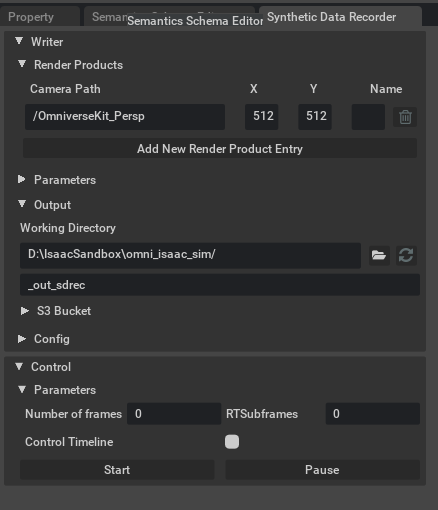
The isaacsim.replicator.synthetic_recorder extension provides a UI for recording synthetic data using Replicator writers in Isaac Sim. This extension enables users to configure and control synthetic data recording sessions through an intuitive graphical interface, supporting both default BasicWriter functionality and custom writers with configurable parameters for machine learning workflows.
Functionality#
The extension integrates synthetic data recording capabilities directly into Isaac Sim’s Tools menu, providing users with a dedicated interface for managing recording sessions. Users can set up render products, configure writer parameters, and control the recording process without requiring additional scripting or command-line operations.
Recording Configuration#
The SyntheticRecorderWindow allows users to configure various aspects of synthetic data recording, including output settings and writer parameters. The interface supports both the default Replicator BasicWriter and custom writers that can be loaded through configuration files as key-value pairs, providing flexibility for different synthetic data generation requirements.
Custom Writer Support#
Beyond the standard BasicWriter functionality, the extension supports custom writers through configuration files. This allows users to define custom parameters and recording behaviors tailored to specific synthetic data generation needs, making it adaptable to various machine learning and computer vision workflows.
Integration#
The extension uses omni.kit.menu.utils to add the “Synthetic Data Recorder” window to the Tools/Replicator menu group, making it easily accessible from Isaac Sim’s main interface. It leverages the omni.replicator.core framework to handle the underlying synthetic data generation and recording operations.
Enable Extension#
The extension can be enabled (if not already) in one of the following ways:
Define the next entry as an application argument from a terminal.
APP_SCRIPT.(sh|bat) --enable isaacsim.replicator.synthetic_recorder
Define the next entry under [dependencies] in an experience (.kit) file or an extension configuration (extension.toml) file.
[dependencies]
"isaacsim.replicator.synthetic_recorder" = {}
Open the Window > Extensions menu in a running application instance and search for isaacsim.replicator.synthetic_recorder.
Then, toggle the enable control button if it is not already active.