


[isaacsim.asset.transformer.ui] Isaac Sim Asset Transformer#
Version: 1.1.1
Overview#
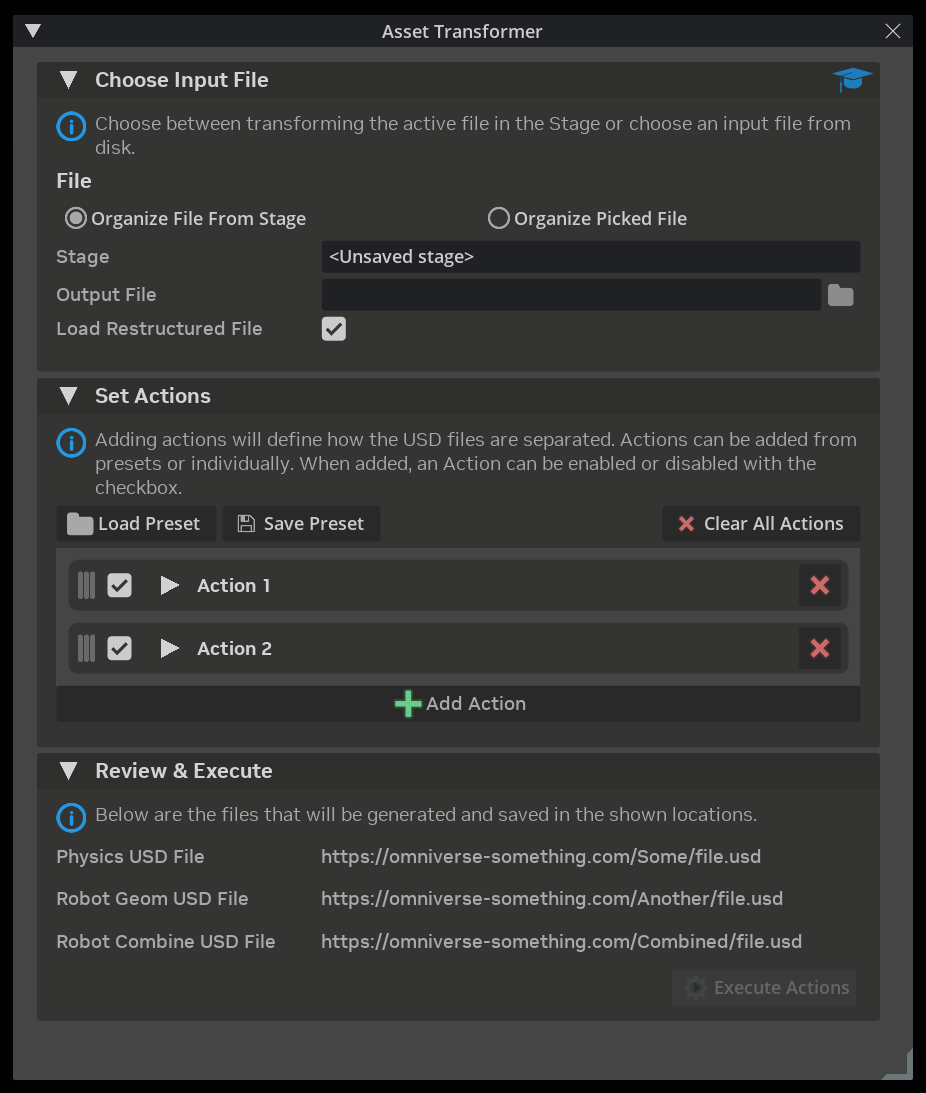
The Asset Transformer extension provides a UI for applying configurable transformation actions to USD assets. It enables users to restructure, split, and modify USD files through a pipeline of ordered actions.
Features#
Flexible Input Sources: Transform the currently open stage or select a USD file from disk
Action Pipeline: Build a sequence of transformation actions that execute in order
Drag-and-Drop Reordering: Easily reorganize action execution order
Per-Action Configuration: Each action type provides its own configuration UI
Preset System: Save and load action configurations as JSON presets for reuse
Autoload Option: Automatically open the transformed output file after execution
Usage#
Opening the Window#
Navigate to Tools > Robotics > Asset Transformer in the menu bar.
Choosing an Input File#
The Choose Input File section offers two modes:
Organize File From Stage: Transforms the currently open USD stage. The field displays the stage’s file path, or indicators like
<Unsaved stage>or<No stage open>.Organize Picked File: Select any USD file (
.usd,.usda,.usdc,.usdz) from disk using the file picker.
Specify an Output File path where the transformed asset will be saved.
Enable Load Restructured File to automatically open the output file in the stage after all actions complete successfully.
Configuring Actions#
The Set Actions section manages the transformation pipeline:
Load Preset: Load a previously saved action configuration from a JSON file
Save Preset: Save the current action list and settings to a JSON file
Clear All Actions: Remove all actions from the list
Add Action: Add a new transformation action to the pipeline
Each action row displays:
Drag Handle: Reorder actions via drag-and-drop
Checkbox: Enable or disable the action without removing it
Expand Triangle: Click to reveal action-specific configuration options
Remove Button: Delete the action from the list
Executing Transformations#
The Review & Execute section shows a summary of the files that will be generated. Click Execute Actions to run all enabled actions in sequence.
The Execute button is only enabled when:
At least one action is enabled
An output file path is specified
Preset File Format#
Presets are stored as JSON files with the following structure:
{
  "version": "1.0",
  "actions": [
    {
      "type": "ActionTypeName",
      "name": "Display Name",
      "enabled": true,
      "config": {
        "option1": "value1",
        "option2": false
      }
    }
  ]
}
Extension Settings#
Setting |
Description |
|---|---|
|
Show window automatically when extension loads |
Creating Custom Actions#
To implement a custom transformation action, subclass AssetTransformerAction:
from isaacsim.asset.transformer.ui.actions import AssetTransformerAction
import omni.ui as ui

class MyCustomAction(AssetTransformerAction):
    ACTION_TYPE = "MyCustomAction"

    def __init__(self, name: str = "My Custom Action"):
        super().__init__(name)
        self._param_model = ui.SimpleStringModel()

    def build_ui(self) -> None:
        """Build configuration UI shown when action row is expanded."""
        with ui.HStack(height=0):
            ui.Label("Parameter:", width=100)
            ui.StringField(model=self._param_model)

    def run(self) -> bool:
        """Execute the transformation. Return True on success."""
        param_value = self._param_model.get_value_as_string()
        # Implement transformation logic here
        return True

    def to_dict(self) -> dict:
        """Serialize action configuration for preset saving."""
        return {
            "type": self.ACTION_TYPE,
            "name": self.name,
            "enabled": self.enabled,
            "config": {
                "parameter": self._param_model.get_value_as_string()
            }
        }

    @classmethod
    def from_dict(cls, data: dict) -> "MyCustomAction":
        """Deserialize action from preset data."""
        instance = cls(data.get("name", "My Custom Action"))
        instance.enabled = data.get("enabled", True)
        config = data.get("config", {})
        instance._param_model.set_value(config.get("parameter", ""))
        return instance
Dependencies#
omni.kit.menu.utils: Menu integrationomni.kit.window.filepicker: File selection dialogsomni.usd: USD stage access
Known Limitations#
The Review panel currently shows placeholder output paths; actual paths will be populated by the action implementations
Action registry for discovering available action types is not yet implemented
Support#
For issues or feature requests, contact the Isaac Sim team or file an issue in the repository.
Enable Extension#
The extension can be enabled (if not already) in one of the following ways:
Define the next entry as an application argument from a terminal.
APP_SCRIPT.(sh|bat) --enable isaacsim.asset.transformer.ui
Define the next entry under [dependencies] in an experience (.kit) file or an extension configuration (extension.toml) file.
[dependencies]
"isaacsim.asset.transformer.ui" = {}
Open the Window > Extensions menu in a running application instance and search for isaacsim.asset.transformer.ui.
Then, toggle the enable control button if it is not already active.