


[isaacsim.robot_setup.assembler] Robot Assembler#
Version: 3.3.2
Overview#
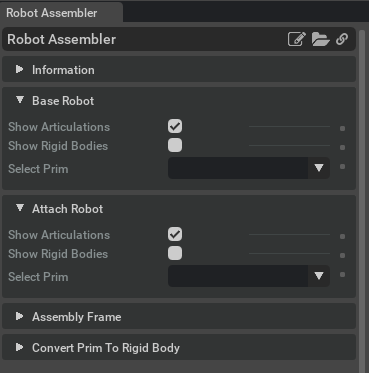
The isaacsim.robot_setup.assembler extension enables the assembly of multiple articulated robots into single unified structures. It provides tools to physically connect separate robot components by creating fixed joints between them, managing their transforms, and handling collision masking to prevent interference during simulation.
Key Components#
RobotAssembler#
The RobotAssembler class serves as the primary interface for robot assembly operations. It manages the complete assembly workflow from initial positioning through final composition.
Assembly Process: The assembler follows a multi-stage process where robots are first positioned relative to each other using mount frames, then physically connected through fixed joints. The process supports variant management, allowing different assembly configurations to be stored and selected.
Transform Alignment: The assembler automatically calculates and applies the necessary transforms to align attachment points between robots. It uses mount frames on both the base and attachment robots to determine the proper positioning and orientation.
AssembledBodies#
The AssembledBodies class represents the result of a successful assembly operation between two rigid bodies. It maintains references to the base and attachment components along with their connecting joint.
Joint Management: The class tracks the fixed joint that physically connects the two bodies and manages the root joints of the attachment body. Root joints are disabled during assembly to prevent the attachment from being independently controlled, and can be re-enabled during disassembly.
Collision Control: Each assembled body includes collision masking relationships that prevent physics conflicts between the connected components during simulation.
AssembledRobot#
The AssembledRobot class provides a simplified interface for working with assembled robot data. It wraps an AssembledBodies instance and exposes key properties through a streamlined API focused on robot-specific use cases.
Functionality#
Physical Assembly#
The extension creates fixed joints between robot components at specified mount points, effectively making separate articulated structures behave as a single physical entity during simulation.
Variant Management#
Assembly configurations can be stored as USD variants, allowing users to switch between different robot configurations or attachment states within the same asset.
Collision Masking#
The system automatically creates collision filter relationships between assembled components to prevent physics solver conflicts while maintaining collision detection with external objects.
Transform Calculation#
Advanced transform utilities handle the complex calculations needed to properly align robot components based on their mount frames and current world positions.
Enable Extension#
The extension can be enabled (if not already) in one of the following ways:
Define the next entry as an application argument from a terminal.
APP_SCRIPT.(sh|bat) --enable isaacsim.robot_setup.assembler
Define the next entry under [dependencies] in an experience (.kit) file or an extension configuration (extension.toml) file.
[dependencies]
"isaacsim.robot_setup.assembler" = {}
Open the Window > Extensions menu in a running application instance and search for isaacsim.robot_setup.assembler.
Then, toggle the enable control button if it is not already active.
Python API#
RobotAssembler is a class to assemble robots from a base robot and an attachment robot. |
|
A wrapper class providing convenient access to assembled robot body information. |
|
Class representing two assembled rigid bodies connected by a fixed joint. |
- class RobotAssembler#
Bases:
objectRobotAssembler is a class to assemble robots from a base robot and an attachment robot. It will create a new USD stage with the assembly and configure a variant selection to enable the attachment robot to be selected.
If the variant set already exists in the source asset, it creates a new entry to it, otherwise it creates a new variant set.
- assemble() None#
Composes the attachment robot onto the base robot, so that the attachment robot is a child of the base robot, and ready to simulate.
- begin_assembly(
- stage: object,
- base_prim_path: str,
- base_mount_path: str,
- attachment_prim_path: str,
- attachment_mount_path: str,
- variant_set: str,
- variant_name: str,
Start the robot assembly process.
Places the attachment robot relative to the base robot but does not compose them yet.
- Parameters:
stage – USD stage for assembly
base_prim_path – Path to base robot prim
base_mount_path – Path to mount frame on base robot
attachment_prim_path – Path to attachment robot prim
attachment_mount_path – Path to mount frame on attachment robot
variant_set – Name of variant set to create/modify
variant_name – Name of variant to create
- finish_assemble() None#
Finalize the assembly process by configuring variant sets and saving the assembly to a USD file.
- get_articulation_root_api_path(prim_path: str) str#
Get the prim path that has the Articulation Root API applied.
- Parameters:
prim_path – Path to a prim
- Returns:
Path to the prim that has the Articulation Root API applied
- is_root_joint(prim: object) bool#
Check if a prim is a root joint (has no body0 or body1 target).
- Parameters:
prim – Prim to check
- Returns:
True if prim is a root joint, False otherwise
- mask_collisions(
- prim_path_a: str,
- prim_path_b: str,
Mask collisions between two prims. All nested prims will also be included.
- Parameters:
prim_path_a – Path to a prim
prim_path_b – Path to a prim
- Returns:
A relationship filtering collisions between prim_path_a and prim_path_b
- reset() None#
Reset the assembler to its initial state.
Performs three responsibilities:
If an assembly is in progress (
self._status == AssemblyStatus.ASSEMBLING) cancels it viacancel_assembly().Clears the references to the active stage and to the base/attachment robot and mount prim paths.
Initializes the assembly-sublayer bookkeeping fields (
_assembly_identifier,_local_assembly_identifier,_assembly_layer,_direct_edit,_variant_set,_variant_name) to safe defaults so thatcancel_assembly()remains valid to call on a fresh or already-reset instance.
- class AssembledRobot(
- assembled_robots: AssembledBodies,
Bases:
objectA wrapper class providing convenient access to assembled robot body information.
This class serves as a high-level interface for interacting with assembled robots, encapsulating the underlying AssembledBodies instance and exposing its key properties through a simplified API. It provides direct access to robot paths, joint information, and collision masking relationships for assembled robot configurations.
The class acts as a facade over AssembledBodies, making it easier to work with assembled robot data without needing to interact directly with the lower-level assembly implementation.
- Parameters:
assembled_robots – The AssembledBodies instance containing the robot assembly data.
- property attach_path: str#
Prim path of the floating (attach) body.
- Returns:
Prim path of the floating (attach) body.
- property base_path: str#
Prim path of the base body.
- Returns:
Prim path of the base body.
- property collision_mask: pxr.Usd.Relationship#
A Usd Relationship masking collisions between the two assembled robots.
- Returns:
A Usd Relationship masking collisions between the two assembled robots.
- property fixed_joint: pxr.UsdPhysics.FixedJoint#
USD fixed joint linking base and floating body together.
- Returns:
USD fixed joint linking base and floating body together.
- property root_joints: list[pxr.UsdPhysics.Joint]#
Root joints that tie the floating body to the USD stage. These are disabled in an assembled body,.
and will be re-enabled by the disassemble() function.
- Returns:
Root joints that tie the floating body to the USD stage.
- class AssembledBodies(
- base_path: str,
- attach_path: str,
- fixed_joint: pxr.UsdPhysics.FixedJoint,
- root_joints: list[pxr.UsdPhysics.Joint],
- attach_body_articulation_root: pxr.Usd.Prim,
- collision_mask: object = None,
Bases:
objectClass representing two assembled rigid bodies connected by a fixed joint.
This class maintains references to the base and attach bodies, the fixed joint connecting them, and provides methods to manipulate their relative transform.
- Parameters:
base_path – Prim path of the base body.
attach_path – Prim path of the attach body.
fixed_joint – Fixed joint connecting the bodies.
root_joints – Root joints of the attach body.
attach_body_articulation_root – Articulation root of attach body.
collision_mask – Collision mask between bodies.
- property attach_body_articulation_root: pxr.Usd.Prim#
USD articulation root of the floating body.
- Returns:
USD articulation root of the floating body.
- property attach_path: str#
Prim path of the floating (attach) body.
- Returns:
Prim path of the floating (attach) body.
- property base_path: str#
Prim path of the base body.
- Returns:
Prim path of the base body.
- property collision_mask: pxr.Usd.Relationship#
A Usd Relationship masking collisions between the two assembled bodies.
- Returns:
A Usd Relationship masking collisions between the two assembled bodies.
- property fixed_joint: pxr.UsdPhysics.FixedJoint#
USD fixed joint linking base and floating body together.
- Returns:
USD fixed joint linking base and floating body together.
- property root_joints: list[pxr.UsdPhysics.Joint]#
Root joints that tie the floating body to the USD stage. These are disabled in an assembled body,.
and will be re-enabled by the disassemble() function.
- Returns:
Root joints that tie the floating body to the USD stage.
Actions in isaacsim.robot_setup.assembler#
ID |
Display Name |
Description |
|---|---|---|
CreateUIExtension:Robot Assembler |
Add Robot Assembler Extension to UI toolbar |