


[isaacsim.replicator.mobility_gen.ui] MobilityGen UI#
Version: 0.4.4
Overview#
This extension provides a user interface for creating teleoperated mobility data collection sessions in Isaac Sim. It enables users to configure robot types, scenario parameters, and occupancy maps to generate machine learning training datasets through physics-based simulation with real-time control input.
Functionality#
The extension supports multiple robot configurations and scenario types for mobility data generation. Users can select from available robot models and scenario configurations to create customized data collection sessions. The system handles automatic stage loading, robot spawning, camera setup, and physics simulation management.
Real-time teleoperation is supported through both keyboard and gamepad inputs, allowing users to control robots within the simulated environment. The extension automatically records timestamped datasets during teleoperation sessions, capturing robot states, sensor data, and environmental information for machine learning applications.
UI Components#
MobilityGen Control Panel#
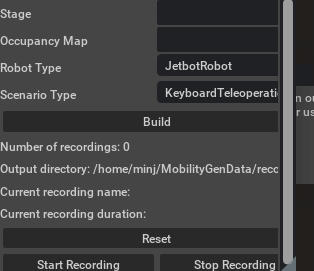
The main control window provides configuration options for scenario setup and recording management. Users can select robot types through dropdown menus, choose scenario configurations, and specify USD stage files and occupancy maps for the simulation environment.
Recording controls allow users to start and stop data collection sessions, with automatic timestamping and directory management. The interface displays current recording status, step counts, and output directory information to track data generation progress.
MobilityGen Occupancy Map Window#
A dedicated visualization window displays the occupancy map with real-time robot position tracking. This provides visual feedback during teleoperation sessions, showing the robot’s location within the mapped environment and helping users navigate effectively during data collection.
The occupancy map visualization updates dynamically as the robot moves through the environment, providing spatial context for the recorded mobility data.
Integration#
The extension integrates with the core MobilityGen framework through the isaacsim.replicator.mobility_gen dependency, which provides the underlying scenario management and data generation capabilities. It utilizes isaacsim.gui.components for consistent UI element construction across the interface.
Physics simulation integration occurs through Isaac Sim’s physics callbacks, allowing the extension to advance scenarios and handle data recording in sync with the simulation timestep. The system manages stage caching and restoration to ensure consistent scenario replay conditions.
Data Recording#
Recording sessions generate timestamped datasets in structured directories, with automatic file management and metadata capture. The extension creates configuration files alongside recorded data, preserving scenario parameters, robot configurations, and occupancy map information for dataset reproducibility.
Data recording operates in real-time during teleoperation sessions, capturing robot states, input commands, and environmental data at each physics timestep. The recording system handles file I/O operations asynchronously to maintain simulation performance during data collection.
Enable Extension#
The extension can be enabled (if not already) in one of the following ways:
Define the next entry as an application argument from a terminal.
APP_SCRIPT.(sh|bat) --enable isaacsim.replicator.mobility_gen.ui
Define the next entry under [dependencies] in an experience (.kit) file or an extension configuration (extension.toml) file.
[dependencies]
"isaacsim.replicator.mobility_gen.ui" = {}
Open the Window > Extensions menu in a running application instance and search for isaacsim.replicator.mobility_gen.ui.
Then, toggle the enable control button if it is not already active.