


[isaacsim.asset.gen.omap.ui] UI components for the Isaac Sim Occupancy Map#
Version: 2.6.1
Overview#
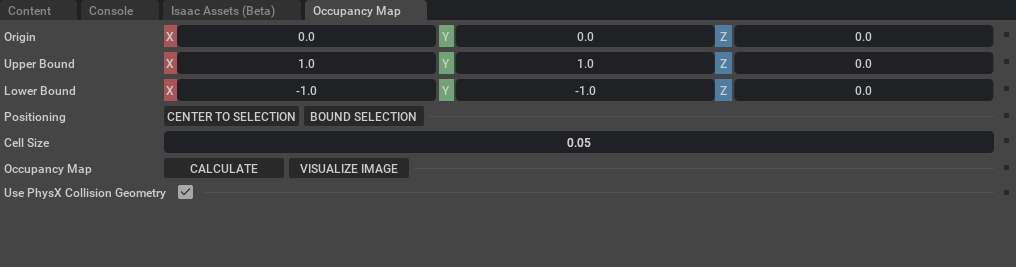
To enable this extension, go to the Extension Manager menu and enable isaacsim.asset.gen.omap extension.
Generating an Occupancy Map#
Open the panel via Tools > Robotics > Occupancy Map.
Set the origin, upper/lower bounds, and cell size to define the mapping region.
Click Calculate to compute the occupancy grid from collision geometry in the stage.
Click Visualize to open the visualization window.
Visualization Window#
The Occupancy Map Visualization window lets you configure the output before saving:
Occupied / Freespace / Unknown Color — colors used for each cell type in the image.
Rotate Image — clockwise rotation (0°, 90°, −90°, 180°) applied to the output image.
Coordinate Type — format of the config data shown in the text field: ROS YAML or stage-space coordinates.
Re-Generate Image — recompute the image after changing settings.
Filename — base name used for both the PNG and YAML saves; also written into the YAML
imagefield. Updates the YAML preview automatically as you type.
Saving the Outputs#
After generating the image, two save buttons appear below the map preview:
Save Image — saves the occupancy map as a
.pngfile.Save YAML — saves the ROS occupancy map parameters as a
.yamlfile, usable with tools likemap_server. Both dialogs pre-fill the filename from the Filename field.
Note: The YAML file is always saved in ROS format regardless of which Coordinate Type is selected.
Enable Extension#
The extension can be enabled (if not already) in one of the following ways:
Define the next entry as an application argument from a terminal.
APP_SCRIPT.(sh|bat) --enable isaacsim.asset.gen.omap.ui
Define the next entry under [dependencies] in an experience (.kit) file or an extension configuration (extension.toml) file.
[dependencies]
"isaacsim.asset.gen.omap.ui" = {}
Open the Window > Extensions menu in a running application instance and search for isaacsim.asset.gen.omap.ui.
Then, toggle the enable control button if it is not already active.
Actions in isaacsim.asset.gen.omap.ui#
ID |
Display Name |
Description |
|---|---|---|
open_omap_layout |
Occupancy Map Generation |
Open the Occupancy Map Generation layout |