



Interacting with a surface gripper#
This tutorial shows how to interact with an articulated robot with a surface gripper attached to its end-effector in the simulation. It is a continuation of the Interacting with an articulation tutorial, where we learned how to interact with an articulated robot. Note that as of IsaacSim 5.0 the surface gripper are only supported on the cpu backend.
The Code#
The tutorial corresponds to the run_surface_gripper.py script in the scripts/tutorials/01_assets
directory.
Code for run_surface_gripper.py
  1# Copyright (c) 2022-2026, The Isaac Lab Project Developers (https://github.com/isaac-sim/IsaacLab/blob/main/CONTRIBUTORS.md).
  2# All rights reserved.
  3#
  4# SPDX-License-Identifier: BSD-3-Clause
  5
  6"""This script demonstrates how to spawn a pick-and-place robot equipped with a surface gripper and interact with it.
  7
  8.. code-block:: bash
  9
 10    # Usage
 11    ./isaaclab.sh -p scripts/tutorials/01_assets/run_surface_gripper.py --device=cpu
 12
 13When running this script make sure the --device flag is set to cpu. This is because the surface gripper is
 14currently only supported on the CPU.
 15"""
 16
 17"""Launch Isaac Sim Simulator first."""
 18
 19import argparse
 20
 21from isaaclab.app import AppLauncher
 22
 23# add argparse arguments
 24parser = argparse.ArgumentParser(description="Tutorial on spawning and interacting with a Surface Gripper.")
 25# append AppLauncher cli args
 26AppLauncher.add_app_launcher_args(parser)
 27# parse the arguments
 28args_cli = parser.parse_args()
 29
 30# launch omniverse app
 31app_launcher = AppLauncher(args_cli)
 32simulation_app = app_launcher.app
 33
 34"""Rest everything follows."""
 35
 36import torch
 37
 38import isaaclab.sim as sim_utils
 39from isaaclab.assets import Articulation, SurfaceGripper, SurfaceGripperCfg
 40from isaaclab.sim import SimulationContext
 41
 42##
 43# Pre-defined configs
 44##
 45from isaaclab_assets import PICK_AND_PLACE_CFG  # isort:skip
 46
 47
 48def design_scene():
 49    """Designs the scene."""
 50    # Ground-plane
 51    cfg = sim_utils.GroundPlaneCfg()
 52    cfg.func("/World/defaultGroundPlane", cfg)
 53    # Lights
 54    cfg = sim_utils.DomeLightCfg(intensity=3000.0, color=(0.75, 0.75, 0.75))
 55    cfg.func("/World/Light", cfg)
 56
 57    # Create separate groups called "Origin1", "Origin2"
 58    # Each group will have a robot in it
 59    origins = [[2.75, 0.0, 0.0], [-2.75, 0.0, 0.0]]
 60    # Origin 1
 61    sim_utils.create_prim("/World/Origin1", "Xform", translation=origins[0])
 62    # Origin 2
 63    sim_utils.create_prim("/World/Origin2", "Xform", translation=origins[1])
 64
 65    # Articulation: First we define the robot config
 66    pick_and_place_robot_cfg = PICK_AND_PLACE_CFG.copy()
 67    pick_and_place_robot_cfg.prim_path = "/World/Origin.*/Robot"
 68    pick_and_place_robot = Articulation(cfg=pick_and_place_robot_cfg)
 69
 70    # Surface Gripper: Next we define the surface gripper config
 71    surface_gripper_cfg = SurfaceGripperCfg()
 72    # We need to tell the View which prim to use for the surface gripper
 73    surface_gripper_cfg.prim_path = "/World/Origin.*/Robot/picker_head/SurfaceGripper"
 74    # We can then set different parameters for the surface gripper, note that if these parameters are not set,
 75    # the View will try to read them from the prim.
 76    surface_gripper_cfg.max_grip_distance = 0.1  # [m] (Maximum distance at which the gripper can grasp an object)
 77    surface_gripper_cfg.shear_force_limit = 500.0  # [N] (Force limit in the direction perpendicular direction)
 78    surface_gripper_cfg.coaxial_force_limit = 500.0  # [N] (Force limit in the direction of the gripper's axis)
 79    surface_gripper_cfg.retry_interval = 0.1  # seconds (Time the gripper will stay in a grasping state)
 80    # We can now spawn the surface gripper
 81    surface_gripper = SurfaceGripper(cfg=surface_gripper_cfg)
 82
 83    # return the scene information
 84    scene_entities = {"pick_and_place_robot": pick_and_place_robot, "surface_gripper": surface_gripper}
 85    return scene_entities, origins
 86
 87
 88def run_simulator(
 89    sim: sim_utils.SimulationContext, entities: dict[str, Articulation | SurfaceGripper], origins: torch.Tensor
 90):
 91    """Runs the simulation loop."""
 92    # Extract scene entities
 93    robot: Articulation = entities["pick_and_place_robot"]
 94    surface_gripper: SurfaceGripper = entities["surface_gripper"]
 95
 96    # Define simulation stepping
 97    sim_dt = sim.get_physics_dt()
 98    count = 0
 99    # Simulation loop
100    while simulation_app.is_running():
101        # Reset
102        if count % 500 == 0:
103            # reset counter
104            count = 0
105            # reset the scene entities
106            # root state
107            # we offset the root state by the origin since the states are written in simulation world frame
108            # if this is not done, then the robots will be spawned at the (0, 0, 0) of the simulation world
109            root_state = robot.data.default_root_state.clone()
110            root_state[:, :3] += origins
111            robot.write_root_pose_to_sim(root_state[:, :7])
112            robot.write_root_velocity_to_sim(root_state[:, 7:])
113            # set joint positions with some noise
114            joint_pos, joint_vel = robot.data.default_joint_pos.clone(), robot.data.default_joint_vel.clone()
115            joint_pos += torch.rand_like(joint_pos) * 0.1
116            robot.write_joint_state_to_sim(joint_pos, joint_vel)
117            # clear internal buffers
118            robot.reset()
119            print("[INFO]: Resetting robot state...")
120            # Opens the gripper and makes sure the gripper is in the open state
121            surface_gripper.reset()
122            print("[INFO]: Resetting gripper state...")
123
124        # Sample a random command between -1 and 1.
125        gripper_commands = torch.rand(surface_gripper.num_instances) * 2.0 - 1.0
126        # The gripper behavior is as follows:
127        # -1 < command < -0.3 --> Gripper is Opening
128        # -0.3 < command < 0.3 --> Gripper is Idle
129        # 0.3 < command < 1 --> Gripper is Closing
130        print(f"[INFO]: Gripper commands: {gripper_commands}")
131        mapped_commands = [
132            "Opening" if command < -0.3 else "Closing" if command > 0.3 else "Idle" for command in gripper_commands
133        ]
134        print(f"[INFO]: Mapped commands: {mapped_commands}")
135        # Set the gripper command
136        surface_gripper.set_grippers_command(gripper_commands)
137        # Write data to sim
138        surface_gripper.write_data_to_sim()
139        # Perform step
140        sim.step()
141        # Increment counter
142        count += 1
143        # Read the gripper state from the simulation
144        surface_gripper.update(sim_dt)
145        # Read the gripper state from the buffer
146        surface_gripper_state = surface_gripper.state
147        # The gripper state is a list of integers that can be mapped to the following:
148        # -1 --> Open
149        # 0 --> Closing
150        # 1 --> Closed
151        # Print the gripper state
152        print(f"[INFO]: Gripper state: {surface_gripper_state}")
153        mapped_commands = [
154            "Open" if state == -1 else "Closing" if state == 0 else "Closed" for state in surface_gripper_state.tolist()
155        ]
156        print(f"[INFO]: Mapped commands: {mapped_commands}")
157
158
159def main():
160    """Main function."""
161    # Load kit helper
162    sim_cfg = sim_utils.SimulationCfg(device=args_cli.device)
163    sim = SimulationContext(sim_cfg)
164    # Set main camera
165    sim.set_camera_view([2.75, 7.5, 10.0], [2.75, 0.0, 0.0])
166    # Design scene
167    scene_entities, scene_origins = design_scene()
168    scene_origins = torch.tensor(scene_origins, device=sim.device)
169    # Play the simulator
170    sim.reset()
171    # Now we are ready!
172    print("[INFO]: Setup complete...")
173    # Run the simulator
174    run_simulator(sim, scene_entities, scene_origins)
175
176
177if __name__ == "__main__":
178    # run the main function
179    main()
180    # close sim app
181    simulation_app.close()
The Code Explained#
Designing the scene#
Similarly to the previous tutorial, we populate the scene with a ground plane and a distant light. Then, we spawn an articulation from its USD file. This time a pick-and-place robot is spawned. The pick-and-place robot is a simple robot with 3 driven axes, its gantry allows it to move along the x and y axes, as well as up and down along the z-axis. Furthermore, the robot end-effector is outfitted with a surface gripper. The USD file for the pick-and-place robot contains the robot’s geometry, joints, and other physical properties as well as the surface gripper. Before implementing a similar gripper on your own robot, we recommend to check out the USD file for the gripper found on Isaaclab’s Nucleus.
For the pick-and-place robot, we use its pre-defined configuration object, you can find out more about it in the
Writing an Asset Configuration tutorial. For the surface gripper, we also need to create a configuration
object. This is done by instantiating a assets.SurfaceGripperCfg object and passing it the relevant
parameters.
The available parameters are:
max_grip_distance: The maximum distance at which the gripper can grasp an object.shear_force_limit: The maximum force the gripper can exert in the direction perpendicular to the gripper’s axis.coaxial_force_limit: The maximum force the gripper can exert in the direction of the gripper’s axis.retry_interval: The time the gripper will stay in a grasping state.
As seen in the previous tutorial, we can spawn the articulation into the scene in a similar fashion by creating
an instance of the assets.Articulation class by passing the configuration object to its constructor. The same
principle applies to the surface gripper. By passing the configuration object to the assets.SurfaceGripper
constructor, the surface gripper is created and can be added to the scene. In practice, the object will only be
initialized when the play button is pressed.
    # Create separate groups called "Origin1", "Origin2"
    # Each group will have a robot in it
    origins = [[2.75, 0.0, 0.0], [-2.75, 0.0, 0.0]]
    # Origin 1
    sim_utils.create_prim("/World/Origin1", "Xform", translation=origins[0])
    # Origin 2
    sim_utils.create_prim("/World/Origin2", "Xform", translation=origins[1])

    # Articulation: First we define the robot config
    pick_and_place_robot_cfg = PICK_AND_PLACE_CFG.copy()
    pick_and_place_robot_cfg.prim_path = "/World/Origin.*/Robot"
    pick_and_place_robot = Articulation(cfg=pick_and_place_robot_cfg)

    # Surface Gripper: Next we define the surface gripper config
    surface_gripper_cfg = SurfaceGripperCfg()
    # We need to tell the View which prim to use for the surface gripper
    surface_gripper_cfg.prim_path = "/World/Origin.*/Robot/picker_head/SurfaceGripper"
    # We can then set different parameters for the surface gripper, note that if these parameters are not set,
    # the View will try to read them from the prim.
    surface_gripper_cfg.max_grip_distance = 0.1  # [m] (Maximum distance at which the gripper can grasp an object)
    surface_gripper_cfg.shear_force_limit = 500.0  # [N] (Force limit in the direction perpendicular direction)
    surface_gripper_cfg.coaxial_force_limit = 500.0  # [N] (Force limit in the direction of the gripper's axis)
    surface_gripper_cfg.retry_interval = 0.1  # seconds (Time the gripper will stay in a grasping state)
    # We can now spawn the surface gripper
    surface_gripper = SurfaceGripper(cfg=surface_gripper_cfg)
Running the simulation loop#
Continuing from the previous tutorial, we reset the simulation at regular intervals, set commands to the articulation, step the simulation, and update the articulation’s internal buffers.
Resetting the simulation#
To reset the surface gripper, we only need to call the SurfaceGripper.reset() method which will reset the
internal buffers and caches.
            # Opens the gripper and makes sure the gripper is in the open state
            surface_gripper.reset()
Stepping the simulation#
Applying commands to the surface gripper involves two steps:
Setting the desired commands: This sets the desired gripper commands (Open, Close, or Idle).
Writing the data to the simulation: Based on the surface gripper’s configuration, this step handles writes the converted values to the PhysX buffer.
In this tutorial, we use a random command to set the gripper’s command. The gripper behavior is as follows:
-1 < command < -0.3 –> Gripper is Opening
-0.3 < command < 0.3 –> Gripper is Idle
0.3 < command < 1 –> Gripper is Closing
At every step, we randomly sample commands and set them to the gripper by calling the
SurfaceGripper.set_grippers_command() method. After setting the commands, we call the
SurfaceGripper.write_data_to_sim() method to write the data to the PhysX buffer. Finally, we step
the simulation.
        # Sample a random command between -1 and 1.
        gripper_commands = torch.rand(surface_gripper.num_instances) * 2.0 - 1.0
        # The gripper behavior is as follows:
        # -1 < command < -0.3 --> Gripper is Opening
        # -0.3 < command < 0.3 --> Gripper is Idle
        # 0.3 < command < 1 --> Gripper is Closing
        print(f"[INFO]: Gripper commands: {gripper_commands}")
        mapped_commands = [
            "Opening" if command < -0.3 else "Closing" if command > 0.3 else "Idle" for command in gripper_commands
        ]
        print(f"[INFO]: Mapped commands: {mapped_commands}")
        # Set the gripper command
        surface_gripper.set_grippers_command(gripper_commands)
        # Write data to sim
        surface_gripper.write_data_to_sim()
Updating the state#
To know the current state of the surface gripper, we can query the assets.SurfaceGripper.state() property.
This property returns a tensor of size [num_envs] where each element is either -1, 0, or 1
corresponding to the gripper state. This property is updated every time the assets.SurfaceGripper.update() method
is called.
-1–> Gripper is Open0–> Gripper is Closing1–> Gripper is Closed
        # Read the gripper state from the simulation
        surface_gripper.update(sim_dt)
        # Read the gripper state from the buffer
        surface_gripper_state = surface_gripper.state
The Code Execution#
To run the code and see the results, let’s run the script from the terminal:
./isaaclab.sh -p scripts/tutorials/01_assets/run_surface_gripper.py --device cpu
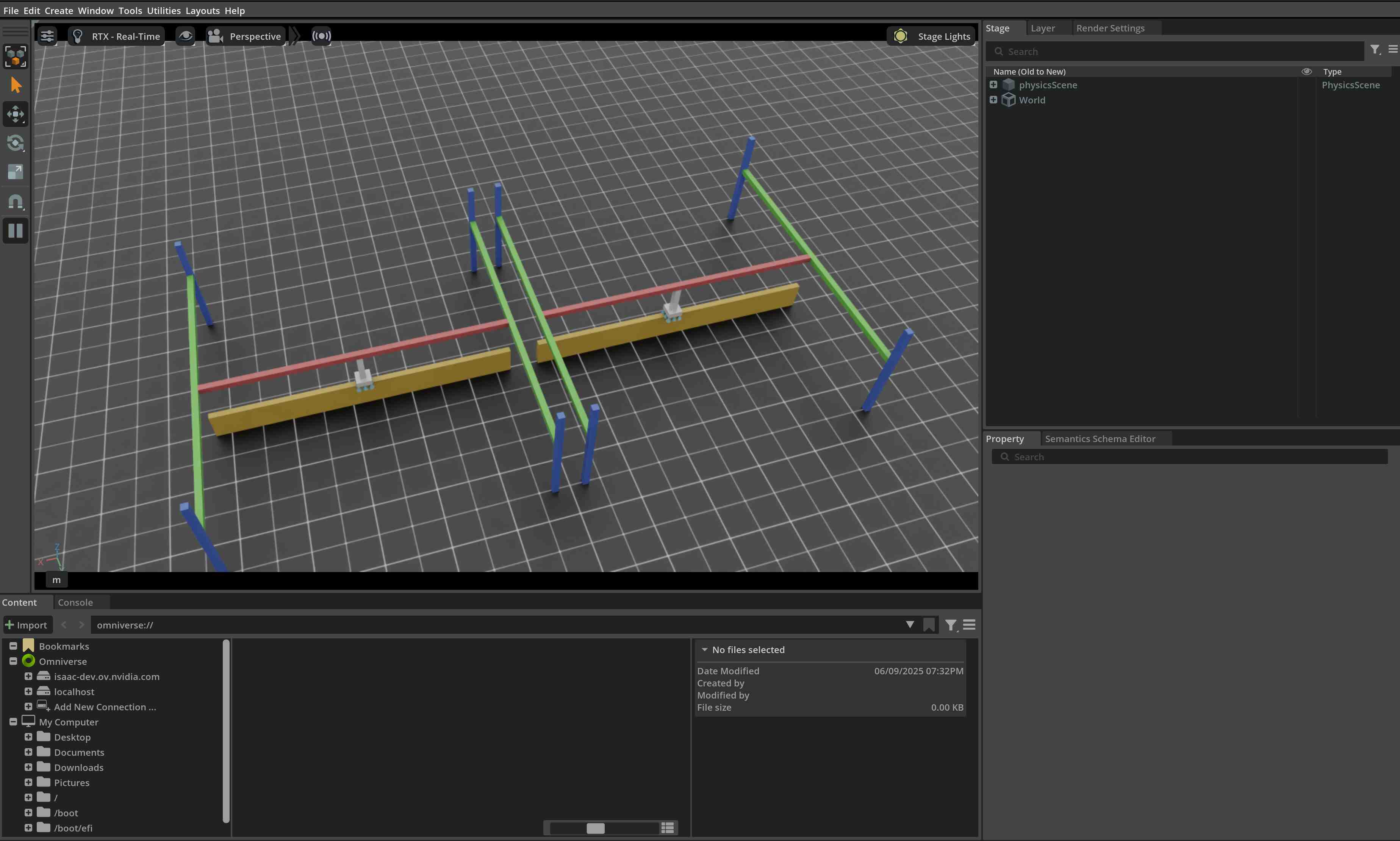
This command should open a stage with a ground plane, lights, and two pick-and-place robots.
In the terminal, you should see the gripper state and the command being printed.
To stop the simulation, you can either close the window, or press Ctrl+C in the terminal.
In this tutorial, we learned how to create and interact with a surface gripper. We saw how to set commands and query the gripper state. We also saw how to update its buffers to read the latest state from the simulation.
In addition to this tutorial, we also provide a few other scripts that spawn different robots. These are included
in the scripts/demos directory. You can run these scripts as:
# Spawn many pick-and-place robots and perform a pick-and-place task
./isaaclab.sh -p scripts/demos/pick_and_place.py
Note that in practice, the users would be expected to register their assets.SurfaceGripper instances inside
a isaaclab.InteractiveScene object, which will automatically handle the calls to the
assets.SurfaceGripper.write_data_to_sim() and assets.SurfaceGripper.update() methods.
# Create a scene
scene = InteractiveScene()

# Register the surface gripper
scene.surface_grippers["gripper"] = surface_gripper