


Frame Transformer#
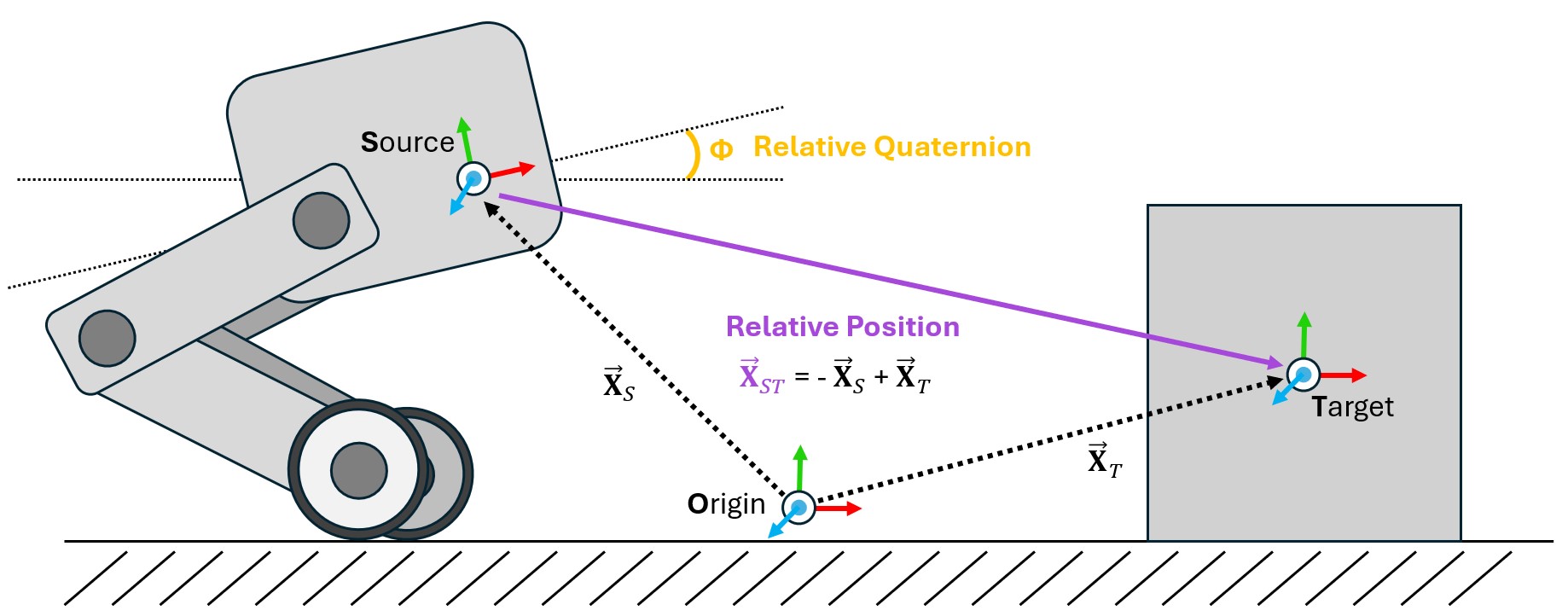
One of the most common operations that needs to be performed within a physics simulation is the frame transformation: rewriting a vector or quaternion in the basis of an arbitrary euclidean coordinate system. There are many ways to accomplish this within Isaac and USD, but these methods can be cumbersome to implement within Isaac Lab’s GPU based simulation and cloned environments. To mitigate this problem, we have designed the Frame Transformer Sensor, that tracks and calculate the relative frame transformations for rigid bodies of interest to the scene.
The sensory is minimally defined by a source frame and a list of target frames. These definitions take the form of a prim path (for the source) and list of regex capable prim paths the rigid bodies to be tracked (for the targets).
@configclass
class FrameTransformerSensorSceneCfg(InteractiveSceneCfg):
    """Design the scene with sensors on the robot."""

    # ground plane
    ground = AssetBaseCfg(prim_path="/World/defaultGroundPlane", spawn=sim_utils.GroundPlaneCfg())

    # lights
    dome_light = AssetBaseCfg(
        prim_path="/World/Light", spawn=sim_utils.DomeLightCfg(intensity=3000.0, color=(0.75, 0.75, 0.75))
    )

    # robot
    robot = ANYMAL_C_CFG.replace(prim_path="{ENV_REGEX_NS}/Robot")

    # Rigid Object
    cube = RigidObjectCfg(
        prim_path="{ENV_REGEX_NS}/Cube",
        spawn=sim_utils.CuboidCfg(
            size=(1, 1, 1),
            rigid_props=sim_utils.RigidBodyPropertiesCfg(),
            mass_props=sim_utils.MassPropertiesCfg(mass=100.0),
            collision_props=sim_utils.CollisionPropertiesCfg(),
            physics_material=sim_utils.RigidBodyMaterialCfg(static_friction=1.0),
            visual_material=sim_utils.PreviewSurfaceCfg(diffuse_color=(0.0, 1.0, 0.0), metallic=0.2),
        ),
        init_state=RigidObjectCfg.InitialStateCfg(pos=(5, 0, 0.5)),
    )

    specific_transforms = FrameTransformerCfg(
        prim_path="{ENV_REGEX_NS}/Robot/base",
        target_frames=[
            FrameTransformerCfg.FrameCfg(prim_path="{ENV_REGEX_NS}/Robot/LF_FOOT"),
            FrameTransformerCfg.FrameCfg(prim_path="{ENV_REGEX_NS}/Robot/RF_FOOT"),
        ],
        debug_vis=True,
    )

    cube_transform = FrameTransformerCfg(
        prim_path="{ENV_REGEX_NS}/Robot/base",
        target_frames=[FrameTransformerCfg.FrameCfg(prim_path="{ENV_REGEX_NS}/Cube")],
        debug_vis=False,
    )

    robot_transforms = FrameTransformerCfg(
        prim_path="{ENV_REGEX_NS}/Robot/base",
        target_frames=[FrameTransformerCfg.FrameCfg(prim_path="{ENV_REGEX_NS}/Robot/.*")],
We can now run the scene and query the sensor for data
def run_simulator(sim: sim_utils.SimulationContext, scene: InteractiveScene):
  .
  .
  .
  # Simulate physics
  while simulation_app.is_running():
    .
    .
    .

    # print information from the sensors
    print("-------------------------------")
    print(scene["specific_transforms"])
    print("relative transforms:", scene["specific_transforms"].data.target_pos_source)
    print("relative orientations:", scene["specific_transforms"].data.target_quat_source)
    print("-------------------------------")
    print(scene["cube_transform"])
    print("relative transform:", scene["cube_transform"].data.target_pos_source)
    print("-------------------------------")
    print(scene["robot_transforms"])
    print("relative transforms:", scene["robot_transforms"].data.target_pos_source)
Let’s take a look at the result for tracking specific objects. First, we can take a look at the data coming from the sensors on the feet
-------------------------------
FrameTransformer @ '/World/envs/env_.*/Robot/base':
        tracked body frames: ['base', 'LF_FOOT', 'RF_FOOT']
        number of envs: 1
        source body frame: base
        target frames (count: ['LF_FOOT', 'RF_FOOT']): 2

relative transforms: tensor([[[ 0.4658,  0.3085, -0.4840],
        [ 0.4487, -0.2959, -0.4828]]], device='cuda:0')
relative orientations: tensor([[[ 0.9623,  0.0072, -0.2717, -0.0020],
        [ 0.9639,  0.0052, -0.2663, -0.0014]]], device='cuda:0')
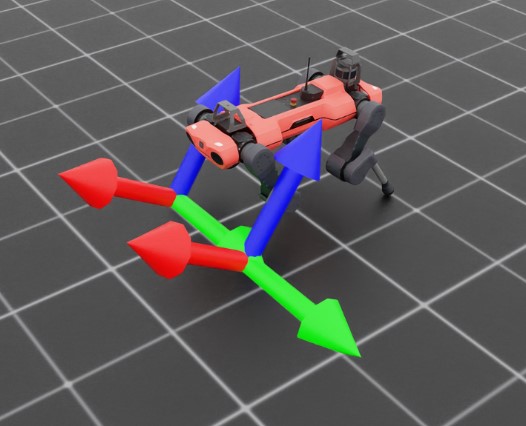
By activating the visualizer, we can see that the frames of the feet are rotated “upward” slightly. We can also see the explicit relative positions and rotations by querying the sensor for data, which returns these values as a list with the same order as the tracked frames. This becomes even more apparent if we examine the transforms specified by regex.
-------------------------------
FrameTransformer @ '/World/envs/env_.*/Robot/base':
        tracked body frames: ['base', 'LF_FOOT', 'LF_HIP', 'LF_SHANK', 'LF_THIGH', 'LH_FOOT', 'LH_HIP', 'LH_SHANK', 'LH_THIGH', 'RF_FOOT', 'RF_HIP', 'RF_SHANK', 'RF_THIGH', 'RH_FOOT', 'RH_HIP', 'RH_SHANK', 'RH_THIGH', 'base']
        number of envs: 1
        source body frame: base
        target frames (count: ['LF_FOOT', 'LF_HIP', 'LF_SHANK', 'LF_THIGH', 'LH_FOOT', 'LH_HIP', 'LH_SHANK', 'LH_THIGH', 'RF_FOOT', 'RF_HIP', 'RF_SHANK', 'RF_THIGH', 'RH_FOOT', 'RH_HIP', 'RH_SHANK', 'RH_THIGH', 'base']): 17

relative transforms: tensor([[[ 4.6581e-01,  3.0846e-01, -4.8398e-01],
        [ 2.9990e-01,  1.0400e-01, -1.7062e-09],
        [ 2.1409e-01,  2.9177e-01, -2.4214e-01],
        [ 3.5980e-01,  1.8780e-01,  1.2608e-03],
        [-4.8813e-01,  3.0973e-01, -4.5927e-01],
        [-2.9990e-01,  1.0400e-01,  2.7044e-09],
        [-2.1495e-01,  2.9264e-01, -2.4198e-01],
        [-3.5980e-01,  1.8780e-01,  1.5582e-03],
        [ 4.4871e-01, -2.9593e-01, -4.8277e-01],
        [ 2.9990e-01, -1.0400e-01, -2.7057e-09],
        [ 1.9971e-01, -2.8554e-01, -2.3778e-01],
        [ 3.5980e-01, -1.8781e-01, -9.1049e-04],
        [-5.0090e-01, -2.9095e-01, -4.5746e-01],
        [-2.9990e-01, -1.0400e-01,  6.3592e-09],
        [-2.1860e-01, -2.8251e-01, -2.5163e-01],
        [-3.5980e-01, -1.8779e-01, -1.8792e-03],
        [ 0.0000e+00,  0.0000e+00,  0.0000e+00]]], device='cuda:0')
Here, the sensor is tracking all rigid body children of Robot/base, but this expression is inclusive, meaning that the source body itself is also a target. This can be seen both by examining the source and target list, where base appears twice, and also in the returned data, where the sensor returns the relative transform to itself, (0, 0, 0).
Code for frame_transformer_sensor.py
  1# Copyright (c) 2022-2026, The Isaac Lab Project Developers (https://github.com/isaac-sim/IsaacLab/blob/main/CONTRIBUTORS.md).
  2# All rights reserved.
  3#
  4# SPDX-License-Identifier: BSD-3-Clause
  5
  6import argparse
  7
  8from isaaclab.app import AppLauncher
  9
 10# add argparse arguments
 11parser = argparse.ArgumentParser(description="Example on using the frame transformer sensor.")
 12parser.add_argument("--num_envs", type=int, default=1, help="Number of environments to spawn.")
 13# append AppLauncher cli args
 14AppLauncher.add_app_launcher_args(parser)
 15# demos should open Kit visualizer by default
 16parser.set_defaults(visualizer=["kit"])
 17# parse the arguments
 18args_cli = parser.parse_args()
 19
 20# launch omniverse app
 21app_launcher = AppLauncher(args_cli)
 22simulation_app = app_launcher.app
 23
 24"""Rest everything follows."""
 25
 26import torch
 27
 28import isaaclab.sim as sim_utils
 29from isaaclab.assets import AssetBaseCfg, RigidObjectCfg
 30from isaaclab.scene import InteractiveScene, InteractiveSceneCfg
 31from isaaclab.sensors import FrameTransformerCfg
 32from isaaclab.utils.configclass import configclass
 33
 34##
 35# Pre-defined configs
 36##
 37from isaaclab_assets.robots.anymal import ANYMAL_C_CFG  # isort: skip
 38
 39
 40@configclass
 41class FrameTransformerSensorSceneCfg(InteractiveSceneCfg):
 42    """Design the scene with sensors on the robot."""
 43
 44    # ground plane
 45    ground = AssetBaseCfg(prim_path="/World/defaultGroundPlane", spawn=sim_utils.GroundPlaneCfg())
 46
 47    # lights
 48    dome_light = AssetBaseCfg(
 49        prim_path="/World/Light", spawn=sim_utils.DomeLightCfg(intensity=3000.0, color=(0.75, 0.75, 0.75))
 50    )
 51
 52    # robot
 53    robot = ANYMAL_C_CFG.replace(prim_path="{ENV_REGEX_NS}/Robot")
 54
 55    # Rigid Object
 56    cube = RigidObjectCfg(
 57        prim_path="{ENV_REGEX_NS}/Cube",
 58        spawn=sim_utils.CuboidCfg(
 59            size=(1, 1, 1),
 60            rigid_props=sim_utils.RigidBodyPropertiesCfg(),
 61            mass_props=sim_utils.MassPropertiesCfg(mass=100.0),
 62            collision_props=sim_utils.CollisionPropertiesCfg(),
 63            physics_material=sim_utils.RigidBodyMaterialCfg(static_friction=1.0),
 64            visual_material=sim_utils.PreviewSurfaceCfg(diffuse_color=(0.0, 1.0, 0.0), metallic=0.2),
 65        ),
 66        init_state=RigidObjectCfg.InitialStateCfg(pos=(5, 0, 0.5)),
 67    )
 68
 69    specific_transforms = FrameTransformerCfg(
 70        prim_path="{ENV_REGEX_NS}/Robot/base",
 71        target_frames=[
 72            FrameTransformerCfg.FrameCfg(prim_path="{ENV_REGEX_NS}/Robot/LF_FOOT"),
 73            FrameTransformerCfg.FrameCfg(prim_path="{ENV_REGEX_NS}/Robot/RF_FOOT"),
 74        ],
 75        debug_vis=True,
 76    )
 77
 78    cube_transform = FrameTransformerCfg(
 79        prim_path="{ENV_REGEX_NS}/Robot/base",
 80        target_frames=[FrameTransformerCfg.FrameCfg(prim_path="{ENV_REGEX_NS}/Cube")],
 81        debug_vis=False,
 82    )
 83
 84    robot_transforms = FrameTransformerCfg(
 85        prim_path="{ENV_REGEX_NS}/Robot/base",
 86        target_frames=[FrameTransformerCfg.FrameCfg(prim_path="{ENV_REGEX_NS}/Robot/.*")],
 87        debug_vis=False,
 88    )
 89
 90
 91def run_simulator(sim: sim_utils.SimulationContext, scene: InteractiveScene):
 92    """Run the simulator."""
 93    # Define simulation stepping
 94    sim_dt = sim.get_physics_dt()
 95    sim_time = 0.0
 96    count = 0
 97
 98    # Simulate physics
 99    while simulation_app.is_running():
100        if count % 500 == 0:
101            # reset counter
102            count = 0
103            # reset the scene entities
104            # root state
105            # we offset the root state by the origin since the states are written in simulation world frame
106            # if this is not done, then the robots will be spawned at the (0, 0, 0) of the simulation world
107            root_pose = scene["robot"].data.default_root_pose.torch.clone()
108            root_pose[:, :3] += scene.env_origins
109            scene["robot"].write_root_pose_to_sim_index(root_pose=root_pose)
110            root_vel = scene["robot"].data.default_root_vel.torch.clone()
111            scene["robot"].write_root_velocity_to_sim_index(root_velocity=root_vel)
112            # set joint positions with some noise
113            joint_pos, joint_vel = (
114                scene["robot"].data.default_joint_pos.torch.clone(),
115                scene["robot"].data.default_joint_vel.torch.clone(),
116            )
117            joint_pos += torch.rand_like(joint_pos) * 0.1
118            scene["robot"].write_joint_position_to_sim_index(position=joint_pos)
119            scene["robot"].write_joint_velocity_to_sim_index(velocity=joint_vel)
120            # clear internal buffers
121            scene.reset()
122            print("[INFO]: Resetting robot state...")
123        # Apply default actions to the robot
124        # -- generate actions/commands
125        targets = scene["robot"].data.default_joint_pos.torch
126        # -- apply action to the robot
127        scene["robot"].set_joint_position_target_index(target=targets)
128        # -- write data to sim
129        scene.write_data_to_sim()
130        # perform step
131        sim.step()
132        # update sim-time
133        sim_time += sim_dt
134        count += 1
135        # update buffers
136        scene.update(sim_dt)
137
138        # print information from the sensors
139        print("-------------------------------")
140        print(scene["specific_transforms"])
141        print("relative transforms:", scene["specific_transforms"].data.target_pos_source)
142        print("relative orientations:", scene["specific_transforms"].data.target_quat_source)
143        print("-------------------------------")
144        print(scene["cube_transform"])
145        print("relative transform:", scene["cube_transform"].data.target_pos_source)
146        print("-------------------------------")
147        print(scene["robot_transforms"])
148        print("relative transforms:", scene["robot_transforms"].data.target_pos_source)
149
150
151def main():
152    """Main function."""
153
154    # Initialize the simulation context
155    sim_cfg = sim_utils.SimulationCfg(dt=0.005, device=args_cli.device)
156    sim = sim_utils.SimulationContext(sim_cfg)
157    # Set main camera
158    sim.set_camera_view(eye=[3.5, 3.5, 3.5], target=[0.0, 0.0, 0.0])
159    # design scene
160    scene_cfg = FrameTransformerSensorSceneCfg(num_envs=args_cli.num_envs, env_spacing=2.0)
161    scene = InteractiveScene(scene_cfg)
162    # Play the simulator
163    sim.reset()
164    # Now we are ready!
165    print("[INFO]: Setup complete...")
166    # Run the simulator
167    run_simulator(sim, scene)
168
169
170if __name__ == "__main__":
171    # run the main function
172    main()
173    # close sim app
174    simulation_app.close()